SEO Analyzer Tool
Analyze your website for on-page, technical, mobile, and performance issues.
What Does an SEO Analyzer Do?
An SEO analyzer checks important elements of a webpage or website that can affect search visibility and usability. Depending on the checks available in the report, it can help identify issues with metadata, headings, links, mobile usability, technical SEO, performance, and other optimization areas.
Note
An SEO analyzer does not guarantee Google rankings. It helps you identify issues; you still need to decide which recommendations are appropriate for your website.
Run a Complete SEO Audit in Seconds
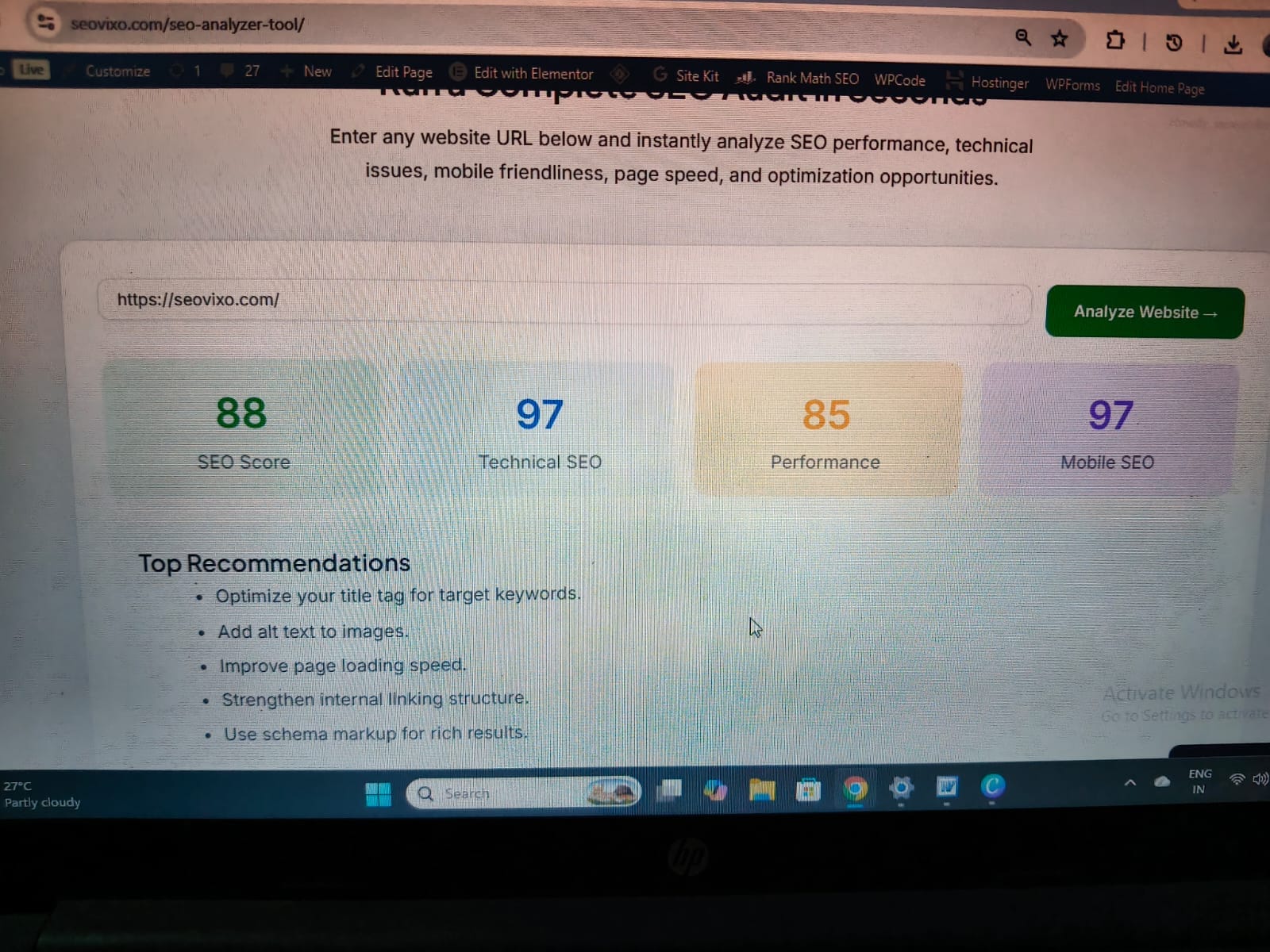
Enter any website URL below and instantly analyze SEO performance, technical issues, mobile friendliness, page speed, and optimization opportunities.
Top Recommendations
- Optimize your title tag for target keywords.
- Add alt text to images.
- Improve page loading speed.
- Strengthen internal linking structure.
- Use schema markup for rich results.
SEO Score
Overall website optimization score.
Technical SEO
Check crawlability and indexing.
Page Speed
Measure performance indicators.
Mobile SEO
Evaluate mobile friendliness.
What Our SEO Analyzer Checks
Get a complete SEO health report covering on-page SEO, technical performance, mobile usability, content structure, and ranking opportunities.
Meta Tags Analysis
Checks title tags, meta descriptions, length optimization, and keyword placement to improve search visibility.
Heading Structure
Analyzes H1, H2, H3 hierarchy to ensure your content is organized for users and search engines.
Page Speed Audit
Evaluates loading speed, performance metrics, and optimization opportunities affecting rankings.
Mobile Friendliness
Checks whether your website is optimized for mobile devices and responsive across screen sizes.
Internal Link Analysis
Identifies internal linking opportunities that help search engines crawl and understand your website.
Technical SEO Check
Analyzes indexing, crawlability, HTTPS, schema markup, and technical SEO issues affecting performance.
Everything You Need in One SEO Report
Stop switching between multiple SEO tools. Analyze your website's performance, technical SEO, content structure, and ranking opportunities from a single dashboard.
What an SEO Analyzer Cannot Tell You
An automated SEO audit is useful, but it cannot replace every part of SEO analysis.
It cannot guarantee rankings.
It cannot predict exactly how much traffic you'll receive.
It cannot fully evaluate content quality or search intent.
It cannot replace Google Search Console.It cannot replace analytics data.
It cannot determine whether your content is genuinely better than competitors.
Automated recommendations still need human judgment.
Why Use Our SEO Analyzer Tool?
SEO Performance Report
88/100SEO Score
Technical SEO
Performance
Mobile SEO
Our SEO Analyzer goes beyond basic checks. It identifies critical issues, uncovers missed opportunities, and provides recommendations that help improve search visibility and user experience.
Find problems faster
Identify common SEO issues without manually checking every page.
Understand what needs attention
Recommendations help you prioritize potential improvements.
Get a simple report
See important findings in one place instead of checking each element separately.
No account required
Run an analysis without creating an account.
Use it alongside your existing SEO workflow
The analyzer can be one part of your broader SEO process—not a replacement for Search Console, analytics, or specialist SEO tools. That last point actually increases credibility.
Explore More Free SEO Tools
Boost your rankings with our collection of free SEO tools designed for bloggers, marketers, and website owners.
Schema Markup Generator
Generate JSON-LD schema markup to help search engines understand your content and improve rich results visibility.
Use Tool →Keyword Density Checker
Analyze keyword frequency, keyword density percentage, and content optimization opportunities instantly.
Use Tool →Meta Description Generator
Create compelling SEO-friendly meta descriptions that improve click-through rates from search results.
Use Tool →SEO Title Generator
Generate high-converting SEO titles designed to attract clicks and improve search visibility.
Use Tool →SEO Content Brief Generator
Build detailed content outlines, keyword strategies, and SEO briefs for better content planning.
Use Tool →More SEO Tools Coming Soon
We're continuously building powerful SEO tools to help you grow traffic, improve rankings, and optimize your website faster.
Build Your Complete SEO Toolkit
Use multiple SEO tools together to discover opportunities, optimize content, improve rankings, and grow organic traffic faster.
Explore All SEO Tools →Ready to Check Your Website?
Run a free SEO analysis and see which areas may need attention.
Start Free SEO Analysis →Frequently Asked Questions About the SEO Analyzer
1. What is an SEO Analyzer Tool?
An SEO Analyzer Tool checks a webpage for common search engine optimization issues. Depending on the checks supported, it can help you review title tags, meta descriptions, headings, images, links, and technical SEO elements so you can identify areas that need improvement.
2. Is the Seovixo SEO Analyzer Tool free to use?
The Seovixo SEO Analyzer is designed to help website owners review SEO issues without needing an expensive SEO subscription. Check the tool interface for any current usage limits or requirements before running an analysis.
3. How do I analyze my website using this tool?
Enter the webpage URL in the SEO Analyzer, start the analysis, and review the results it returns. Prioritize important issues, such as missing page titles or incorrect indexing directives, when the tool checks for them. Test your changes afterward to confirm that the issues are resolved.
4. Can an SEO Analyzer improve my Google rankings?
An SEO Analyzer can help you identify issues that may affect your website's search performance, but it cannot guarantee higher rankings. Results also depend on content quality, search intent, competition, site accessibility, and other ranking factors.
5. What is a good SEO score?
There is no universal SEO score that guarantees good rankings. A score summarizes the checks performed by a particular tool. Review individual findings, fix important issues, and verify recommendations instead of focusing only on the overall number.
6. Does an SEO Analyzer check technical SEO issues?
That depends on the features available in the tool. Technical checks may include HTTPS, canonical tags, robots directives, crawlability, and indexing-related signals. Confirm which checks the analyzer actually performs, and use Google Search Console or specialist tools for additional verification.
7. Is an SEO Analyzer the same as Google Search Console?
No. An SEO Analyzer checks the elements supported by its analysis engine, while Google Search Console provides data about your site's presence in Google Search, including impressions, clicks, click-through rate, indexing reports, and search queries. Using both gives you a more complete picture.
8. How often should I run an SEO analysis?
Run an analysis after significant changes to a page, a website redesign, or a technical SEO update. You can also check important pages periodically. Avoid making changes simply to increase a tool's score if the recommendations do not address a genuine problem.
9. Can I use an SEO Analyzer for a WordPress website?
Yes, you can analyze a publicly accessible WordPress page if the tool supports its URL and can retrieve the page. The results may help you identify issues with page elements or technical settings. Some server-side, plugin-specific, or logged-in content issues may require additional checks inside WordPress.
10. What should I do after finding SEO issues?
Start with issues that affect accessibility, indexing, or important page elements. Then review titles, meta descriptions, headings, images, and internal links where relevant. Recheck the page after making changes, and monitor Google Search Console to understand whether search performance changes over time.