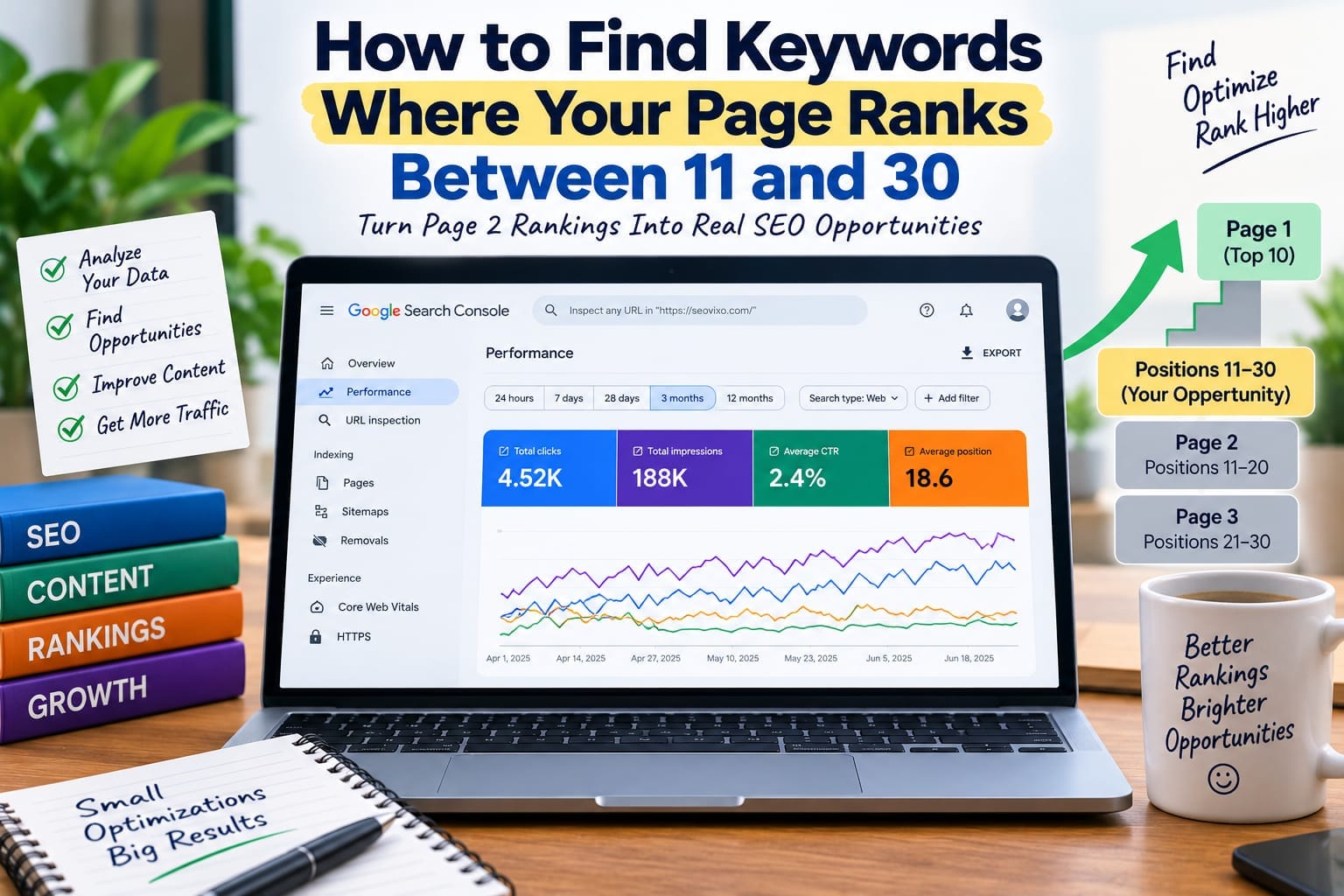
How to Find Keywords Where Your Page Ranks Between 11 and 30
One of the easiest SEO opportunities is often hiding in your existing Google Search Console data.You may already have pages appearing for hundreds of keywords, but many of those keywords never generate meaningful traffic because your page ranks on the second or third page of
Google.Positions 11–30 are particularly interesting because your content is already being discovered for those searches. Instead of creating a completely new article, you may be able to improve an existing page and move it closer to the first page.But there is an important distinction:
Position 11–30 does not automatically mean “easy keyword.”]You need to identify the right queries, understand why the page is ranking, evaluate search intent, and decide whether improving the existing page is actually worthwhile.
My Practical Experience
While working on my own website, I found that some of my existing pages were already appearing for keywords in positions 11–30. Instead of immediately writing new articles, I checked those queries in Google Search Console and compared their impressions, relevance, and search intent.I noticed that keywords with higher impressions and positions closer to 10 were usually better optimization opportunities. For those pages, I focused on improving the content, matching search intent more closely, strengthening internal links, and updating outdated information.This helped me realize that sometimes the next SEO opportunity is not creating another article—it is improving a page that Google already considers relevant.
What Does Ranking Between 11 and 30 Mean?
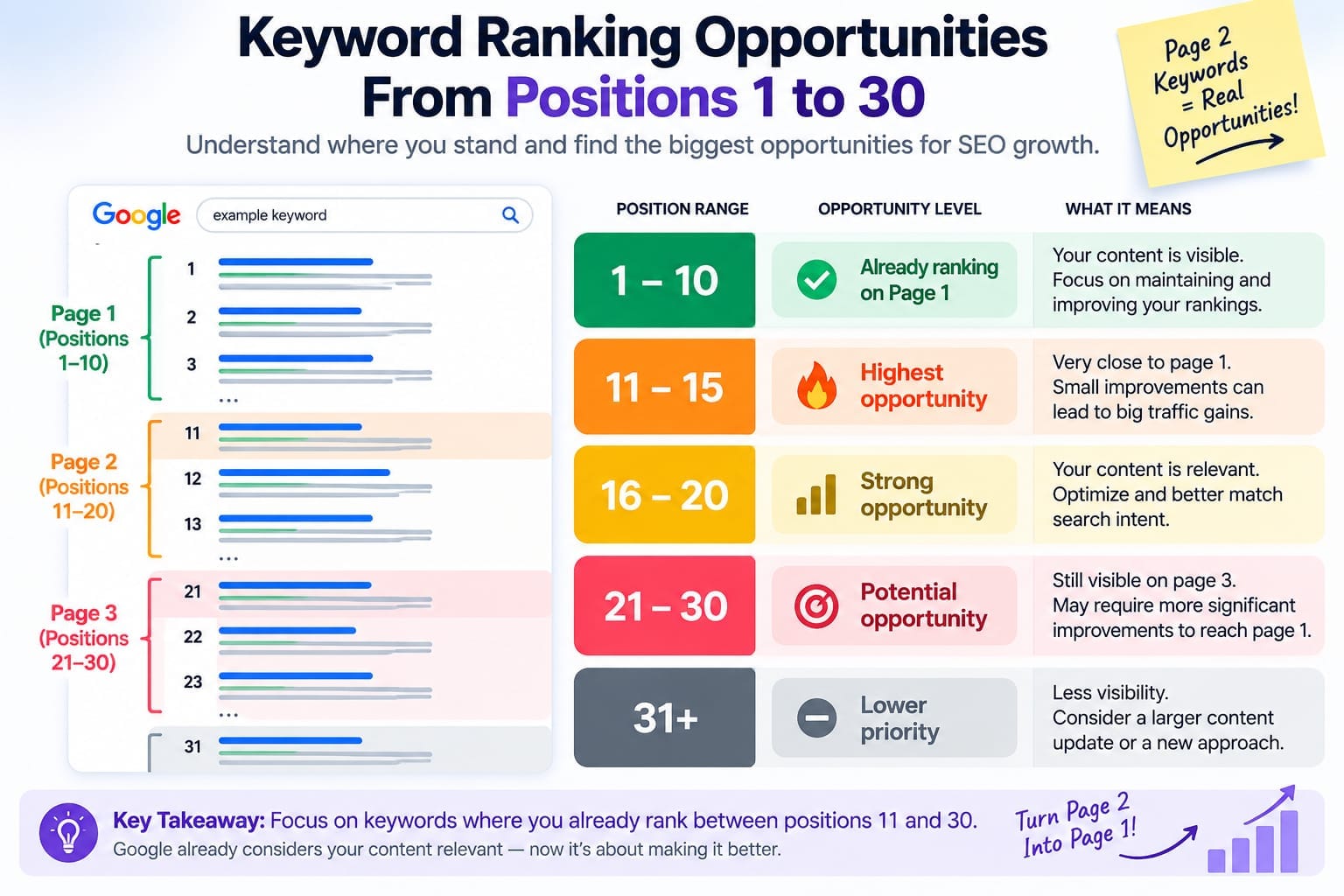
A keyword ranking between 11 and 30 generally means your page is appearing around Google's second or third page for that search.For example:
Position 8 = already on page one
Position 14 = page two opportunity
Position 22 = page three opportunity
Position 35 = weaker opportunity
If a page has meaningful impressions for a query at position 14, Google is already considering the page relevant enough to show it.That makes the query more interesting than a completely unrelated keyword for which your website has no visibility.
However, Google Search Console reports average position, not a permanent ranking position. Search results can vary by location, device, search history, and other factors. Google itself recommends looking at trends in impressions and clicks rather than focusing only on position.
Why Positions 11–30 Are Valuable SEO Opportunities
Suppose you have two keyword ideas.Keyword A:Your website has zero impressions and no ranking history.Keyword B:Your page has 2,500 impressions and an average position of 17.Keyword B is usually the more interesting starting point.Why?Because Google is already showing your page for Keyword B.You don't have to convince Google that your website belongs to the topic from scratch. You need to determine whether the existing page can become a better result.
Possible improvements include:
- Better search
-intent matching
- More complete information
- Stronger examples
- Better headings
- Updated information
- Improved internal linking
- Better title and snippet
- More original analysis
- Stronger topical coverage
Step 1: Open Google Search Console
Go to Google Search Console and open:
Performance → Search results
Turn on these metrics:
- Total clicks
- Total impressions
- Average CTR
- Average position
Then select a useful date range.For a small website, 3 months can provide a useful starting point. If the website has enough data, comparing 6 months or 12 months can reveal more stable opportunities.
Search Console lets you analyze performance by Queries and Pages and filter data using multiple dimensions
Step 2: Find Your Existing Keywords
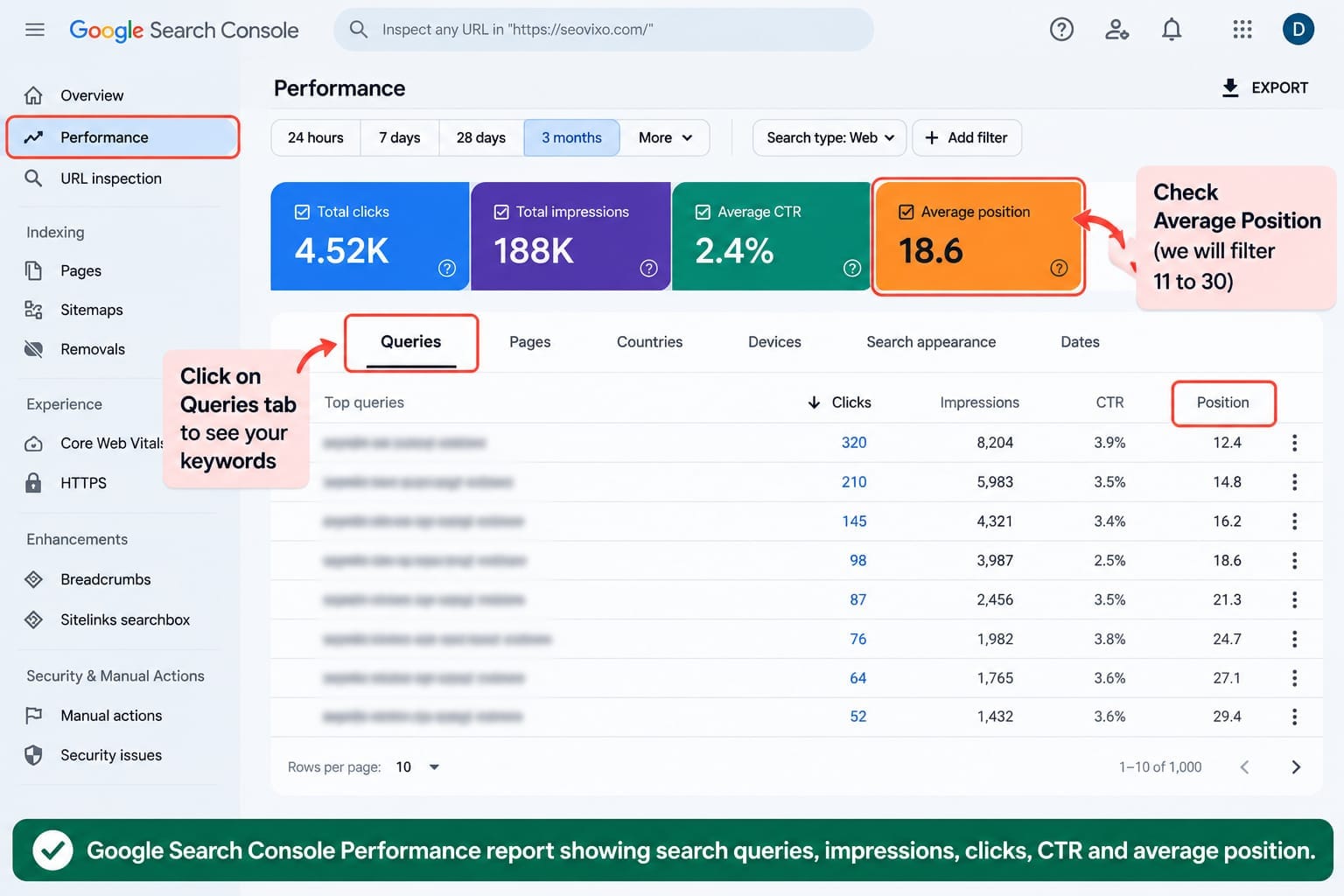
Click the [RED]Queries] tab.This is where you can see the searches that resulted in your website appearing in Google.Look for queries with:
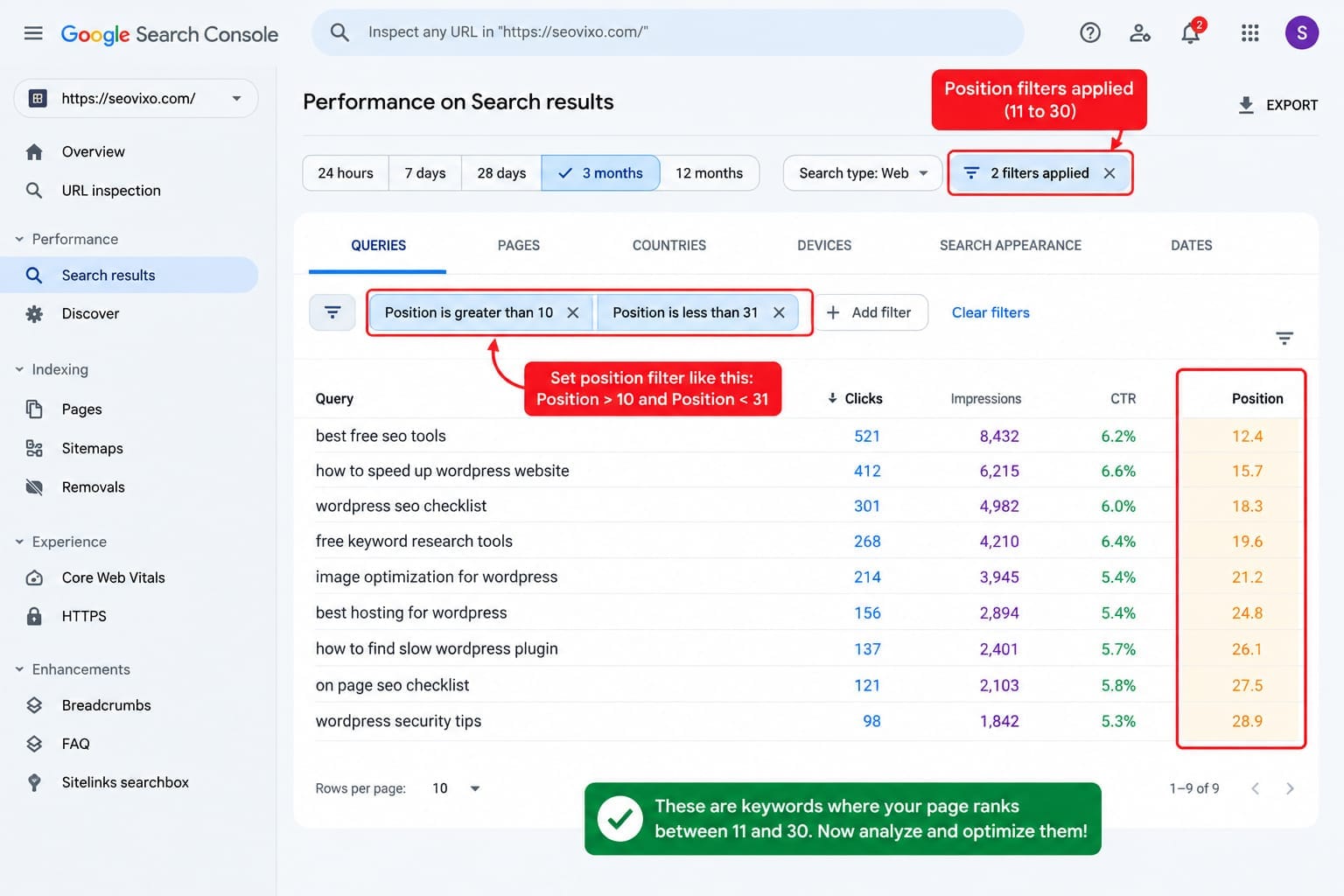
- Average position between approximately 11 and 30
- Meaningful impressions
- Relevant search intent
- A page that genuinely addresses the topic
Don't immediately select every keyword in this range.A keyword with 15 impressions may not deserve the same attention as one with 3,000 impressions.
Step 3: Don’t Confuse Average Position With Exact Ranking
This is one of the most important details.If Search Console shows:
Average position:
18
It does not necessarily mean your page is sitting at position 18 every time someone searches. Google explains that average position represents the average topmost position of your site's result in the reported data. Search Console data can also be aggregated differently depending on whether you're looking at a property or a specific page.
Therefore, use positions 11–30 as a [RED]screening method], not as absolute ranking truth.For more precise daily keyword tracking, dedicated rank-tracking tools can complement Search Console.
Step 4: Connect the Keyword to the Correct Page
Finding the keyword isn't enough.You also need to know which page is ranking for it.
In Search Console, select the query and then open the Pages tab.Google specifically provides this workflow for identifying which pages appeared for a particular query.
Now ask:
Does this page actually target the keyword?
If yes, optimization may be appropriate.
If the page is only loosely related, creating a separate page might be better.
Step 5: Prioritize Keywords With High Impressions
Not every position 11–30 keyword deserves optimization.Use impressions to prioritize.
For example:
Keyword A — Position 12 — 2,800 impressions
Keyword B — Position 19 — 45 impressions
Keyword C — Position 27 — 1,900 impressions
Keyword A and Keyword C may deserve more investigation than Keyword B.
This doesn't mean impressions alone determine the best opportunity.
You also need to consider:
- Search intent
- Business value
- Relevance
- Competition
- Existing content quality
- Conversion potential
Step 6: Look for Keywords Where Your CTR Is Weak
A ranking improvement isn't the only opportunity.You may discover that a page receives thousands of impressions but very few clicks.Google specifically identifies high-impression, low-CTR queries as opportunities to review titles and snippets and determine whether the result accurately communicates the page's value.
For example:
Position: 14
Impressions: 4,500
CTR: 0.8%
This page may have two opportunities:First, improve its ability to rank.Second, improve how compelling and relevant the search result appears.
Step 7: Analyze Search Intent Before Editing
This is where many SEO strategies fail.Don't simply add the keyword 20 times.Search the keyword yourself and study the results.
Ask:
What type of content is Google showing?
Are the results tutorials?
Comparisons?
Product pages?
Lists?
Definitions?
Case studies?
If Google mostly shows comparison articles and your page is a basic definition, adding more paragraphs may not solve the problem.You may need to change the content format.
Step 8: Improve the Existing Page
Once you've found a strong opportunity, improve the page around the actual search intent.
Consider:
Improve the Introduction
Answer the main question quickly.
Strengthen the Main Sections
Add missing information that competing results cover but your page doesn't.
Add Original Information
Include your own testing, examples, screenshots, comparisons, or experience.
Improve Internal Links
Link to relevant supporting articles and use descriptive anchor text.
Improve Title and Description
Make sure the title accurately communicates what the reader will get.Don't force keywords unnaturally.
Which Position 11–30 Keywords Should You Prioritize?
Step 9: Check Whether the Page Has Multiple Related Keywords
This is where the opportunity becomes much bigger.A page may rank around position 17 for one keyword but also appear for dozens of related searches.
For example
“WordPress plugin slowing website”
“find slow WordPress plugin”
“plugin making WordPress slow”
“how to check WordPress plugin performance”
These queries may reveal that Google already understands your page as relevant to a broader topic.Instead of creating four separate articles immediately, consider whether one stronger resource could serve the entire topic.
Step 10: Track the Results After Optimization
Don't change the page today and expect an immediate conclusion tomorrow.
Record:
- Current average position
- Impressions
- Clicks
- CTR
- Target queries
Then compare performance after a meaningful period.
Search Console supports date comparisons and lets you examine changes in clicks, impressions, CTR, and position.
The goal isn't simply:
“Did the keyword move from 19 to 8?”
Also ask:
Did impressions increase?
Did clicks increase?
Did the page gain additional queries?
Did CTR improve?Did traffic become more valuable?
The Biggest Mistake: Optimizing Every Keyword
Don't optimize every position 11–30 keyword.
That can create unnecessary changes and keyword cannibalization.
Choose keywords where:
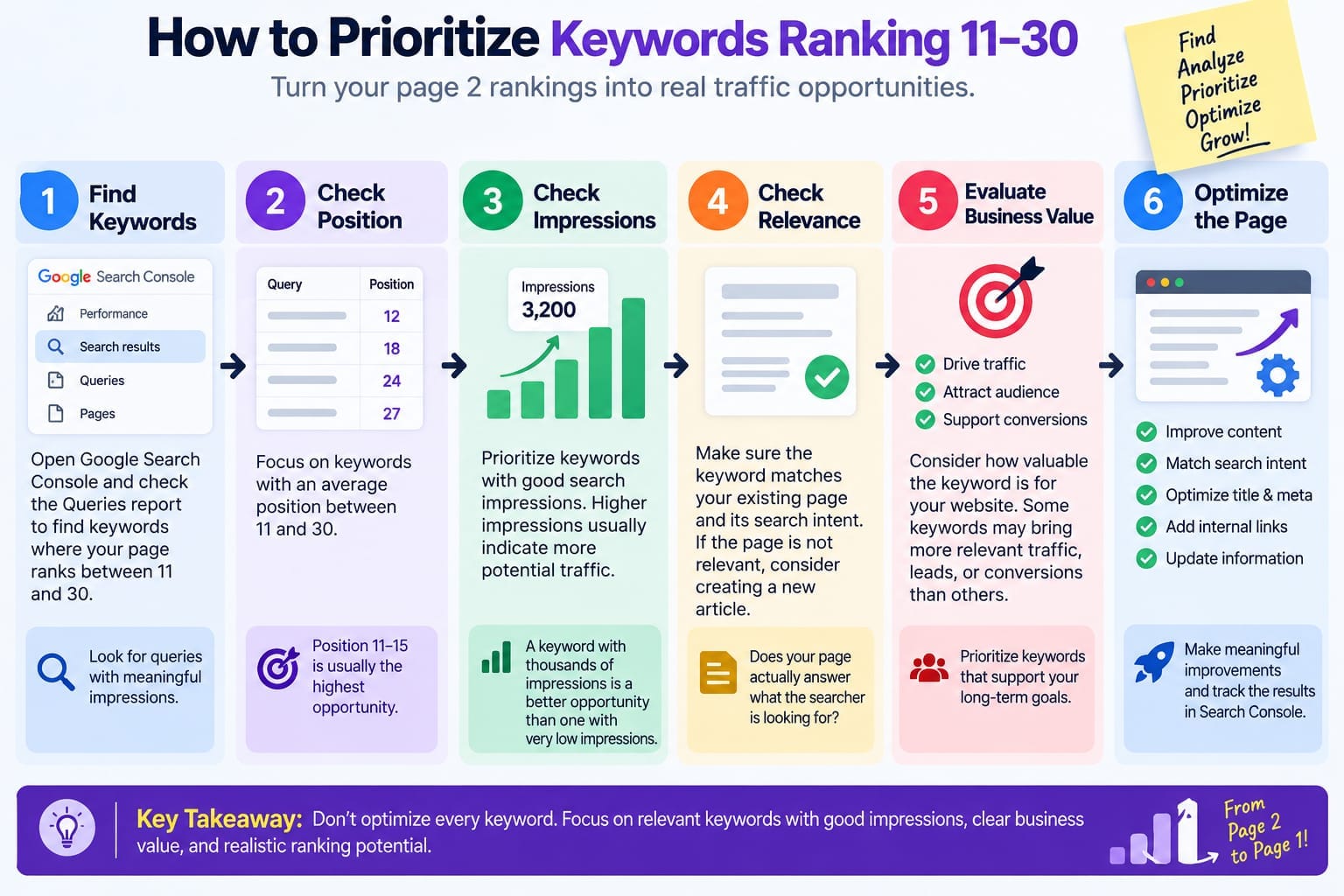
The page is already relevant + impressions are meaningful + the search intent matches + the keyword has value for your website.
These are much stronger candidates.
Final Verdict
The keywords where your pages rank between 11 and 30 can be some of the most practical SEO opportunities on an established website.The strategy is not to blindly chase every second-page keyword.
Use Google Search Console to discover the queries, connect each query to the page ranking for it, examine impressions and CTR, verify search intent, study competing results, and then improve the existing page.Start with the opportunities closest to page one.
A page already ranking at position 12 with thousands of impressions is usually a more actionable SEO project than a completely new keyword with zero visibility.]Find those opportunities, improve the pages that deserve it, and measure the results.