Best Hosting for Beginners in 2026: A Practical Guide to Choosing the Right Host
Choosing web hosting is one of the first major decisions you make when starting a website.For a beginner, the hosting market can be confusing. Every provider advertises fast servers, excellent uptime, easy WordPress installation, security features, free SSL, and attractive introductory prices.But the cheapest plan is not always the best choice.A hosting plan should give your website enough resources to grow while remaining simple enough for you to manage. You also need to look beyond the promotional price and understand renewal costs, resource limits, backups, support, server locations, and the technology behind the hosting platform.
This guide explains what beginners should actually look for when choosing hosting and compares some popular options, including Hostinger, Bluehost, A2 Hosting, and SiteGround.The goal is not to claim that one provider is perfect for everyone.
[HIGHLIGHT: The right hosting depends on your website, budget, technical experience, and expected growth.]
What Is Web Hosting?
Web hosting is the service that stores your website's files and makes them available to visitors through the internet.Think of your domain as your website's address and hosting as the space where your website's files and applications live.When someone visits your domain, the hosting server processes the request and sends the required website resources to the visitor's browser.
Those resources can include HTML files, images, CSS, JavaScript, WordPress files, databases, and other application data.This is why hosting is more than simply buying storage.The server's CPU, memory, storage technology, network connection, software configuration, security, caching, and resource limits can all influence how your website behaves.
What Should Beginners Look for in Web Hosting?
You do not need to understand every technical specification before buying hosting.Instead, concentrate on the features that will actually affect your website.
Performance
Your hosting server should have enough resources to handle your website's workload.Modern SSD or NVMe storage can help with storage operations, but storage is only one part of performance.CPU resources, RAM, server configuration, caching, PHP performance, database performance, and network quality can also matter.A provider advertising NVMe does not automatically have a faster website than every provider using SATA SSD storage.
Ease of Use
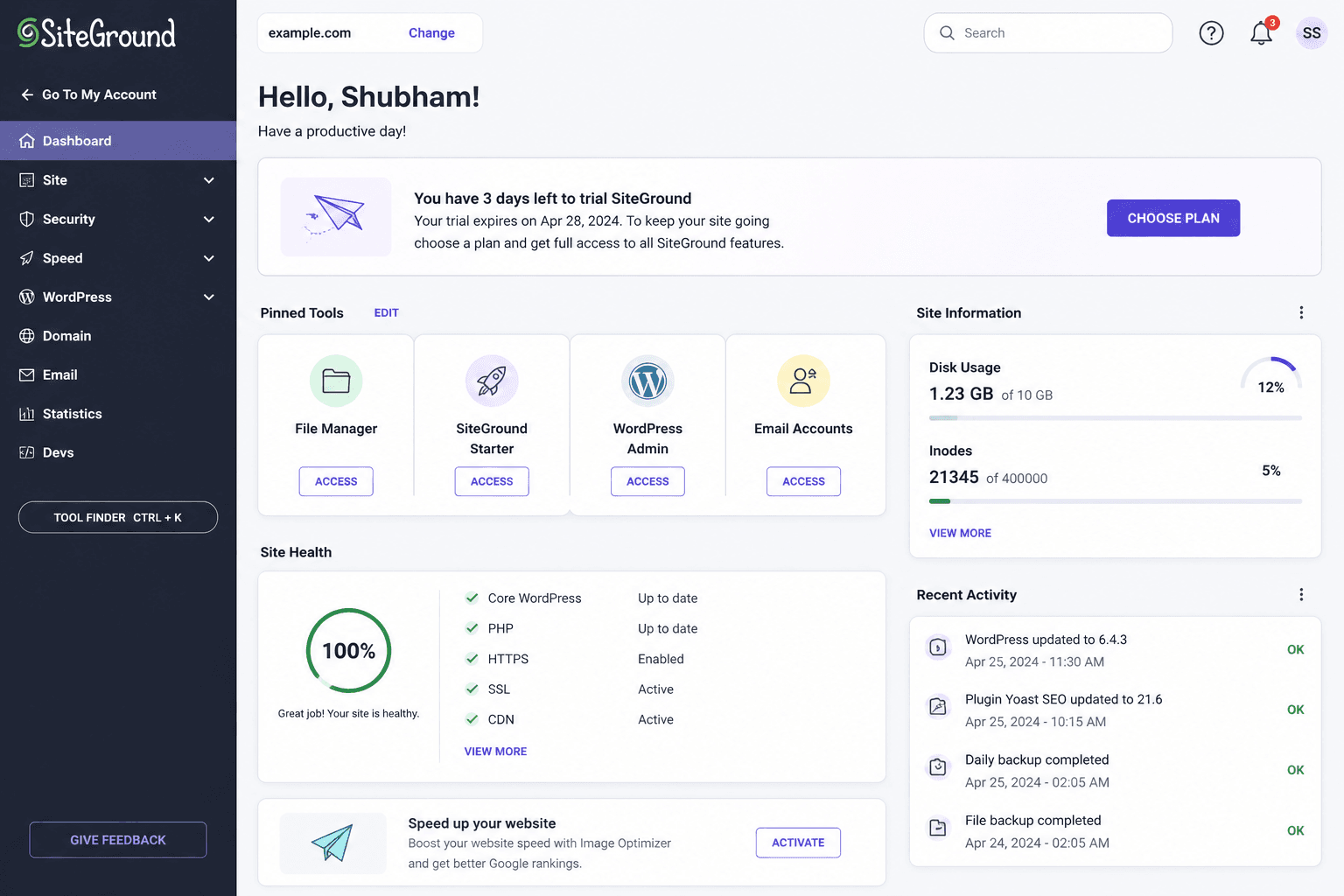
Beginners should not have to fight with their hosting control panel.Look for a dashboard that makes common tasks easy, such as installing WordPress, managing domains, creating email accounts, accessing backups, managing databases, and checking resource usage.A simple interface can save considerable time when you are still learning how websites work.
Customer Support
Support becomes particularly important when something goes wrong.Before choosing a host, check how support is provided and whether the provider offers useful documentation and troubleshooting resources.
Do not choose a hosting company solely because it advertises twenty-four-hour support.The quality and responsiveness of that support matter more than the label.
Backups
Backups are extremely important.A website can break because of a plugin update, theme modification, configuration mistake, security problem, or accidental deletion.A hosting provider that offers automated backups can provide an additional recovery option.However, do not treat the host's backup system as your only backup.Keep independent copies of important website data whenever possible.
Renewal Pricing
This is one of the easiest things for beginners to overlook.A hosting plan may have an attractive introductory price that applies only during the initial term.The renewal price can be considerably higher.Always check both the introductory price and the regular renewal price before purchasing.
Hostinger: Best Overall Choice for Many Beginners
Hostinger is a popular option for beginners because it focuses heavily on affordability, simplified management, and WordPress hosting.Its control panel is designed to make common website-management tasks easier for users who may not be familiar with traditional hosting interfaces.
For a new blog, portfolio, small business website, or basic WordPress project, that simplicity can be valuable.Another advantage is that Hostinger offers multiple hosting tiers, allowing users to start with a smaller plan and move to a more capable option as their requirements increase.
However, beginners should still examine the exact plan they are purchasing.Resource limits, included features, backup policies, email availability, and renewal pricing can vary between plans.
Who Should Choose Hostinger?
Hostinger is worth considering if you want:-
-A beginner-friendly dashboard
- Affordable entry-level hosting
- WordPress support
- A straightforward setup process
- Room to upgrade later
- A hosting provider with multiple plan options.
It is particularly suitable for someone starting their first website and wanting to keep the initial setup relatively simple.
Bluehost: A Beginner-Friendly WordPress Option
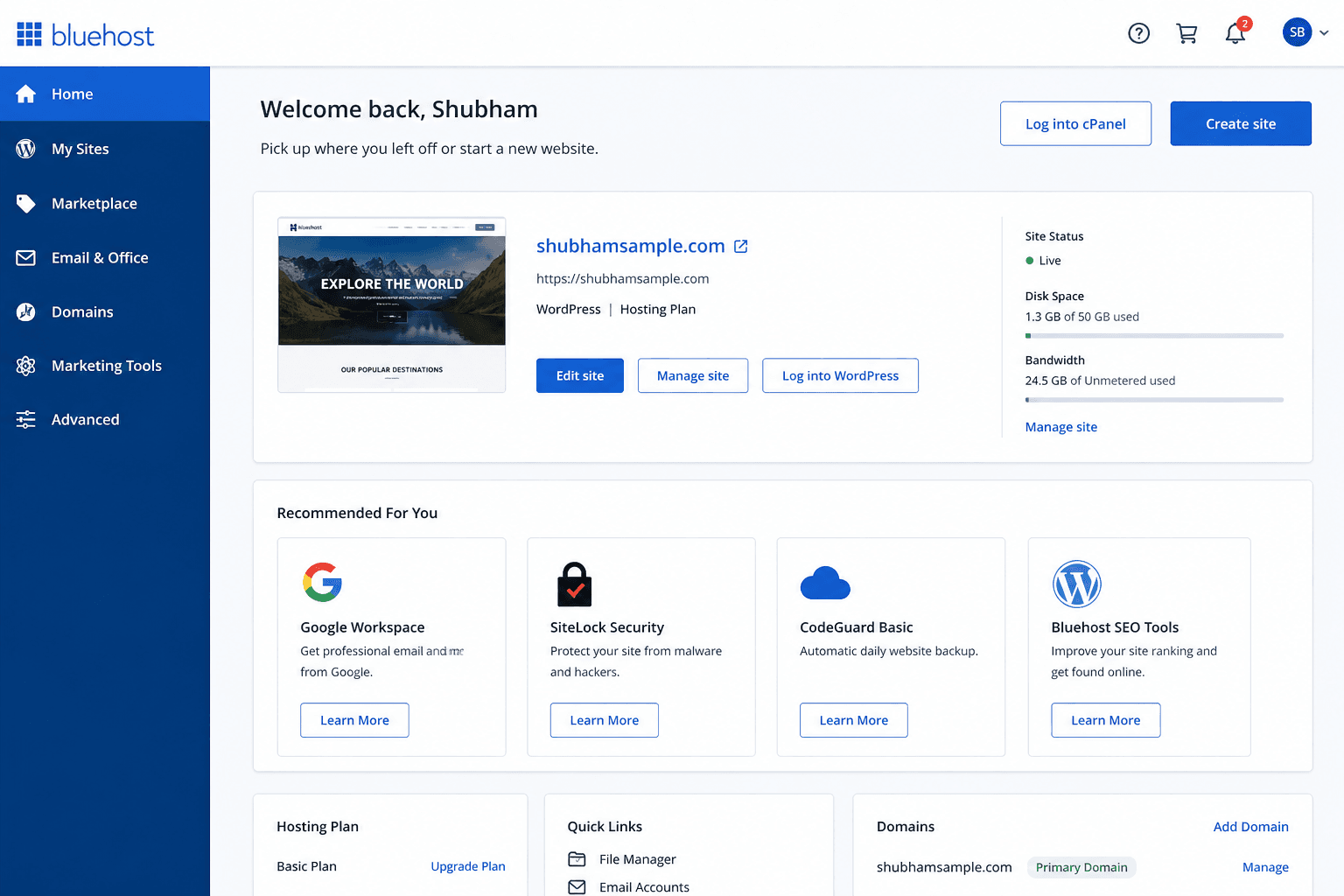
Bluehost is another well-known hosting provider that has historically focused strongly on WordPress users.It can be attractive to beginners because the setup process is designed around getting a WordPress website online without requiring extensive technical knowledge.
The main consideration is value.A beginner should compare the actual resources, included features, renewal pricing, backups, and support rather than selecting Bluehost simply because it is a recognizable name.
Who Should Consider Bluehost?
Bluehost may be worth considering if you want:
- A familiar hosting brand
- WordPress-focused features
- A beginner-oriented setup
- A straightforward way to launch a website
Before purchasing, compare the current plan details against competing providers because hosting features and pricing can change.
A2 Hosting: Worth Considering for Performance-Focused Users
A2 Hosting has traditionally positioned itself around performance-oriented hosting and provides options for users who want more flexibility as their websites grow.It may appeal more to users who are becoming comfortable with hosting and want access to additional performance-focused features.
For a complete beginner, however, the most important question is not whether a host has powerful hardware.It is whether the plan provides enough performance without making website management unnecessarily complicated.
Who Should Consider A2 Hosting?
Consider it if:
- Performance is an important priority
- You expect your website to grow
- You want more hosting flexibility
- You are becoming comfortable with website administration
For a very small beginner blog, a simpler and less expensive plan may provide better overall value.
SiteGround: A More Premium-Oriented Choice
SiteGround is another established hosting provider that is often considered by users who prioritize managed features, support, security, and website performance.It can be attractive when you want a more premium hosting experience.
The main disadvantage for beginners is usually cost.If your website is brand new and has very little traffic, paying significantly more for hosting may not be necessary.On the other hand, if you value support and additional managed features, a premium provider can make sense.
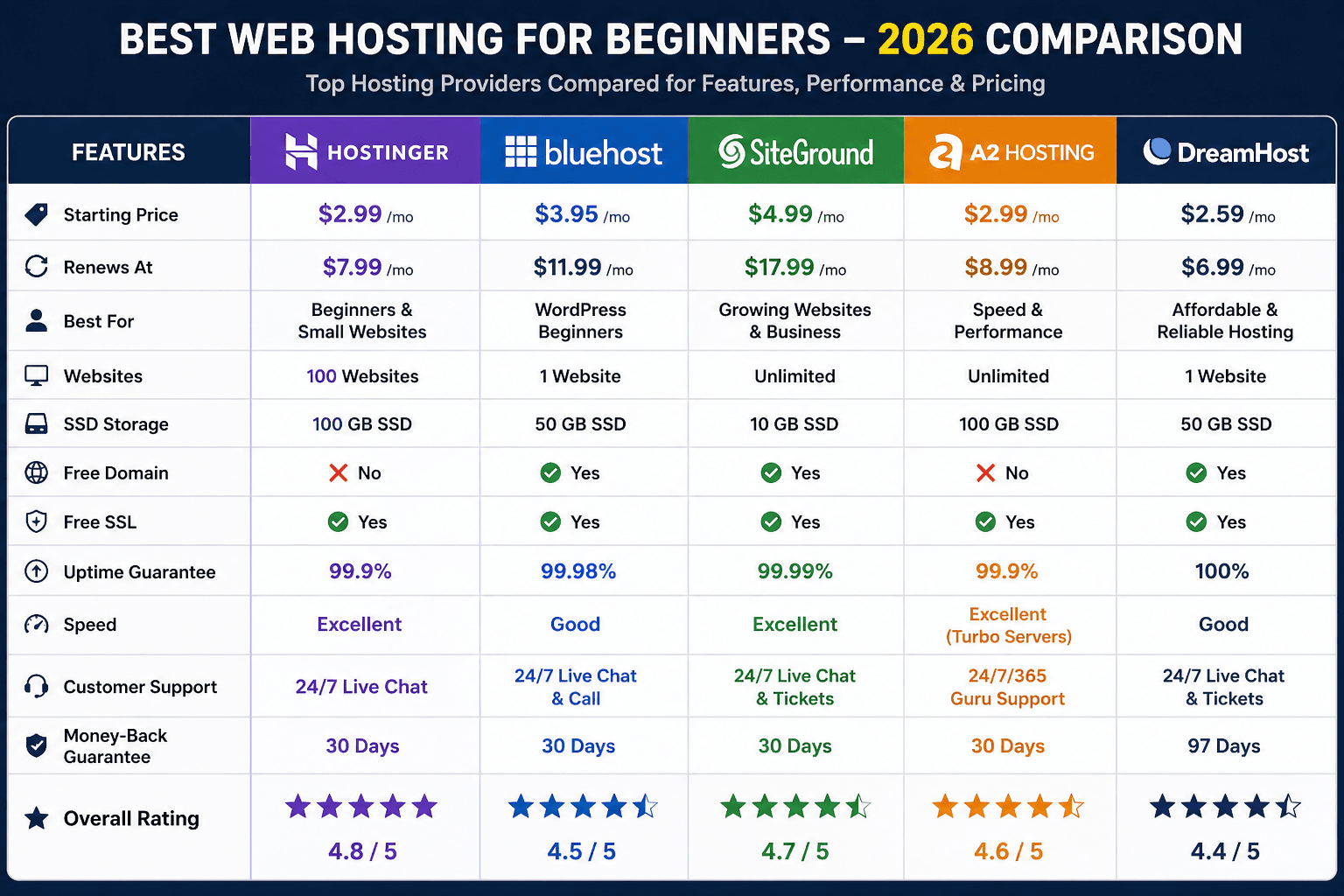
Hosting Comparison for Beginners
Shared Hosting vs Cloud Hosting
Most beginners do not need to start with an expensive cloud server.Shared hosting places multiple websites on a server and is generally designed to provide an affordable entry point.It is suitable for many new blogs, portfolios, small business websites, and informational websites.
Cloud hosting is designed to provide greater scalability and access to more substantial resources, although the exact architecture depends on the provider.If your website is just starting, shared hosting is often the more practical choice.You can upgrade later when your traffic and resource requirements justify it.
Does Hosting Affect SEO?
Hosting can affect the technical performance and availability of a website, but it is misleading to say that buying a particular hosting provider automatically improves Google rankings.A reliable server can help your website remain accessible and perform consistently.Server response time, network performance, caching, and other infrastructure factors can also contribute to the overall user experience.
But SEO depends on much more than hosting.Content quality, relevance, search intent, internal linking, technical accessibility, website structure, competition, and authority all matter.
[HIGHLIGHT: Good hosting supports SEO. It does not replace SEO.]
Mistakes Beginners Should Avoid
One of the biggest mistakes is choosing hosting based only on the lowest introductory price.Another is buying a plan with features you do not need.A new blog usually does not require the most expensive hosting package available.You should also avoid ignoring renewal pricing.Before buying, check what happens when the promotional period ends.Finally, do not assume that moving to a more expensive server will automatically solve every performance problem.
A poorly optimized WordPress website can remain slow even on powerful hosting.Large images, unnecessary plugins, poorly configured themes, excessive scripts, and inefficient databases can all contribute to performance problems.
What Hosting Should a Beginner Choose?
For someone starting a new blog or small WordPress website, I would generally prioritize:
- Reliable infrastructure
- Easy website management
- Good WordPress compatibility
- Adequate CPU and memory resources
- SSD or NVMe storage
- Backups
- Useful customer support
- Transparent renewal pricing
- The ability to upgrade laterAmong the providers discussed here,
Hostinger is a strong starting point for beginners who prioritize affordability and simplicity.Bluehost can be worth considering for users who prefer its WordPress-oriented ecosystem.
A2 Hosting is more interesting for users who place greater emphasis on performance and flexibility.SiteGround can make sense for users who are willing to pay more for a more premium-oriented hosting experience.But always compare the current plan details before purchasing.
How to Start Your Website After Buying Hosting
Once you purchase hosting, the technical setup does not need to become overwhelming.Connect or register your domain.Install WordPress if you are creating a WordPress website.
Choose a lightweight theme.Configure your basic website settings.Set up backups and security.Install only the plugins you actually need.Then start creating useful content.Do not spend weeks changing colors and testing dozens of themes before publishing your first useful article.Your hosting is the foundation.Your content is what gives the website a reason to exist.
Final Recommendation
If you are starting your first website, do not make hosting more complicated than it needs to be.Choose a provider that gives you enough resources, an easy management interface, reliable infrastructure, backups, useful support, and a reasonable path for upgrading later.For many beginners, Hostinger is a practical starting point because of its combination of simplicity and affordability.But the best hosting decision is not necessarily the provider with the cheapest plan or the longest feature list.
It is the provider that gives your particular website the right balance of *performance, reliability, usability, support, and cost.Start small if your website is small.Build your content.Monitor your traffic and resource usage.Upgrade when your website actually needs more capacity.That approach is usually far more sensible than paying for expensive hosting before your website has grown enough to benefit from it.
[HIGHLIGHT: Choose hosting for the website you are building today, but make sure it can support the website you want to build tomorrow.]