Kinsta vs Hostinger: Which WordPress Hosting Is Better in 2026?
Choosing WordPress hosting is not simply about finding the cheapest plan or the company with the most impressive speed claims.Your hosting affects how your website is managed, how much infrastructure is available to it, how easily it can handle traffic, and how much technical work you need to do yourself.
Two hosting providers that take very different approaches are Kinsta and Hostinger.Kinsta focuses heavily on premium managed WordPress hosting, performance, security, monitoring, and professional support.Hostinger focuses on affordability, beginner-friendly management, WordPress tools, and providing strong features at a lower entry price.That creates an important question:
Which one is actually better for your WordPress website?
The answer depends on what you need.
Kinsta is not automatically the better choice simply because it costs more, and Hostinger is not automatically worse because it is cheaper.
The right decision depends on your traffic, budget, technical requirements, performance expectations, and how much server management you want to handle.
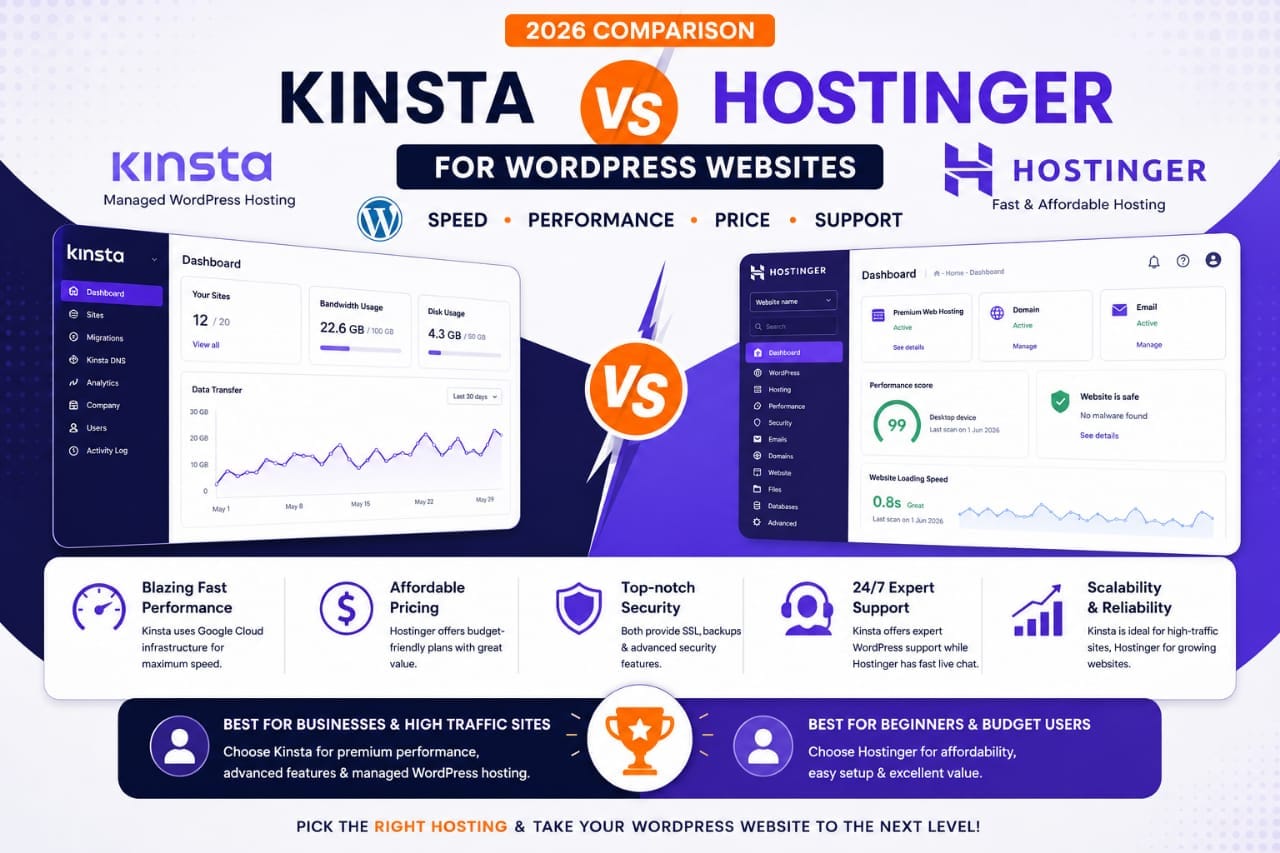
Kinsta vs Hostinger at a Glance
Kinsta is a premium managed WordPress hosting platform.Its current WordPress hosting includes features such as Cloudflare-powered CDN, edge caching, automated database optimization, managed security, free migrations, backups, and 24/7 expert support. Kinsta also offers multiple data-center locations and plans based around visits, bandwidth, storage, and CDN usage.
Hostinger takes a broader and more budget-friendly approach.Its current managed WordPress offering includes CDN, backups, WordPress acceleration, staging, automatic updates, security features, and 24/7 support. Its plans are designed to make WordPress accessible to beginners and smaller businesses.
Kinsta vs Hostinger Comparison
Kinsta: What Are You Paying For?
Kinsta's biggest selling point is not simply server speed.It is the managed infrastructure around your WordPress website.Kinsta currently provides Cloudflare-powered CDN services, edge caching, automated database optimization, managed firewall and DDoS protection, free migrations, malware removal assistance, and 24/7 expert support.
That can be valuable for businesses where website reliability and technical support are worth paying for.Kinsta also provides tools for developers and more advanced website owners, including application performance monitoring and API access.
The downside is straightforward:It costs significantly more.For a new blogger receiving a small amount of traffic, many of Kinsta's premium capabilities may not provide enough additional value to justify the price.
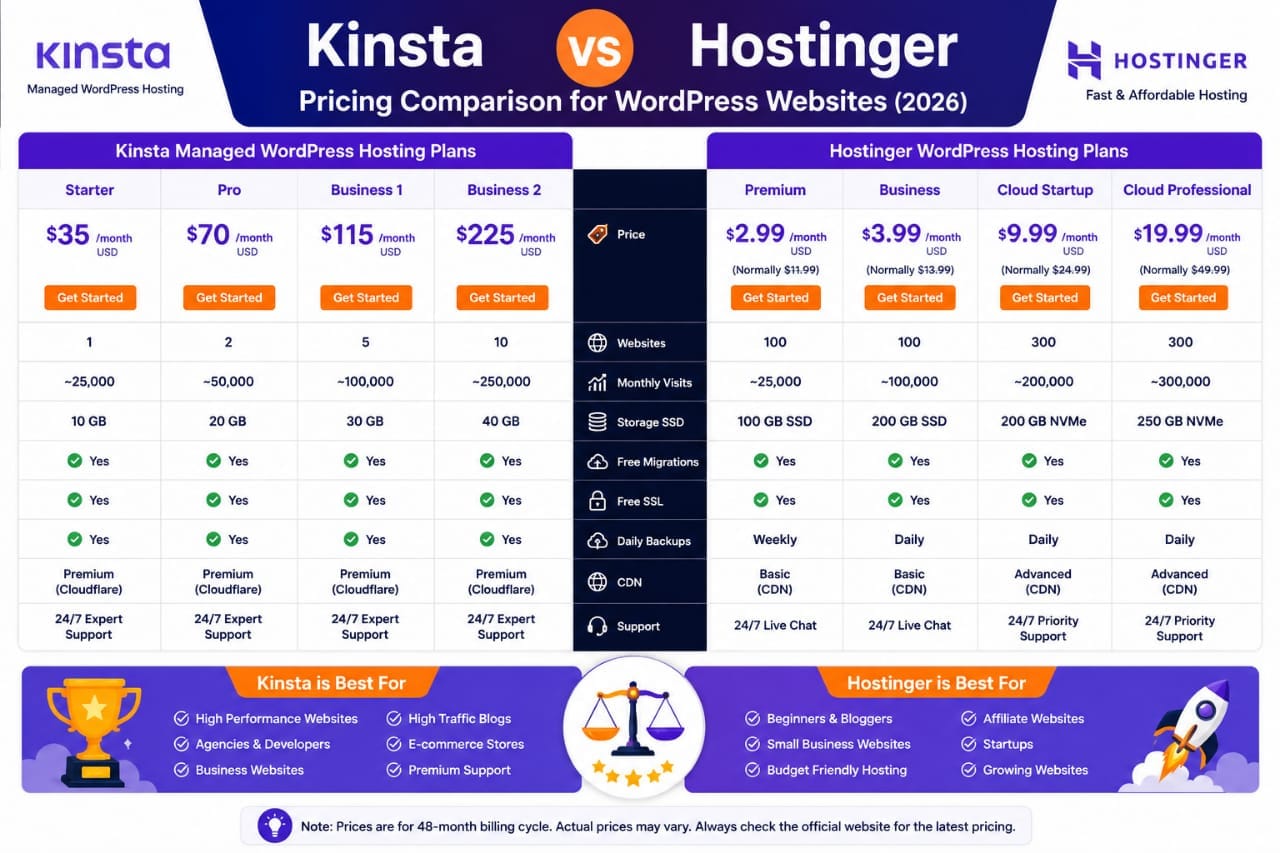
Hostinger: What Are You Getting for the Money?
Hostinger's strength is value.Its current managed WordPress plans combine relatively accessible pricing with features such as CDN, backups, staging, WordPress acceleration, automatic updates, security protection, and support. 6This makes it attractive for:
- New bloggers
- Affiliate websites
- Portfolio websites
- Small businesses
- Personal websites
- Beginners learning WordPress
Hostinger also offers higher-tier cloud plans when a website needs more resources. Its current cloud offerings include NVMe storage, allocated RAM and CPU resources, daily backups, WordPress acceleration, object caching, staging, and dedicated resources on higher plans. That means Hostinger is not limited to the smallest beginner websites.
Which Is Faster: Kinsta or Hostinger?
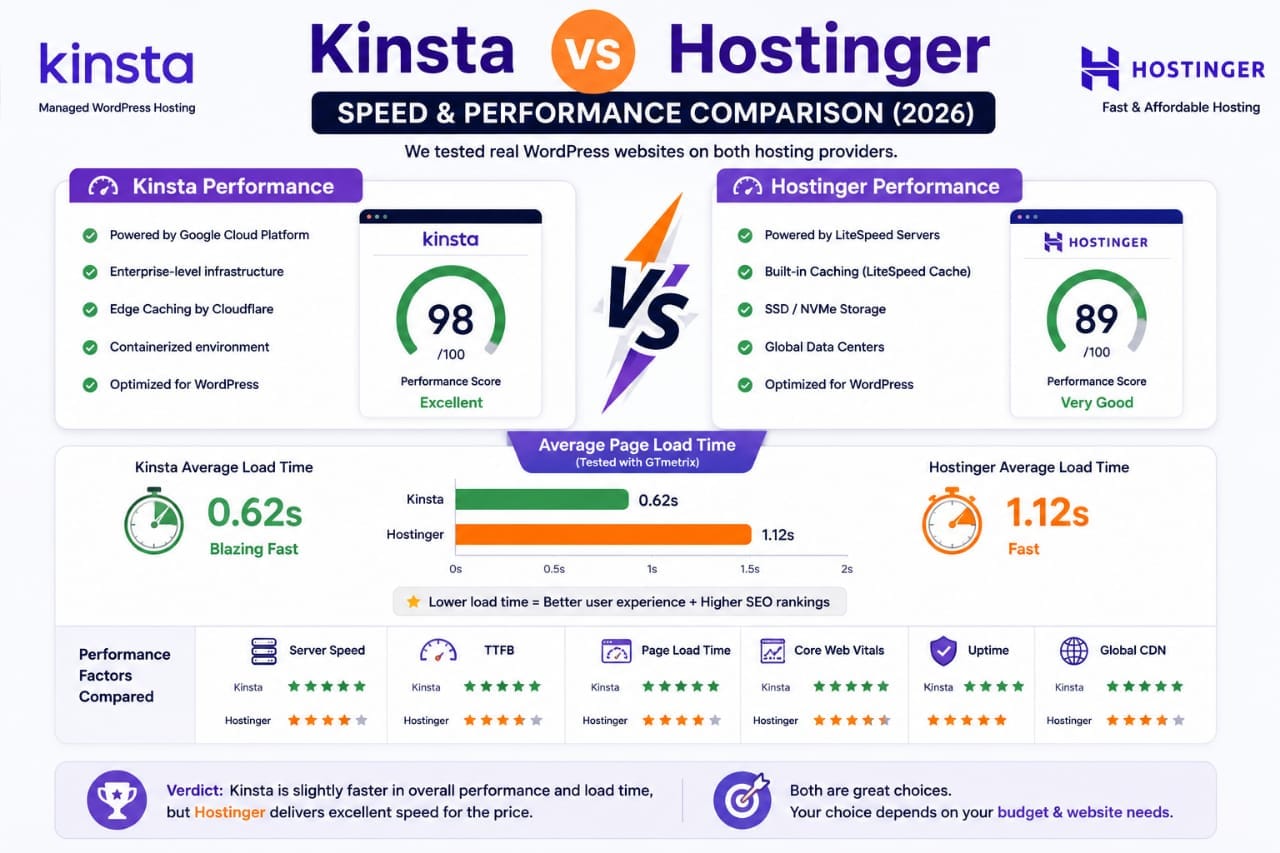
This question needs more nuance than simply declaring one winner.Kinsta has a strong performance-focused infrastructure, including edge caching and a global CDN. Hostinger also provides caching, CDN functionality, and WordPress performance features.
Real website speed depends on much more than the hosting company.Your theme, plugins, images, JavaScript, fonts, database, caching configuration, CDN, and content all influence performance.Therefore, Kinsta's premium infrastructure can be valuable for demanding websites, but that does not mean every website hosted on Kinsta will automatically load faster than every website hosted on Hostinger.
Hosting provides the foundation;
website optimization determines how effectively you use that foundation.
Which Is Better for SEO?
Neither Kinsta nor Hostinger gives you an automatic Google ranking advantage.Hosting can influence SEO indirectly through reliability, server performance, availability, and the ability to handle traffic.But your hosting provider cannot replace:
- High-quality content
- Search-intent optimization
- Internal linking
- Technical SEO
- Backlinks
- Good site architecture
- Mobile usability
If your Hostinger website is fast, secure, stable, and accessible, there is no SEO rule saying you need to move to Kinsta.On the other hand, if your website has substantial infrastructure requirements, upgrading to a more powerful managed environment can make sense.
Which Is Easier for Beginners?
Hostinger has the advantage here.Its hosting products are designed around accessibility and simple management.A beginner can set up WordPress, manage the website, use caching and staging tools, and access support without needing extensive server administration knowledge.
Kinsta is also designed to simplify managed WordPress hosting, but its platform is more clearly aimed at users who value professional infrastructure and advanced management.For a beginner building the first blog, Hostinger usually makes more financial sense.
Which Is Better for High-Traffic Websites?
This is where Kinsta becomes more attractive.High-traffic websites have different requirements from small blogs.They may need:
- More predictable infrastructure
- Advanced caching
- Better monitoring
- Professional support
- Stronger security controls
- More sophisticated staging
- Greater scalability
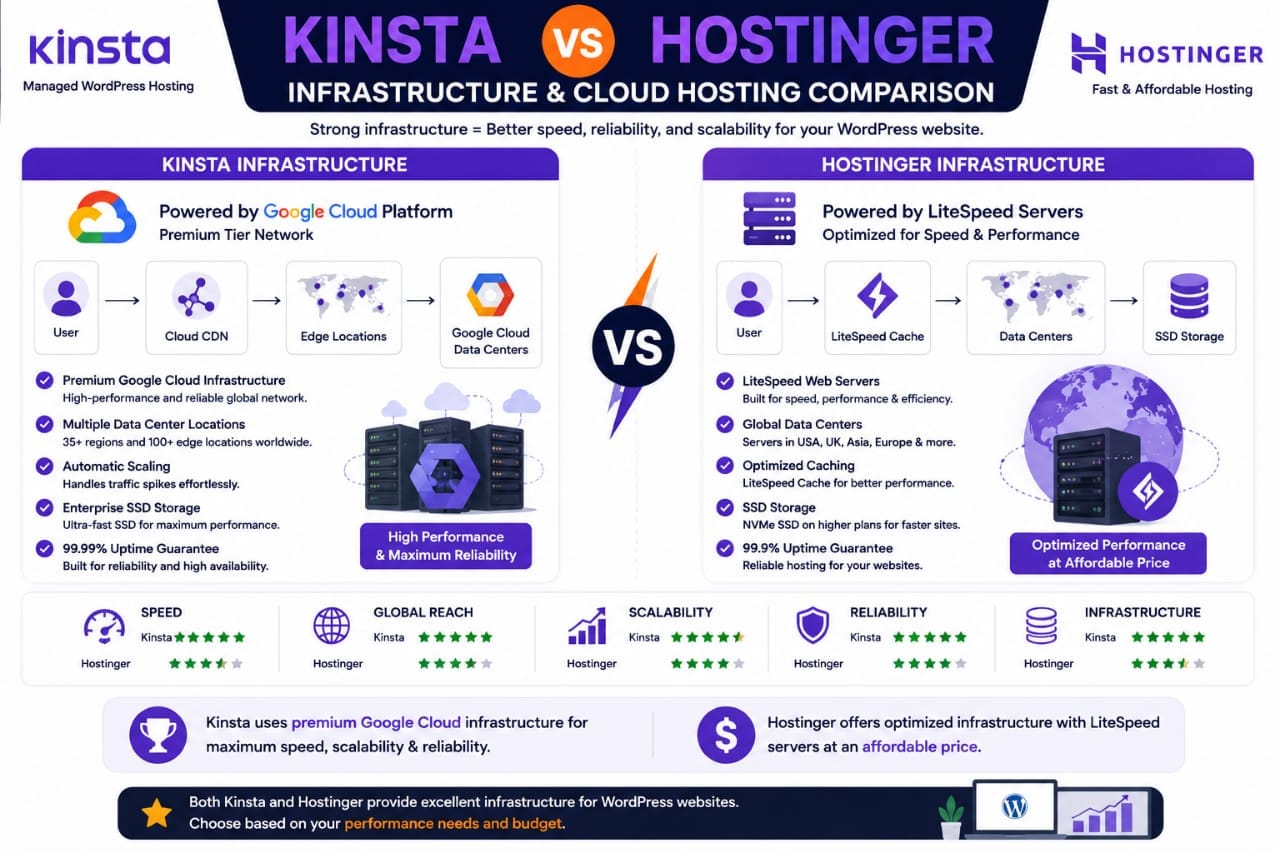
Kinsta's managed infrastructure and premium support are designed for businesses and demanding WordPress installations. Its current plans include features such as application monitoring, managed security, CDN and edge caching. 11However, high traffic alone does not automatically mean you need Kinsta.The actual resource requirements and business importance of the website should determine the decision.
Security Comparison
Both providers take WordPress security seriously, but their approaches differ.Kinsta includes managed firewall protection, DDoS protection, malware removal assistance, and other security features across its WordPress hosting offering.
Hostinger currently advertises WAF protection, DDoS mitigation, automatic malware removal, automatic updates, and other managed security features on its WordPress hosting.
For a normal blog, either can provide a strong foundation.But remember that hosting security does not eliminate WordPress security responsibilities.Keep plugins updated.Use strong passwords.Limit unnecessary administrator accounts.Use trusted plugins and themes.Maintain backups.
Kinsta vs Hostinger: Who Should Choose Which?
Choose *Hostinger* if you:
- Are starting a new blog
- Have a limited hosting budget
- Want beginner-friendly WordPress hosting
- Run a small or medium website
- Want strong features without premium hosting prices
- Need an affordable path to grow
Choose *Kinsta* if you:
- Run a business
-critical website
- Manage high-value WordPress projects
- Need premium managed infrastructure
- Want advanced monitoring and support
- Run demanding WooCommerce or content websites
- Value managed performance enough to justify the higher cost
Is Kinsta Worth the Extra Money?
For every website?
No.
For the right website?
Absolutely.
If your website earns meaningful revenue, supports a business, handles substantial traffic, or requires professional WordPress infrastructure, the additional cost can be justified.But if you are building your first blog and traffic is still modest, paying significantly more for hosting may not be the best use of your budget.
You may get more value from improving your content, SEO, internal linking, website design, and audience growth.
Final Verdict
Kinsta and Hostinger are not really competing for exactly the same customer.Hostinger's biggest advantage is *value*.Kinsta's biggest advantage is *premium managed WordPress infrastructure*.
For a beginner blogger, affiliate website, or small WordPress site, Hostinger is the more practical choice.For a business-critical, high-value, or technically demanding WordPress website, Kinsta becomes much easier to justify.
If your website is small and your budget matters, choose Hostinger. If your website's performance, support, and managed infrastructure justify a premium price, choose Kinsta.
And don't choose either company purely because someone says it will improve your Google rankings.Your hosting should support your SEO strategy—not become the strategy itself.