Pillar Page vs Cluster Page: What's the Difference & Which Is Better for SEO? (2026 Guide)
As websites grow, publishing random blog posts is no longer enough to build topical authority. Search engines have become better at understanding how content is connected, which means organizing your website strategically is more important than ever.
One of the most effective content strategies is the Pillar Page and Cluster Page model. Instead of creating isolated articles, this approach groups related content around a central topic using internal links.
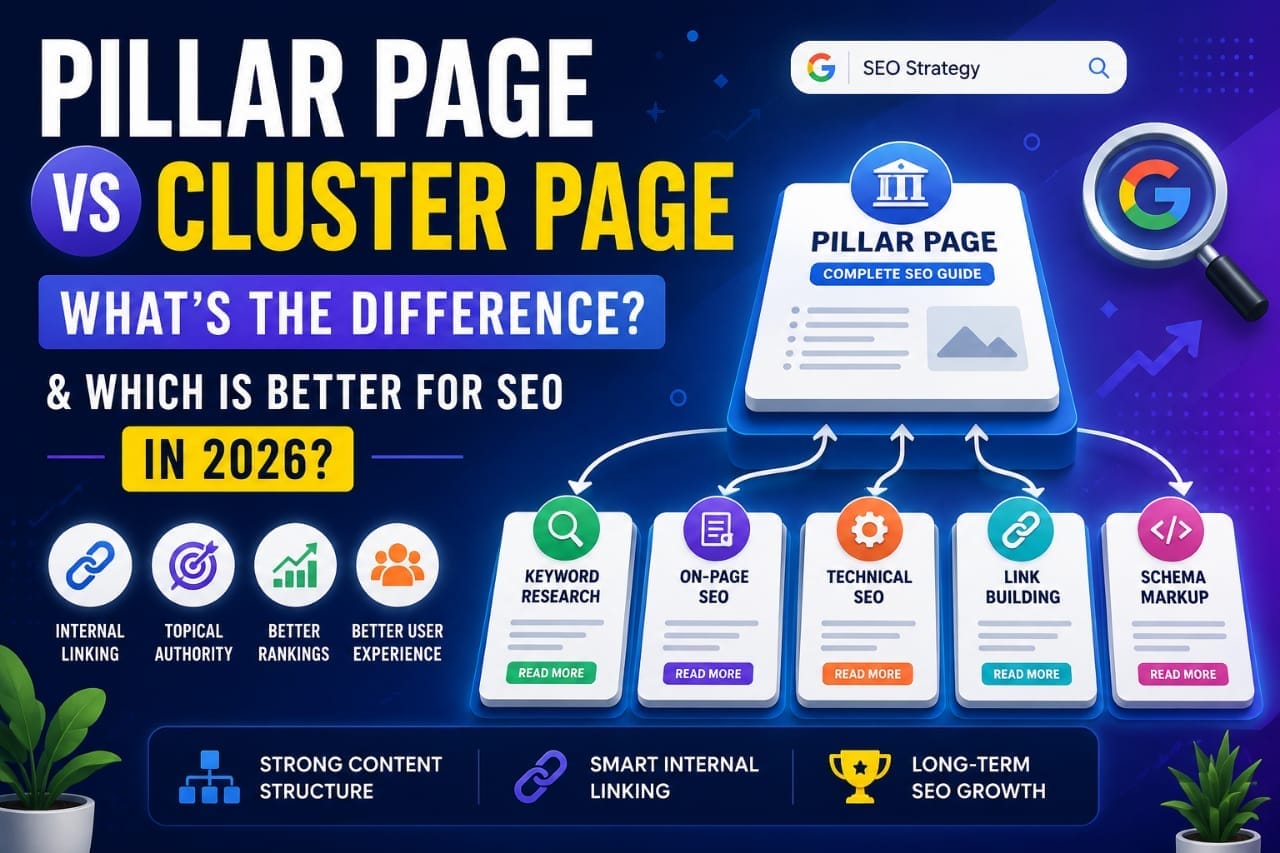
If you've heard terms like "topic clusters," "content hubs," or "pillar content," they all refer to the same fundamental SEO strategy—building comprehensive resources supported by related articles.
After using this approach while planning SEO-focused content, I found that it makes websites easier to navigate, improves internal linking, and helps organize content more effectively.
In this guide, you'll learn what Pillar Pages and Cluster Pages are, how they work together, their differences, and which approach is better for SEO in 2026.
A Pillar Page is a comprehensive guide covering a broad topic, while Cluster Pages focus on specific subtopics related to that main subject. Together, they create a strong internal linking structure that helps users navigate your website and supports topical organization.
What Is a Pillar Page?
A Pillar Page is a detailed, comprehensive resource that covers a broad topic at a high level.
Instead of explaining every detail, it introduces the major subtopics and links readers to dedicated articles for deeper information.
Think of it as the central hub of a content cluster.
For example, if your website focuses on SEO, a Pillar Page could be:
- Complete SEO Guide for Beginners
- WordPress SEO Guide
- Affiliate Marketing Guide
- Content Marketing Guide
Each section would briefly explain a topic before linking to more detailed articles.
What Is a Cluster Page?
A Cluster Page focuses on one specific topic related to the Pillar Page.
Rather than covering everything, it explores one subject in much greater detail.
For example, if your Pillar Page is:
Complete SEO Guide
Possible Cluster Pages include:
- Keyword Research Guide
- On-Page SEO Checklist
- Technical SEO Basics
- Internal Linking Strategy
- Schema Markup Guide
- Image SEO Guide
Each Cluster Page links back to the Pillar Page while the Pillar Page links to every Cluster Page.
How the Pillar–Cluster Model Works
The strategy is built around strong internal linking.
Instead of publishing unrelated articles, everything connects around one primary topic.
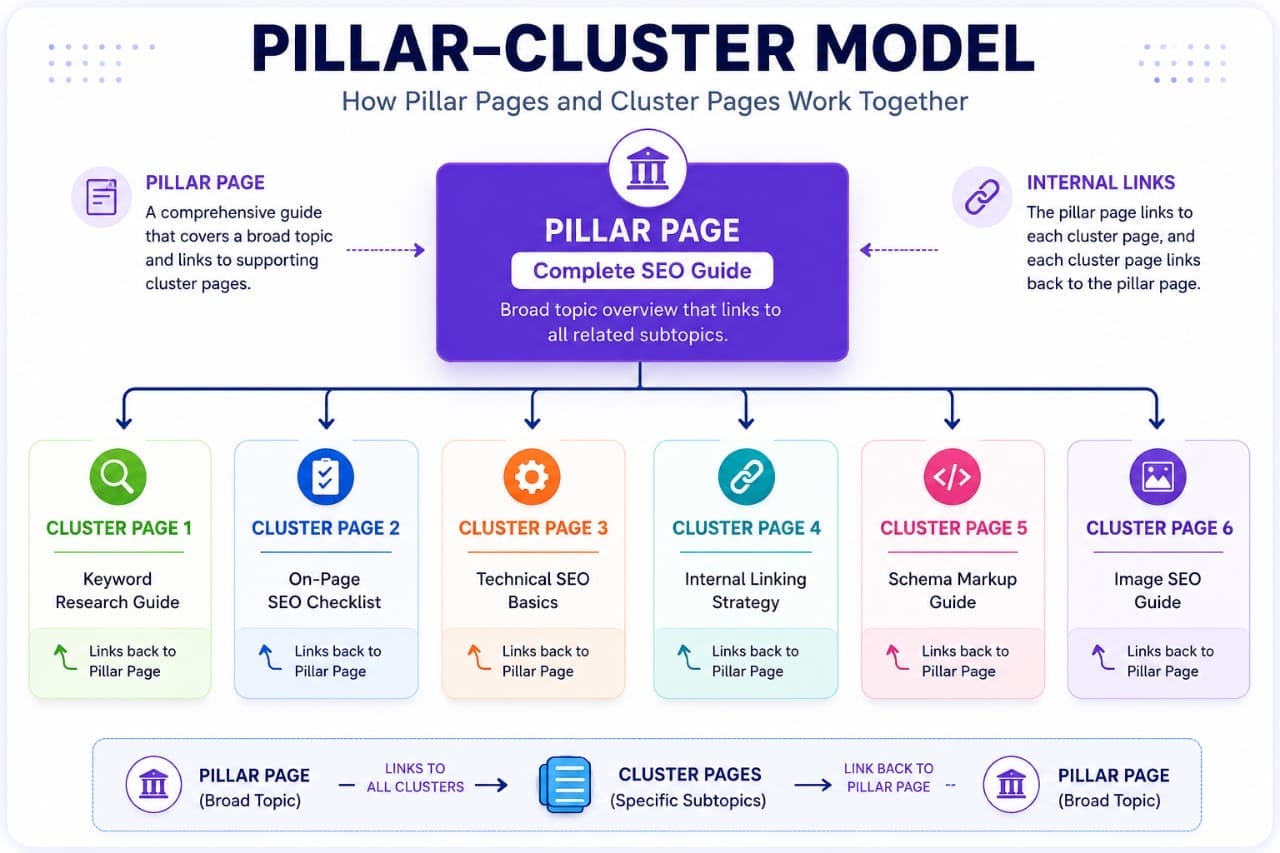
A simple structure looks like this:
- Pillar Page
- ↳ Cluster Page 1
- ↳ Cluster Page 2
- ↳ Cluster Page 3
- ↳ Cluster Page 4
- ↳ Cluster Page 5
Every Cluster Page links back to the Pillar Page, creating a well-connected content hub.
Key Differences Between Pillar Pages and Cluster Pages
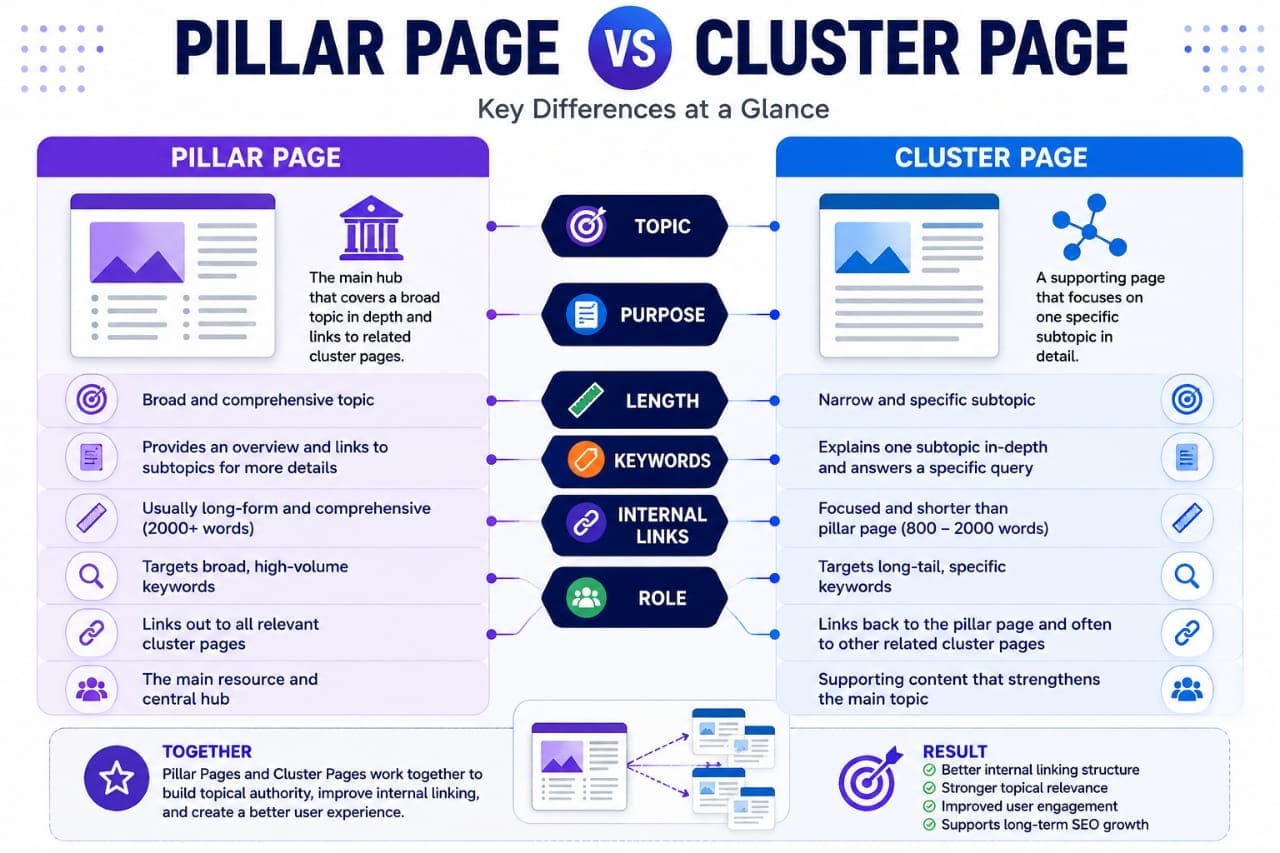
A pillar page covers a broad subject, while a cluster page explores a specific subtopic in greater detail. Both work together through relevant internal links to create a clearer content structure.
| Comparison Factor | Pillar Page | Cluster Page |
|---|---|---|
| Topic scope | Covers a broad subject and its important subtopics. | Focuses on one specific subtopic or question. |
| Main purpose | Introduces the main subject and guides readers to related resources. | Provides a detailed answer or practical solution. |
| Search intent | Often serves readers seeking an overview or comprehensive guide. | Often serves readers looking for a specific answer or task. |
| Keyword strategy | Targets the broader topic and closely related concepts. | Targets a narrower query or specific search intent. |
| Content structure | Organizes the main subject and points readers to deeper explanations. | Explains one part of the subject with focused examples and steps. |
| Internal linking | Links to relevant cluster pages and supporting resources. | Links back to the pillar page and other relevant articles. |
| Example | Complete Guide to WordPress SEO | How to Add Schema Markup in WordPress |
| Success measure | Useful topic coverage, navigation, and connections to related content. | How well the page satisfies its specific search intent and supports the topic. |
How Topic Clusters Help Readers and Search Engines Discover Related Content
Google aims to understand the relationships between topics rather than treating every article as completely independent.
When related pages are connected logically, visitors can explore a subject more easily.
A well-organized topic cluster may help:
- Improve internal linking.
- Make content easier to discover.
- Keep readers engaged longer.
- Build topical organization.
While there is no guarantee of higher rankings, a structured website can improve navigation and content discoverability.
Benefits of Creating a Pillar Page
- Organizes related content.
- Creates stronger internal links.
- Improves website navigation.
- Makes content easier to update.
- Supports long-term content planning.
Benefits of Cluster Pages
- Target long-tail keywords.
- Answer specific user questions.
- Allow deeper topic coverage.
- Create additional internal linking opportunities.
- Support topical relevance.
Instead of publishing unrelated SEO articles, organizing them into a pillar-and-cluster structure made my content planning much more systematic. It also made internal linking easier because every new article naturally connected back to a broader topic.
How to Create a Pillar Page
A successful Pillar Page starts with choosing a broad topic that is important to your audience.
The goal is to provide a complete overview while linking to detailed resources for readers who want to learn more.
A simple process looks like this:
- Choose a broad topic.
- Identify related subtopics.
- Create Cluster Pages for each subtopic.
- Link every Cluster Page back to the Pillar Page.
- Update the Pillar Page as new content is published.
This creates a content hub that grows over time.
How Many Cluster Pages Should a Pillar Page Have?
There isn't a fixed number.
Some websites have five cluster pages, while others have twenty or more.
Instead of focusing on quantity, create cluster pages only when they answer a unique search intent.
For example, a WordPress Pillar Page could include clusters such as:
- Best WordPress Plugins
- Astra Theme Settings
- WordPress Speed Optimization
- WordPress Security Guide
- WordPress Backup Guide
- WordPress Migration Guide
Each article should provide substantial value on its own while supporting the main topic.
Keyword Strategy: Pillar Pages vs Cluster Pages
A pillar page and a cluster page should target different but closely related search intents. The pillar page covers the broader topic, while cluster pages answer specific questions in greater detail.
| Keyword Factor | Pillar Page | Cluster Page |
|---|---|---|
| Keyword focus | A broad keyword or main topic that represents the overall subject. | A specific keyword, question, or subtopic related to the main subject. |
| Search intent | Usually helps readers understand a topic and explore its major areas. | Usually answers a focused question or helps readers complete a specific task. |
| Keyword examples | WordPress SEO guide | How to add schema markup in WordPress |
| Content approach | Provides an overview and links to detailed supporting resources. | Explains one subtopic thoroughly with relevant examples or steps. |
| Internal links | Links to relevant cluster articles using descriptive anchor text. | Links back to the relevant pillar page and other useful related articles. |
| Keyword overlap | Owns the broad topic where it best satisfies the search intent. | Targets a distinct subtopic without unnecessarily duplicating the pillar page. |
| How to measure success | Review relevant impressions, clicks, engagement, and how well it guides readers to supporting content. | Review query relevance, clicks, impressions, and how effectively the article answers its intended question. |
For example:
A pillar page about WordPress SEO could cover technical SEO, on-page optimization, site structure, and SEO plugins. Supporting cluster pages could explain how to configure Rank Math, fix broken internal links, or improve WordPress page speed. Choose keywords based on the information readers need, not just search volume or keyword length. Before creating a new page, review the existing results in Google Search Console and check whether another article on your website already targets the same search intent.
Internal Linking Best Practices
Internal linking is what connects the entire topic cluster.
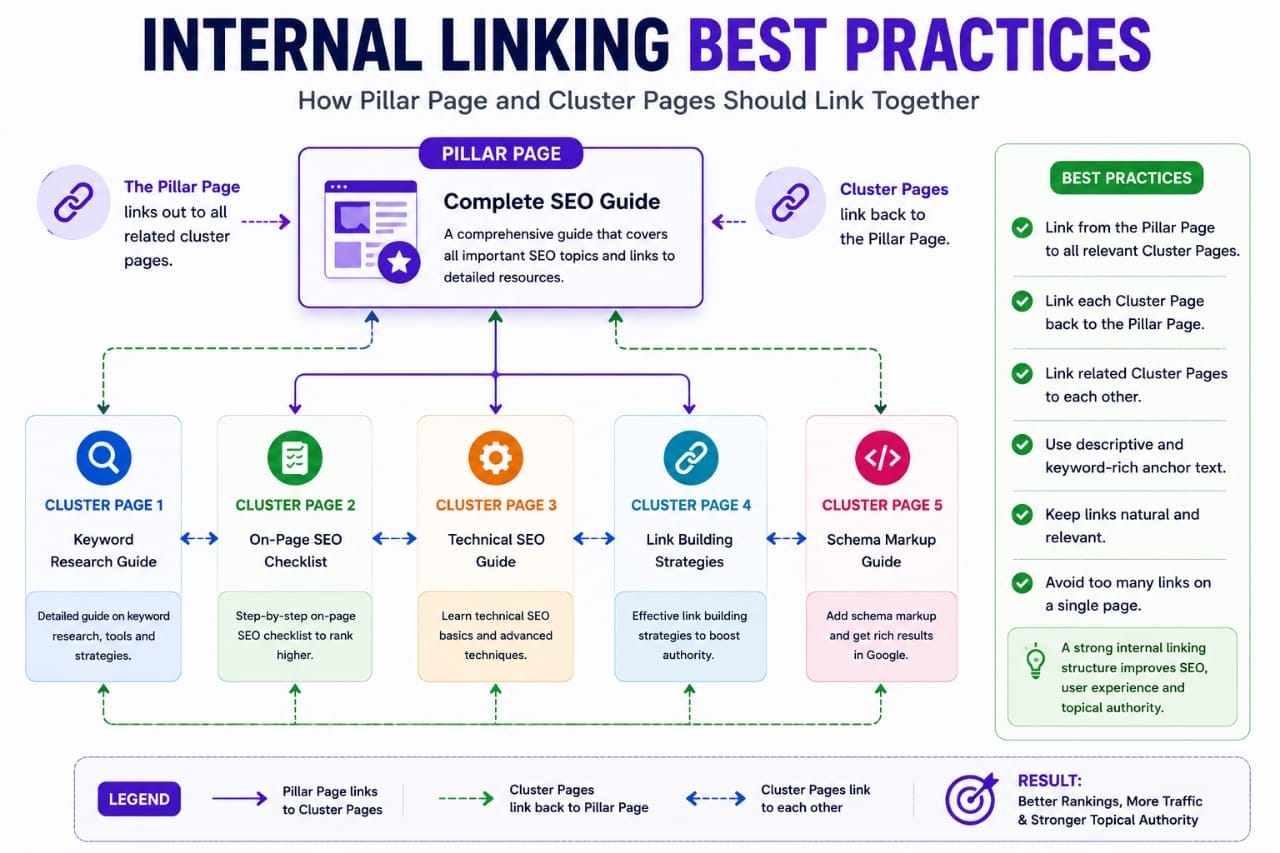
For the best results:
- Link from the Pillar Page to every Cluster Page.
- Link each Cluster Page back to the Pillar Page.
- Link related Cluster Pages to one another where relevant.
- Use descriptive anchor text.
- Avoid excessive or irrelevant links.
A logical internal linking structure helps users discover related content more easily.
Common Mistakes to Avoid
Many beginners misunderstand how topic clusters work.
Some common mistakes include:
- Creating multiple Pillar Pages targeting the same keyword.
- Publishing Cluster Pages without linking back to the Pillar Page.
- Using identical keywords on every page.
- Ignoring internal links.
- Creating thin content for cluster articles.
Every page should have a unique purpose and satisfy a specific search intent.
Topic Clusters vs WordPress Categories: What's the Difference?
WordPress categories and SEO topic clusters serve different purposes. Categories help organize articles into a navigable site structure, while topic clusters connect related content through a deliberate internal-linking strategy.
For example, Seovixo may organize an article about Rank Math under WordPress → WordPress SEO. That same article could link to a relevant SEO tutorial or technical SEO guide when the connection helps readers.You do not need to create a separate WordPress category for every topic cluster. Instead, keep your categories focused, assign each article to its most appropriate category, and use contextual internal links to connect related articles. A well-organized site should make it easy for readers to find related information without creating unnecessary categories or repetitive pages.
When Should You Create a Pillar Page?
You don't need a Pillar Page for every topic on your website.
Create one when you have several related articles that naturally belong under a broader subject.
For example, if your website covers SEO, a Pillar Page becomes valuable once you've published multiple supporting articles such as keyword research, on-page SEO, technical SEO, and link building.
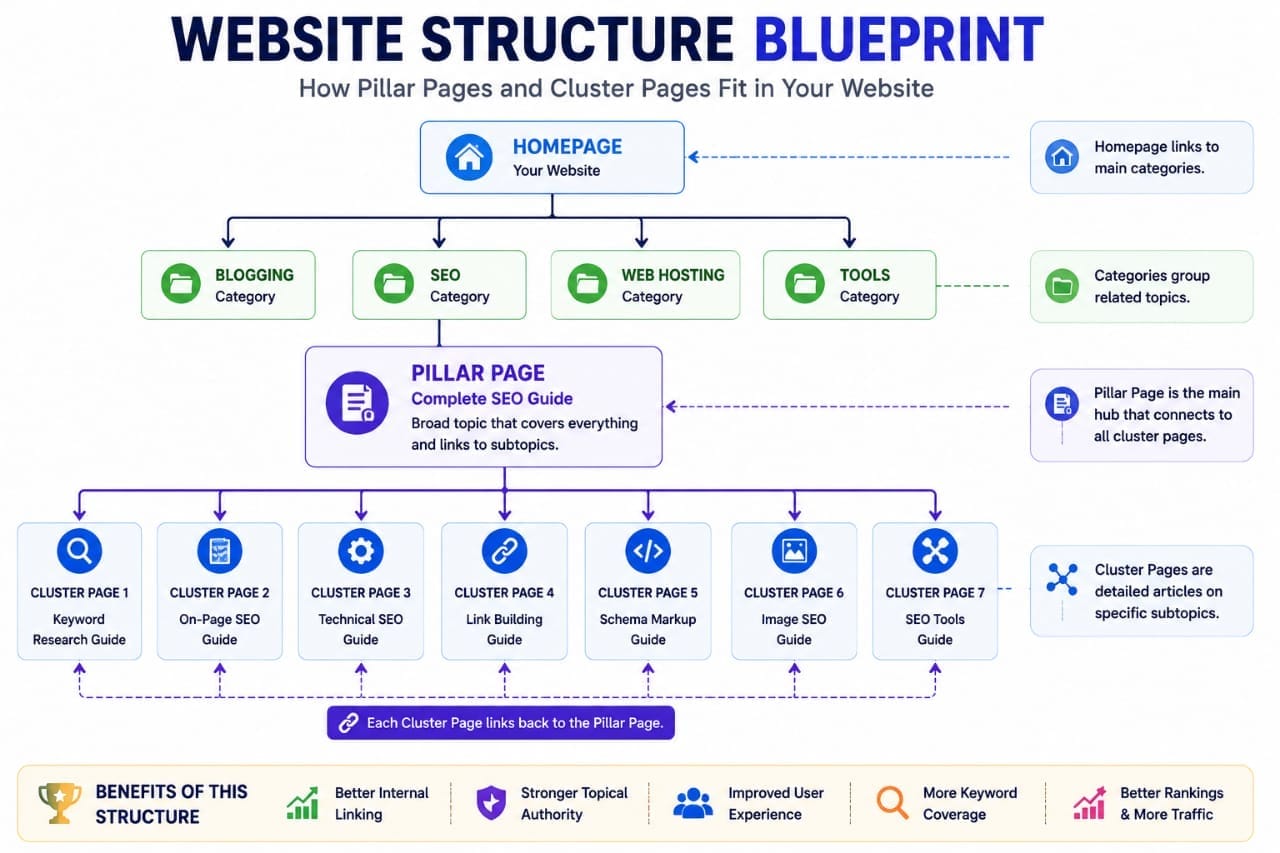
As your content library grows, your Pillar Page becomes the central resource that connects everything together.
When Should You Create Cluster Pages?
Create Cluster Pages whenever a subtopic deserves a detailed explanation.
Each Cluster Page should answer one primary search intent instead of trying to cover an entire subject.
This makes your content easier to read and gives each article a clear purpose.
Can One Cluster Page Belong to Multiple Pillar Pages?
Sometimes, yes.
For example, an article about Keyword Research may be relevant to both an SEO Guide and a Blogging Guide.
However, avoid creating confusing internal linking structures. The primary relationship between a Cluster Page and its main Pillar Page should always remain clear.
Internal Resources
Continue Learning on Seovixo:
Final Verdict
Pillar Pages and Cluster Pages are not competing strategies—they work best together.
A Pillar Page gives readers a comprehensive overview of a broad topic, while Cluster Pages provide in-depth answers to specific questions. Connected through thoughtful internal linking, they create a well-organized website that is easier for visitors to navigate.
For bloggers and businesses planning long-term growth, the pillar-and-cluster model is one of the most effective ways to organize content. It also simplifies future content planning because every new article can naturally fit into an existing topic cluster.
Remember that the structure itself won't guarantee higher rankings. Success still depends on publishing original, helpful content, maintaining strong technical SEO, and regularly updating your articles.
Frequently Asked Questions
What is a Pillar Page?
A Pillar Page is a comprehensive resource that covers a broad topic and links to multiple related Cluster Pages for more detailed information.
What is a Cluster Page?
A Cluster Page focuses on one specific subtopic and links back to the main Pillar Page while also connecting to related content where appropriate.
How many Cluster Pages should a Pillar Page have?
There is no fixed number. Create as many high-quality Cluster Pages as needed to cover important subtopics without producing thin or repetitive content.
Should every website use the Pillar–Cluster model?
Content-rich websites such as blogs, educational resources, and business sites often benefit the most. Smaller websites with only a few pages may not need an extensive cluster structure.
Can I add new Cluster Pages later?
Yes. One advantage of this strategy is that you can continue expanding your topic clusters by publishing new supporting articles over time.