How to Make Website with Elementor (Step-by-Step Guide 2026)
Creating a professional website is easier than ever thanks to Elementor.
Elementor is one of the most popular WordPress page builders that allows beginners to design beautiful websites without coding.
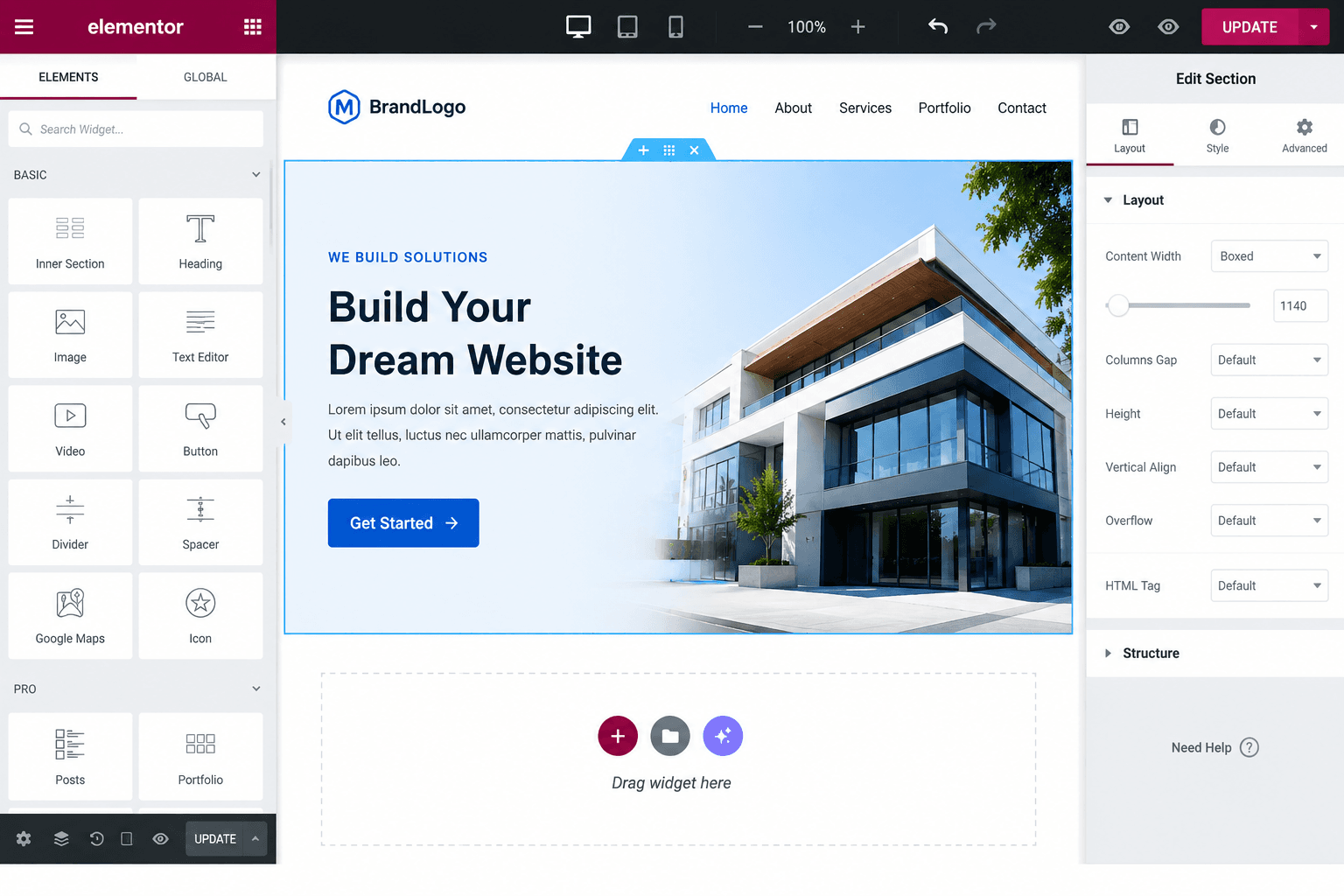
Whether you want to create:
- Blogs
- Business websites
- Portfolio sites
- Affiliate websites
- Landing pages
Elementor makes the process simple using drag-and-drop design tools.
📑 Table of Contents
- What is Elementor?
- Why Use Elementor?
- Things You Need Before Starting
- Step 1: Buy Hosting & Domain
- Step 2: Install WordPress
- Step 3: Install Elementor
- Step 4: Choose a Lightweight Theme
- Step 5: Create Your First Page
- Understanding Elementor Interface
- Step 6: Add Sections & Columns
- Step 7: Use Elementor Widgets
- Step 8: Customize Colors & Typography
- Step 9: Use Elementor Templates
- Step 10: Important Website Pages
- Step 11: Mobile Optimization
- Step 12: Improve Website Speed
- Step 13: SEO Optimization
- Step 14: Add Contact Forms
- Step 15: Publish Website
- Elementor Free vs Pro
- FAQs
- Best Practices
- Common Mistakes
- Best Plugins
- How to Monetize
- Conclusion
What is Elementor?
Elementor is a visual page builder plugin for WordPress.
Instead of writing code, you can design pages visually using blocks, widgets, and templates.
✅ Key Features of Elementor
- Drag-and-drop builder
- Responsive design
- Pre-made templates
- Live editing
- Mobile optimization
- Custom sections & widgets
👉 Official Website: Elementor
Why Use Elementor?
Elementor is beginner-friendly and helps users create modern websites quickly.
📌 Benefits of Elementor
- No coding needed
- Fast website design
- Easy customization
- Professional layouts
- SEO-friendly structure
💡 Elementor is widely used by bloggers, freelancers, businesses, and agencies.
Things You Need Before Starting
Before building your Elementor website, you need:
- Domain name
- Web hosting
- WordPress installation
- Elementor plugin
👉 Learn how to create a WordPress site: Create a WordPress Website
Step 1: Buy Hosting & Domain
The first step is purchasing hosting and a domain name.
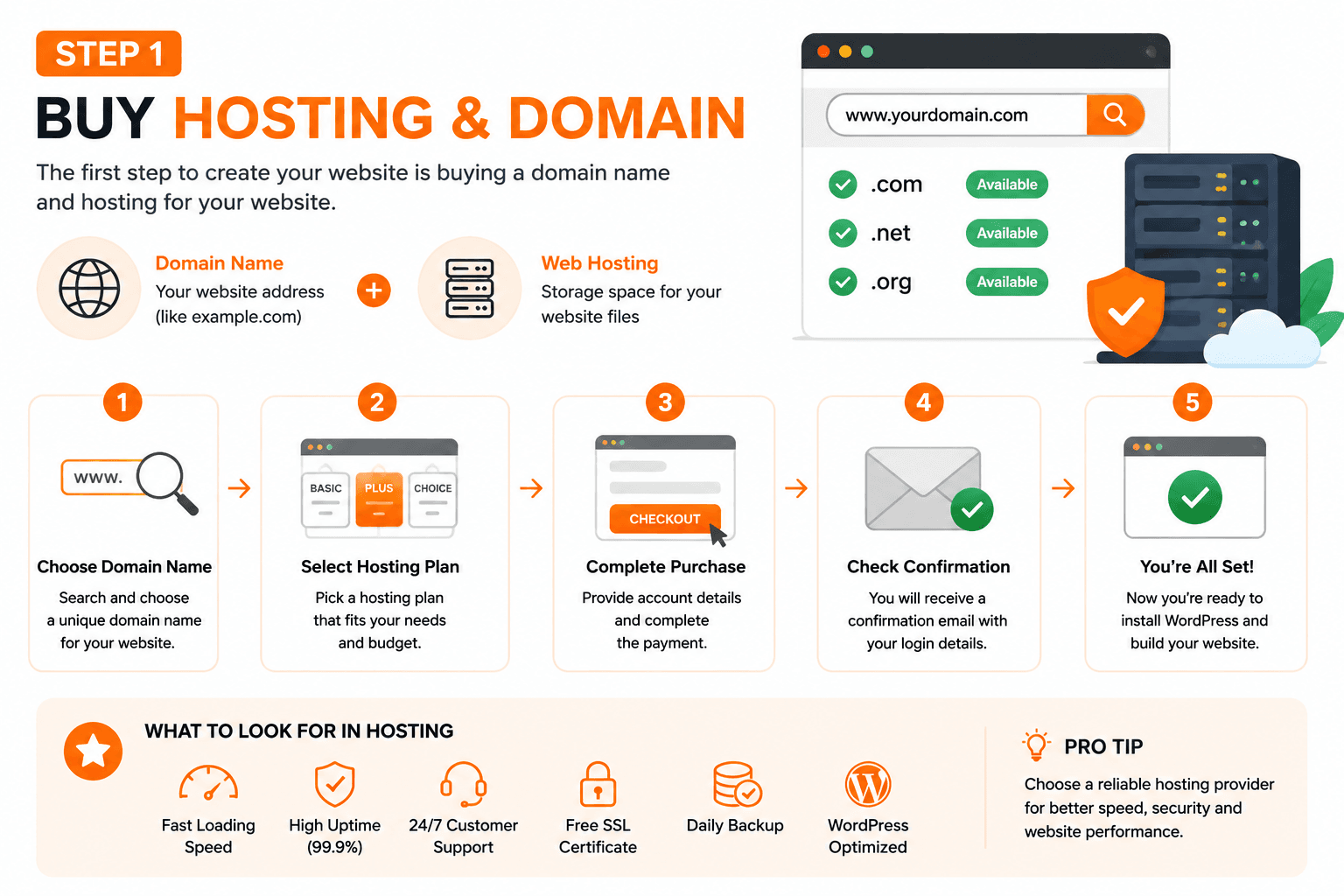
✅ What to Look for in Hosting
- Fast loading speed
- Good uptime
- WordPress support
- Free SSL certificate
👉 Recommended guide: Best Hosting for Beginners
Step 2: Install WordPress
Most hosting providers offer one-click WordPress installation.
📌 Basic WordPress Installation Steps
- Login to hosting dashboard
- Open WordPress installer
- Select domain
- Create admin username & password
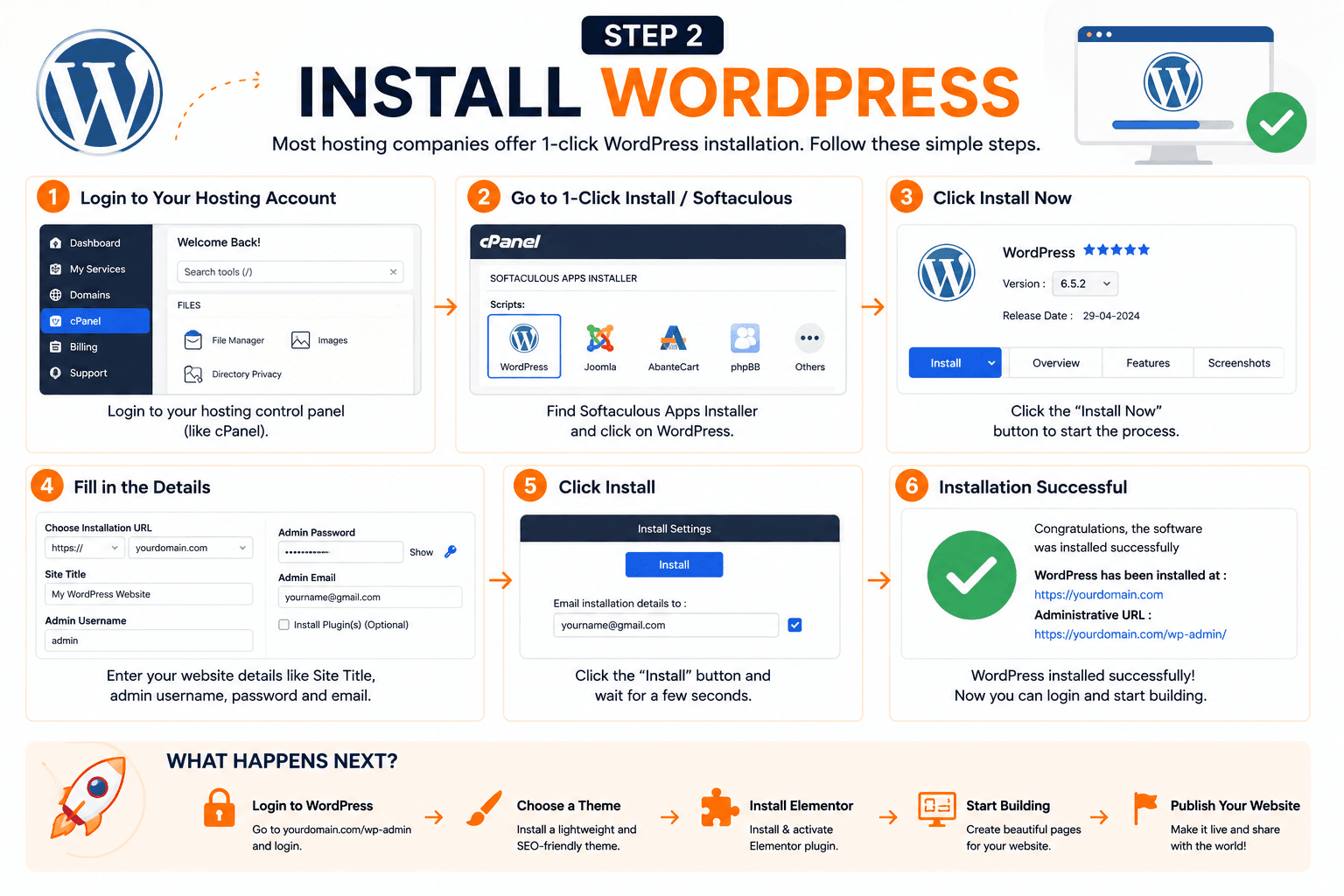
After installation, login to:
yourwebsite.com/wp-admin
Step 3: Install Elementor Plugin
Now you need to install Elementor.
✅ Elementor Installation Steps
- Go to WordPress Dashboard
- Open Plugins → Add New
- Search “Elementor”
- Click Install & Activate
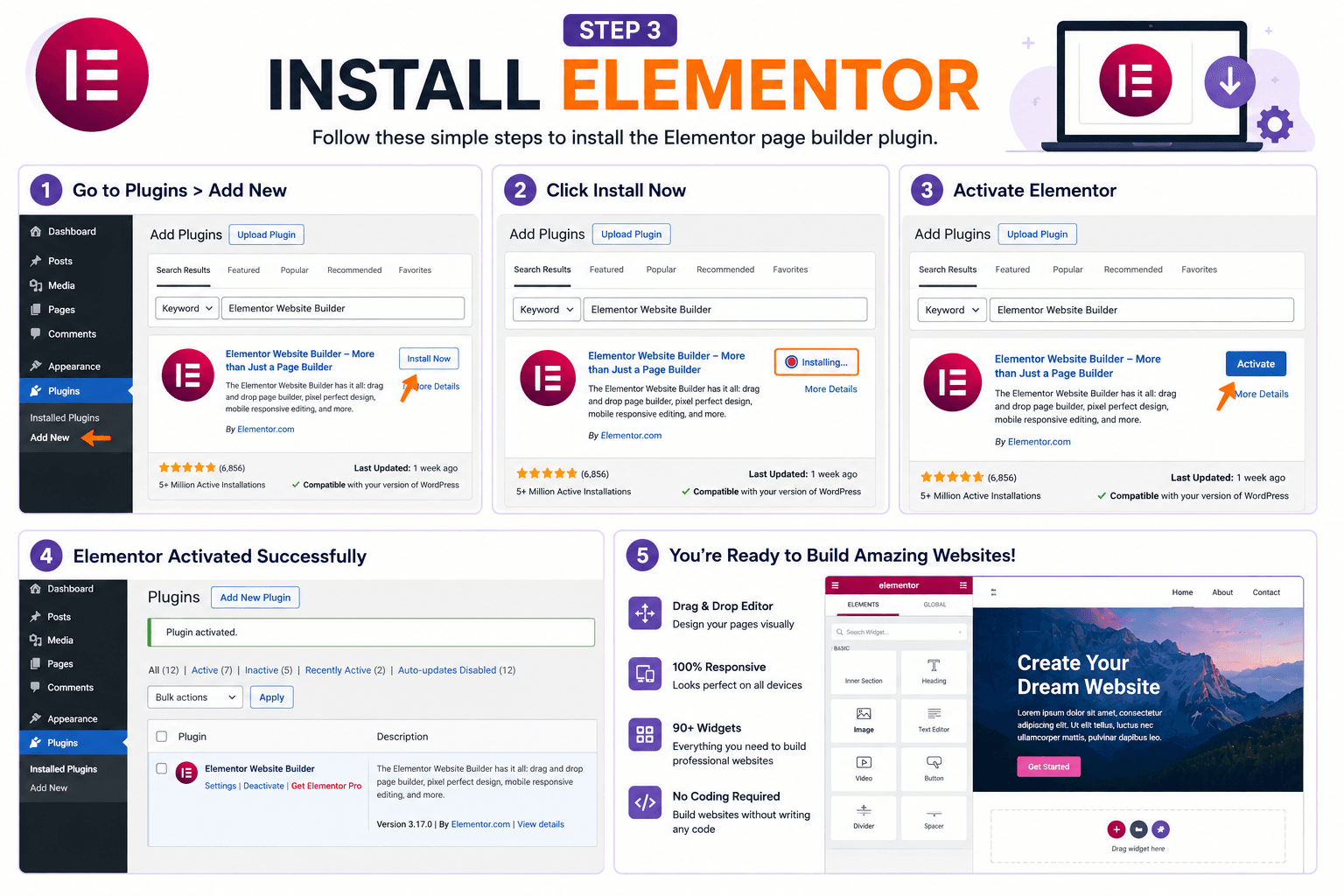
💡 Elementor Free version is enough for beginners.
Step 4: Choose a Lightweight Theme
A lightweight theme improves speed and compatibility.
🚀 Best Elementor Themes
- Astra
- Hello Elementor
- Kadence
- GeneratePress
💡 Astra and Hello Elementor are the most popular choices.
Step 5: Create Your First Page
Now it’s time to build your website page.
📌 Steps to Create a Page
- Go to Pages → Add New
- Enter page title
- Click “Edit with Elementor”
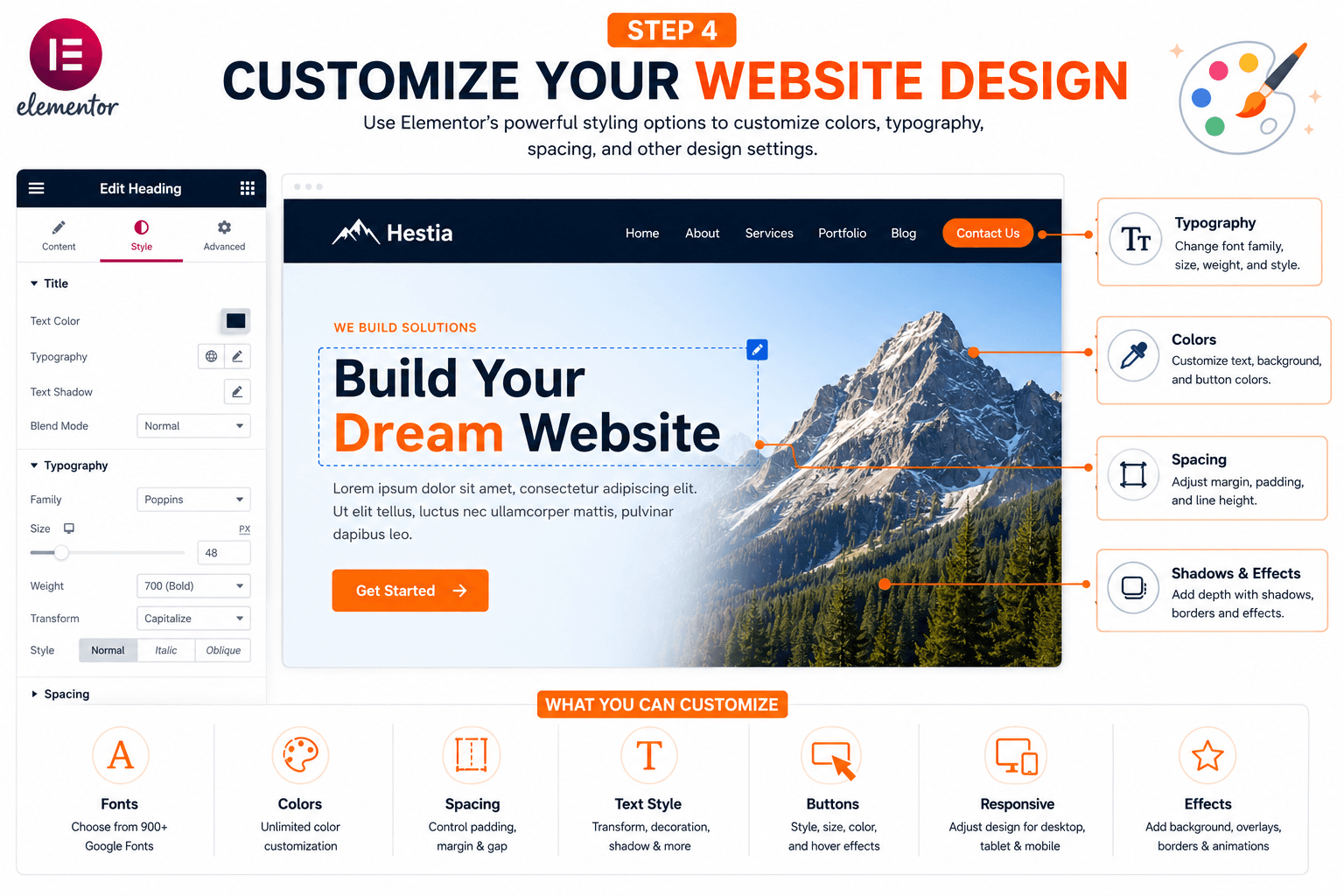
Elementor editor will open where you can visually design your page.
Understanding Elementor Interface
Elementor interface is divided into:
- Widget panel
- Live preview area
- Settings panel
💡 Simply drag widgets and drop them into your page.
Step 6: Add Sections and Columns
Elementor pages are built using sections, columns, and widgets.
📌 How Elementor Structure Works
- Sections → Main layout containers
- Columns → Divide content horizontally
- Widgets → Add content elements
💡 This structure gives complete design flexibility.
Step 7: Use Elementor Widgets
Widgets are the building blocks of your website.
✅ Popular Elementor Widgets
- Heading
- Text Editor
- Image
- Button
- Icon Box
- Testimonials
- Video
Simply drag a widget into your page and customize it.
Step 8: Customize Colors & Typography
Good design improves user experience and professionalism.
🎨 Design Tips
- Use consistent colors
- Choose readable fonts
- Maintain proper spacing
- Use clear CTA buttons
💡 Avoid using too many colors or animations.
Step 9: Use Elementor Templates
Templates help beginners create websites faster.
🚀 Benefits of Templates
- Save time
- Professional layouts
- Easy customization
- Mobile optimized
Elementor provides free and premium template kits.
Step 10: Create Important Website Pages
Every professional website should include essential pages.
📌 Important Pages
- Home
- About
- Contact
- Services
- Blog
- Privacy Policy
💡 These pages improve trust and AdSense approval chances.
Step 11: Make Website Mobile Friendly
Most website visitors use mobile devices.
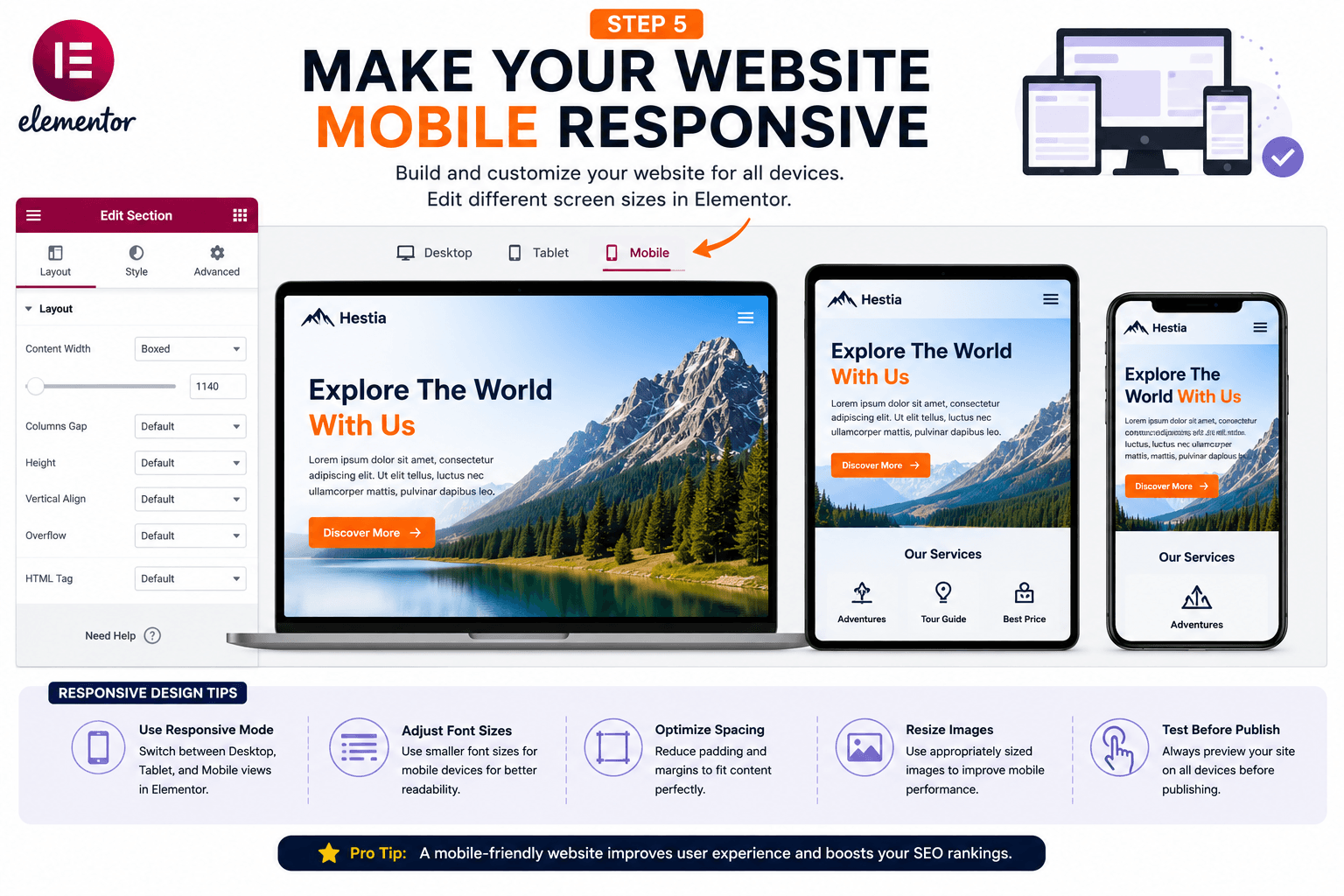
📱 Mobile Optimization Tips
- Check responsive mode
- Adjust font sizes
- Optimize spacing
- Hide unnecessary sections on mobile
💡 Elementor includes built-in responsive editing tools.
Step 12: Improve Website Speed
A slow website can hurt SEO and user experience.
⚡ Speed Optimization Tips
- Use lightweight themes
- Compress images
- Use caching plugins
- Avoid excessive animations
👉 Learn how to optimize speed: Speed Up WordPress Website
Step 13: Optimize Elementor Website for SEO
Elementor websites can rank well if properly optimized.
✅ Elementor SEO Checklist
- Use SEO-friendly headings
- Add meta titles & descriptions
- Optimize images
- Improve loading speed
- Use internal links
👉 Complete SEO guide: On-Page SEO Checklist
Step 14: Add Contact Forms
Contact forms help visitors communicate with you easily.
📌 Best Contact Form Plugins
- WPForms
- Contact Form 7
- Fluent Forms
💡 WPForms is beginner-friendly and works well with Elementor.
Step 15: Publish Your Website
After designing your pages, click the Publish button.
Congratulations 🎉 Your Elementor website is now live.
Free vs Pro Elementor
| Feature | Free | Pro |
|---|---|---|
| Basic Widgets | Yes | Yes |
| Templates | Limited | Advanced |
| Theme Builder | No | Yes |
| Popup Builder | No | Yes |
| WooCommerce Builder | No | Yes |
💡 Elementor Free is enough for most beginners.