How to Write SEO Articles Using ChatGPT (Complete Step-by-Step Guide for 2026)
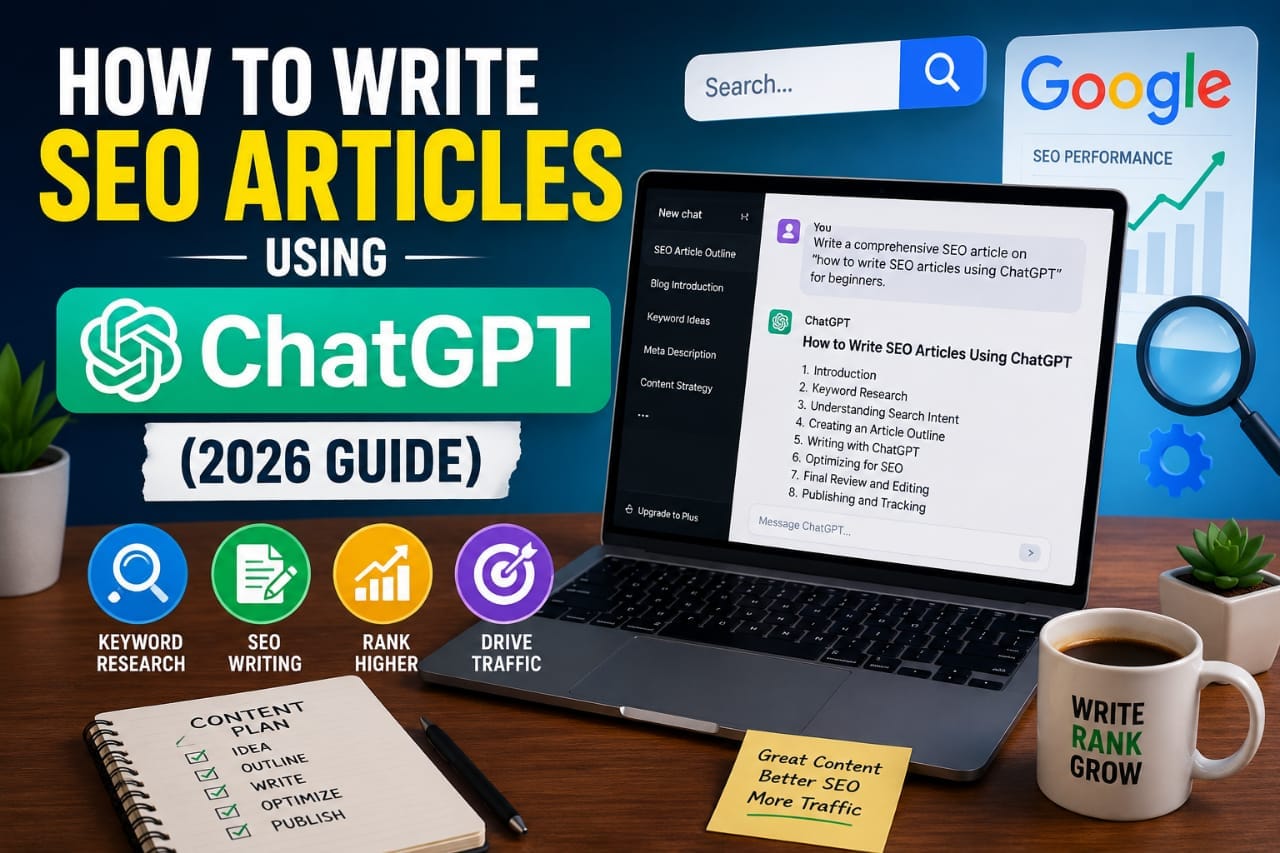
Artificial intelligence has completely changed how bloggers create content. Tools like ChatGPT can help generate outlines, explain complex topics, improve readability, and speed up the writing process. However, many beginners believe they can simply copy AI-generated text, publish it, and expect high Google rankings.
That approach rarely works.
Google doesn't rank content because it was written by AI or by a human. It rewards content that is accurate, original, helpful, and satisfies the reader's search intent.
Ready to Write Better SEO Articles Faster?
Use ChatGPT to brainstorm ideas, create detailed outlines, improve readability, and write high-quality SEO content. Always review and add your own expertise before publishing.
🚀 Try ChatGPTThe most successful bloggers use ChatGPT as a writing assistant—not as a replacement for research, experience, or editing.
In this guide, you'll learn a complete workflow for writing SEO-friendly articles with ChatGPT while creating content that is genuinely useful for readers and aligned with Google's recommendations.
Use ChatGPT to brainstorm ideas, build outlines, draft sections, improve readability, and generate FAQs. Then add your own research, screenshots, examples, and editing before publishing. AI should speed up content creation, but your expertise and review are what make the article valuable.
Can You Rank Articles Written with ChatGPT?
Yes—but not because they are written with ChatGPT.
Google has explained that it focuses on the quality of the content rather than the method used to create it. An AI-assisted article can rank well if it is helpful, accurate, and demonstrates expertise.
Problems usually arise when publishers:
- Publish unedited AI drafts.
- Create dozens of nearly identical articles.
- Provide outdated or incorrect information.
- Ignore search intent.
- Fail to add original value.
Think of ChatGPT as a productivity tool. It can help you write faster, but it cannot replace careful research and editorial review.
Helpful resource:
Google Helpful Content Guidelines
Step 1: Start with Keyword Research
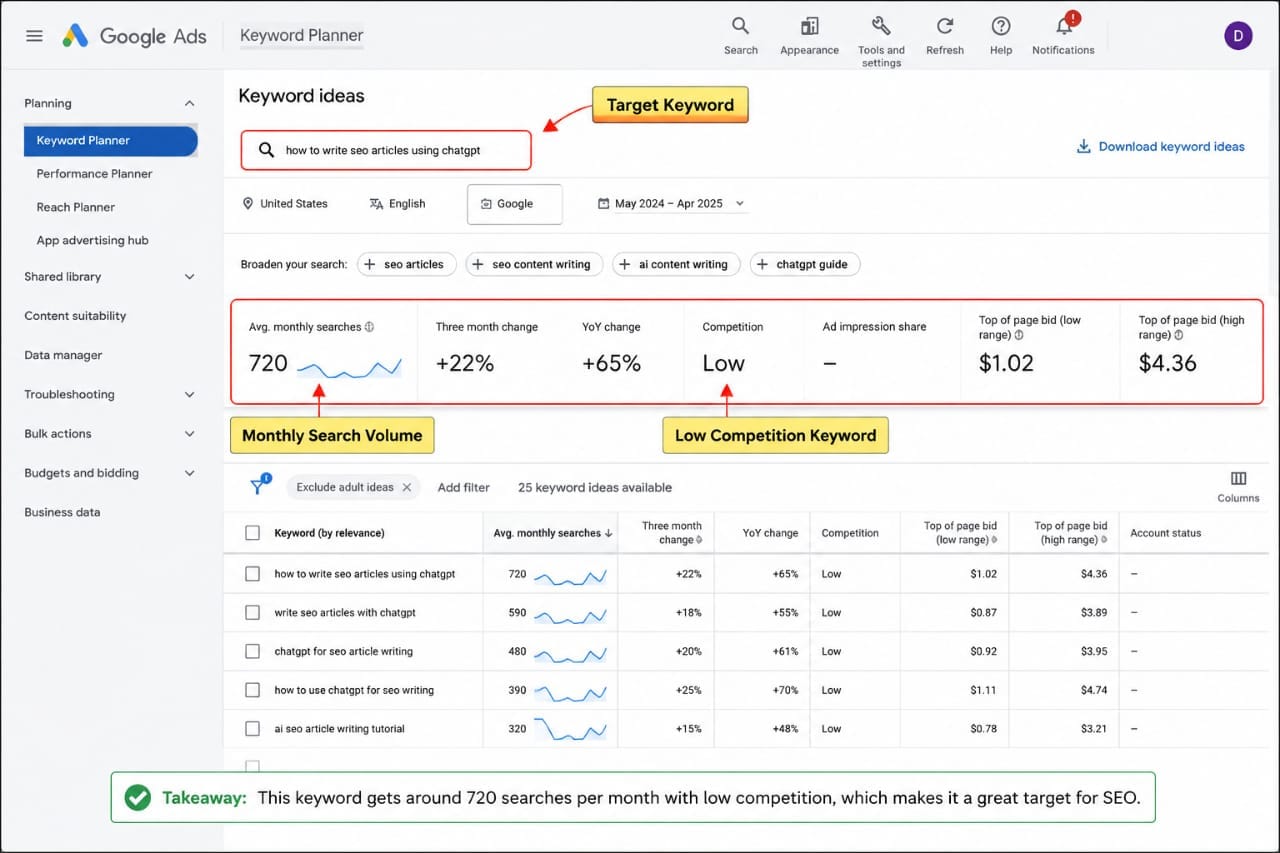
Before opening ChatGPT, decide what problem your article will solve.
Look for keywords that have clear search intent and are relevant to your audience.
For example:
- How to Write SEO Articles Using ChatGPT
- Best AI Writing Prompts
- ChatGPT for Blogging
- SEO Content Writing Guide
Your keyword should appear naturally throughout the article, especially in the title, introduction, headings, and conclusion.
Step 2: Understand Search Intent
Every keyword represents a question or problem.
For this topic, readers want to know:
- Can ChatGPT help with SEO writing?
- How should they use it?
- What mistakes should they avoid?
- Can AI-generated articles rank?
If your article answers those questions clearly, it is much more likely to satisfy both readers and search engines.
Step 3: Ask ChatGPT for an Outline First
Instead of asking ChatGPT to write an entire article immediately, begin with an outline.
A strong outline helps organize your ideas and ensures that you cover every important topic.
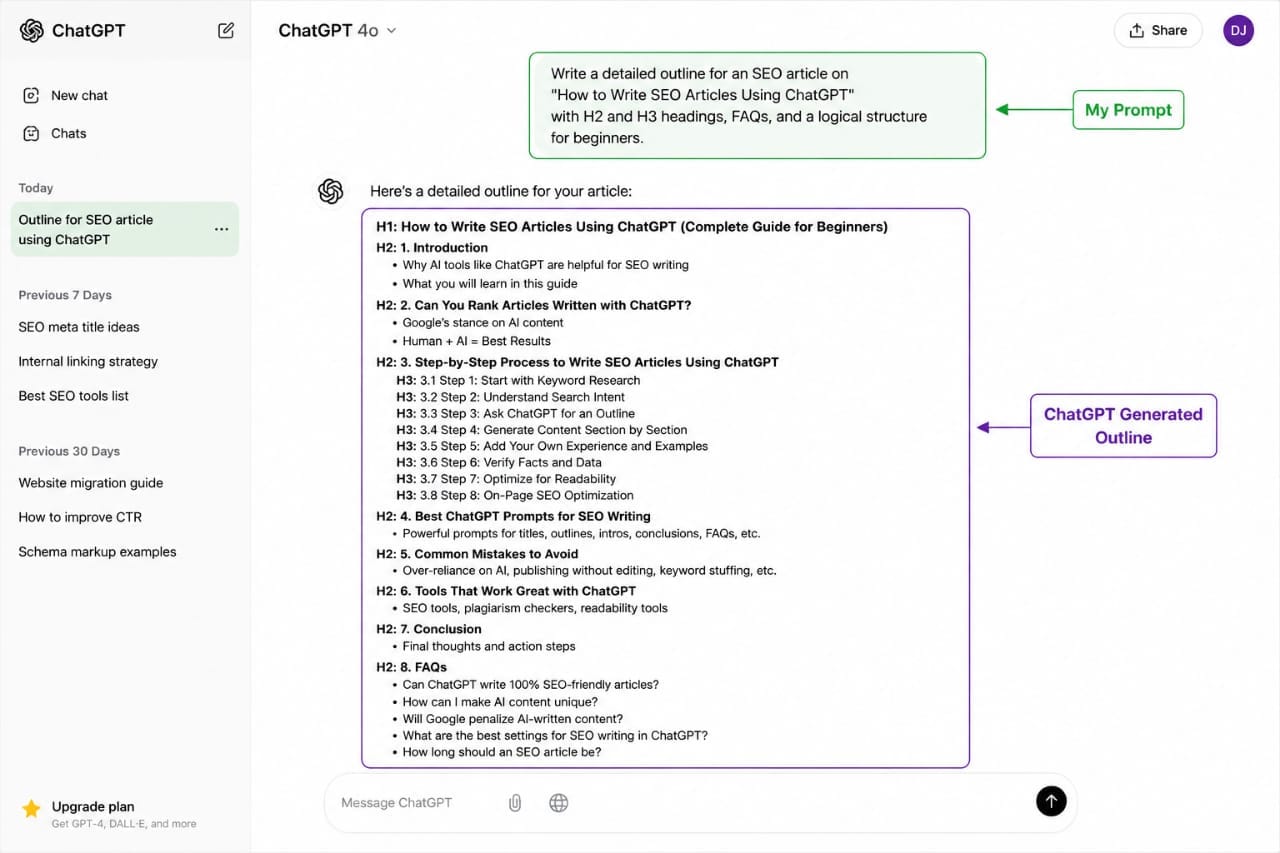
Example prompt:
Once the outline is ready, write each section separately instead of generating one massive draft.
Step 4: Generate One Section at a Time
Writing section by section usually produces better results than asking for a complete article in one prompt.
This allows you to review, edit, and improve every part before moving on.
For example, request:
- Introduction
- Keyword research section
- Search intent section
- Editing checklist
- Conclusion
This workflow improves quality and reduces repetition.
Step 5: Add Your Own Experience
This is one of the biggest differences between average AI content and genuinely helpful content.
Readers appreciate practical insights that come from real projects.
Examples include:
- Lessons learned from publishing articles.
- Traffic improvements after updating content.
- Mistakes that reduced rankings.
- Workflows that saved time.
Adding first-hand observations makes your content more useful and more distinctive than a generic AI draft.
Use ChatGPT to draft the framework, then enrich it with screenshots, examples, case studies, and practical advice based on your own work. That's what turns a basic article into a valuable resource.
Step 6: Verify Facts Before Publishing
AI tools can occasionally produce outdated or incorrect information.
Before publishing, verify:
- Statistics.
- Google recommendations.
- Product features.
- Pricing.
- Technical instructions.
Use official documentation whenever possible rather than relying solely on AI-generated text.
Step 7: Optimize for Readability
Even accurate content can be difficult to read if it contains long paragraphs or poor formatting.
Improve readability by:
- Using descriptive headings.
- Keeping paragraphs short.
- Adding bullet points.
- Including tables where appropriate.
- Using screenshots and diagrams.
Well-structured content helps readers scan the page and find answers more quickly.
Step 8: Strengthen On-Page SEO
Before publishing, review the technical SEO elements of your article.
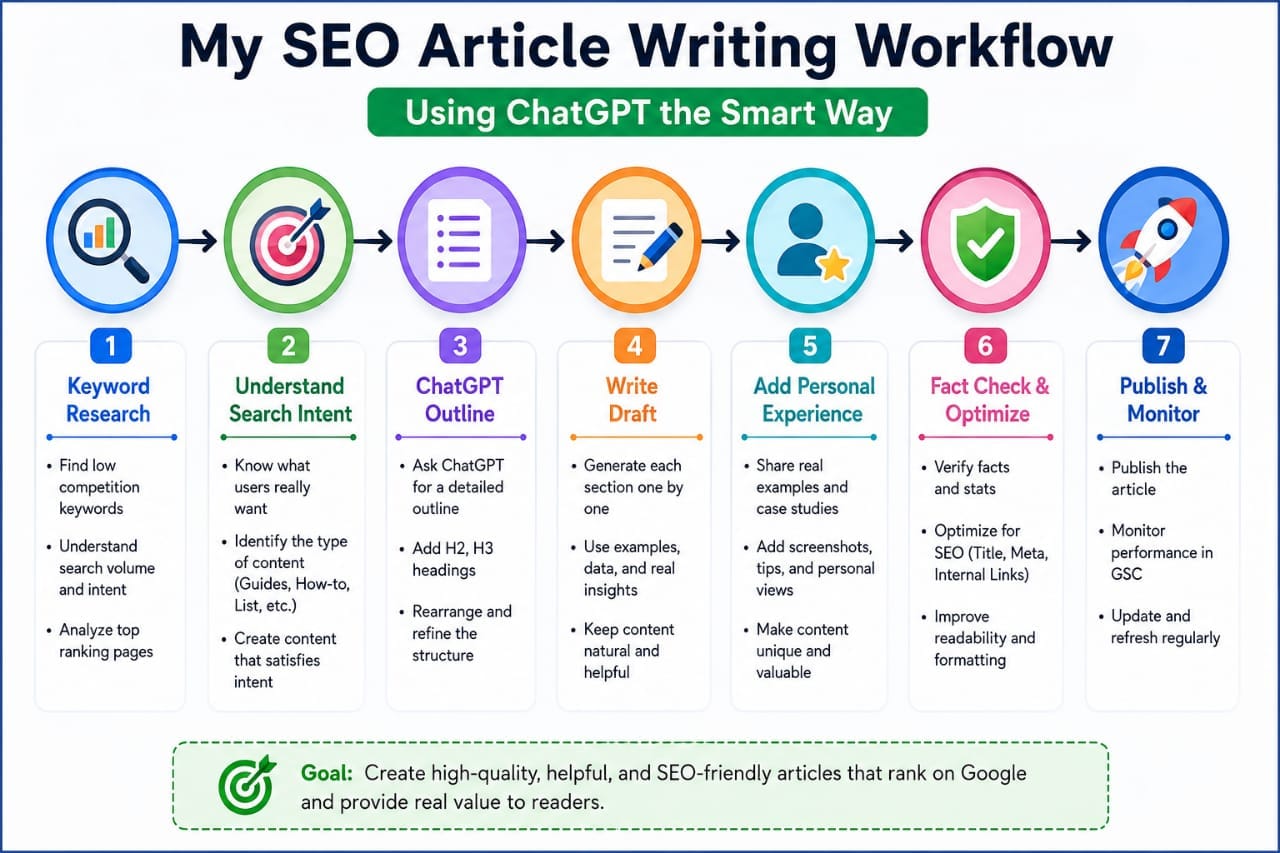
- Write a compelling SEO title.
- Create a clear meta description.
- Use one H1 heading.
- Organize content with H2 and H3 headings.
- Add internal links to related articles.
- Link to authoritative external sources when appropriate.
- Optimize images with descriptive alt text.
These steps help search engines understand your content while improving the reader's experience.
Step 9: Use Better Prompts to Get Better Content
The quality of your article depends heavily on the quality of your prompts.
Instead of asking ChatGPT:
❌ "Write an SEO article."
Try something more specific:
Specific prompts produce more focused and useful content.
Step 10: Don't Publish the First Draft
The first AI-generated draft is only the starting point.
Before publishing:
- Remove repetitive sentences.
- Rewrite robotic phrases.
- Add examples.
- Improve transitions.
- Simplify complicated explanations.
- Correct factual inaccuracies.
Editing is where much of the article's value is created.
Step 11: Follow Google's EEAT Principles
Google encourages content that demonstrates:
- Experience – practical knowledge from using the topic.
- Expertise – accurate and well-informed information.
- Authoritativeness – credibility within the topic.
- Trustworthiness – honesty, transparency, and reliable sources.
You don't need to claim expertise you don't have. Instead, clearly explain your methods, cite official documentation when appropriate, and be transparent about limitations.
Step 12: Add Original Value
Many AI-generated articles repeat information already available online.
To stand out, include material that readers cannot easily find elsewhere.
Examples include:
- Your workflow.
- Checklists.
- Templates.
- Real examples.
- Comparison tables.
- Frequently asked questions.
- Common mistakes.
Original value is often what encourages readers to stay longer and share your content.
Step 13: Add Internal Links
Internal links help both readers and search engines discover related content.
For example, if your website contains articles about:
- Keyword research
- On-page SEO
- Website migration
- Core Web Vitals
Link to them naturally within the article.
This strengthens topical authority and improves site navigation.
Step 14: Use High-Quality External Sources
Whenever you reference technical SEO guidance or platform-specific information, rely on official documentation where possible.
Examples include:
- Google Search documentation.
- Google Search Console Help.
- Google PageSpeed Insights.
- WordPress documentation.
Authoritative references increase credibility and help readers verify important information.
Step 15: Add Helpful Visuals
Images improve comprehension and increase time on page.
Useful visuals include:
- Workflow diagrams.
- Prompt examples.
- SEO checklists.
- Content structure blueprints.
- Search Console screenshots.
Every image should support the content instead of serving only as decoration.
Step 16: Check for Duplicate Content
Even if you use AI responsibly, review your article before publishing.
Ask yourself:
- Does this answer the reader's question clearly?
- Have I added my own explanation or examples?
- Is any section repetitive?
- Are all facts current?
The goal is to create content that is genuinely useful—not just different.
ChatGPT can help you write faster, but your editing, judgment, and subject knowledge are what make the final article valuable.
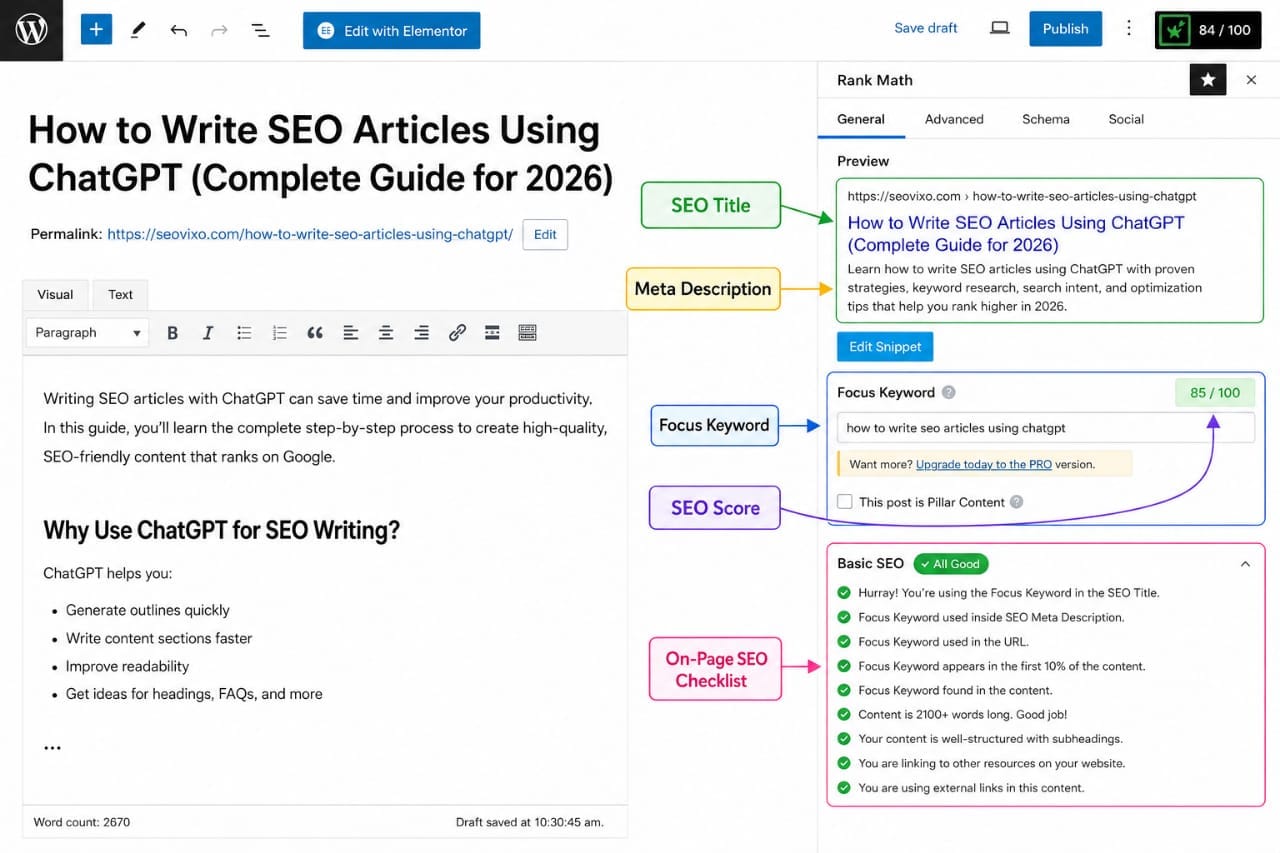
A Practical Workflow for Writing SEO Articles
Many successful content creators follow a structured process:
- Research the keyword.
- Understand search intent.
- Create an outline.
- Draft one section at a time.
- Verify important facts.
- Add original examples.
- Optimize on-page SEO.
- Proofread before publishing.
This approach is slower than copying AI output, but it consistently produces higher-quality articles.
Common Mistakes Bloggers Make with ChatGPT
- Publishing unedited AI text.
- Ignoring search intent.
- Overusing keywords.
- Failing to verify information.
- Skipping internal links.
- Writing without a clear structure.
- Using outdated examples.
- Adding no original insights.
Avoiding these mistakes greatly improves the quality of your content.
Can AI Replace Human Writers?
AI is excellent at organizing ideas, summarizing information, and speeding up drafting.
However, it cannot replace first-hand experience, critical thinking, or editorial judgment.
The strongest articles combine AI efficiency with careful human review and practical expertise.
Step 17: Optimize for Featured Snippets
Featured snippets appear at the top of Google's search results and can significantly increase organic traffic.
To improve your chances:
- Answer questions in the first paragraph.
- Use numbered steps.
- Create bullet lists.
- Add comparison tables.
- Include FAQ sections.
Well-structured content is easier for both readers and search engines to understand.
Step 18: Publish and Monitor Performance
Publishing your article is only the beginning.
Monitor its performance using:
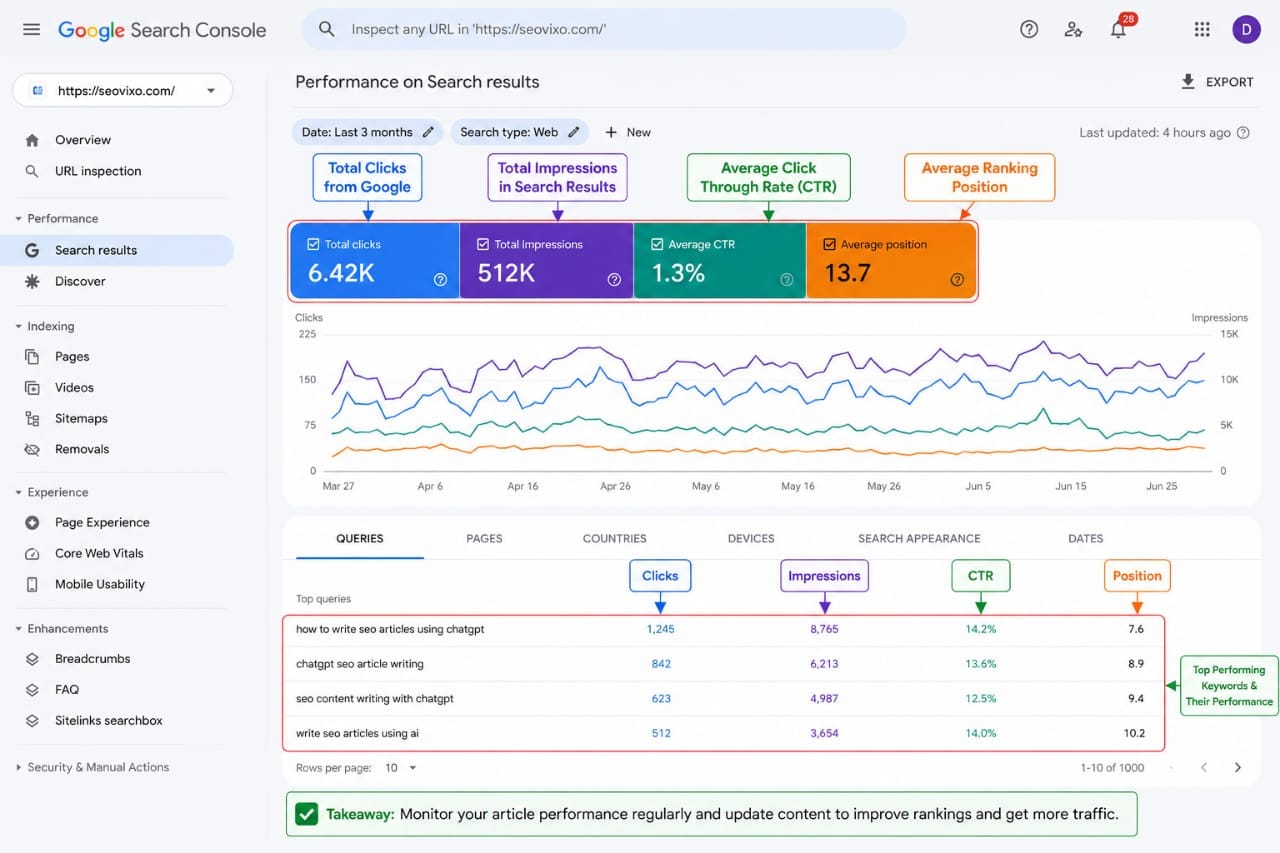
- Google Search Console
- Google Analytics
- Rank tracking tools
Watch metrics such as:
- Organic impressions
- Clicks
- CTR
- Average ranking position
- Top-performing keywords
Use this data to improve your article over time.
Step 19: Refresh Articles Regularly
SEO is not a one-time task.
Review important articles every few months.
Update:
- Statistics
- Screenshots
- Broken links
- Examples
- Publication year
- FAQs
Keeping content current helps maintain relevance and usefulness.
Recommended AI Tools for SEO Writers
ChatGPT works well alongside other SEO tools.
| Tool | Purpose |
|---|---|
| ChatGPT | Outlines, drafting, rewriting and brainstorming |
| Google Search Console | Performance monitoring |
| Google Keyword Planner | Keyword research |
| Google PageSpeed Insights | Performance analysis |
| Rank Math | On-page SEO optimization |
Publishing Checklist
- ✅ Target keyword added naturally
- ✅ Clear H1, H2 and H3 headings
- ✅ Helpful introduction
- ✅ Original examples included
- ✅ SEO title optimized
- ✅ Meta description written
- ✅ Internal links added
- ✅ External authoritative sources added
- ✅ Images optimized with alt text
- ✅ FAQ section included
- ✅ Grammar and readability checked
Internal Resources
Final Verdict
ChatGPT is one of the most powerful writing assistants available, but it is not a shortcut to high rankings.
The highest-performing SEO articles combine AI efficiency with human expertise, careful editing, accurate information, and a deep understanding of search intent.
Use ChatGPT to speed up brainstorming, outlining, drafting, and rewriting, but always review the final content, verify facts, and add your own insights.
When used responsibly, ChatGPT can save hours of work while helping you create comprehensive, reader-focused content that performs well in search results.
Frequently Asked Questions
Can ChatGPT write SEO articles?
Yes. ChatGPT can help create outlines, draft content, improve readability, and generate ideas. However, human editing and fact-checking are essential before publishing.
Does Google penalize AI-written content?
Google evaluates content based on quality and usefulness rather than whether AI assisted in creating it. Low-quality or unhelpful content may perform poorly regardless of how it was written.
Should I copy ChatGPT output directly?
No. Always review, edit, verify facts, and add original examples or insights to improve the article's value.
How can I make AI content unique?
Add your own experience, practical tips, screenshots, examples, and updated information instead of relying solely on the generated draft.
Can ChatGPT replace keyword research?
No. Dedicated keyword research tools and search data are still important for understanding search demand and user intent.
What is the biggest mistake when using ChatGPT for SEO?
Publishing unedited AI-generated content without checking accuracy, readability, or whether it truly satisfies the reader's search intent.
Key Takeaway
ChatGPT is most effective when used as a writing partner—not a replacement for research or expertise.
Focus on solving real problems, answering search intent, adding original value, and continuously improving your content after publication. That combination gives your SEO articles the best chance of earning long-term organic traffic.