How to Compare SEO Tools Without Bias: A Practical Guide for Bloggers
Choosing an SEO tool can be surprisingly difficult. Almost every major platform claims to offer the largest keyword database, the most accurate backlink data, the best site audit, or the most powerful competitor analysis features.
The problem is that these claims don't always tell you which tool is actually better for your website.
A tool can have millions of keywords in its database and still be less useful for a small blogger. Another platform might have fewer features but provide a simpler workflow that saves you hours every month.
I've found that the biggest mistake people make when comparing SEO tools is looking for a single winner. There is no universally best SEO tool. The right choice depends on your website size, SEO goals, budget, technical knowledge, and the type of data you need.
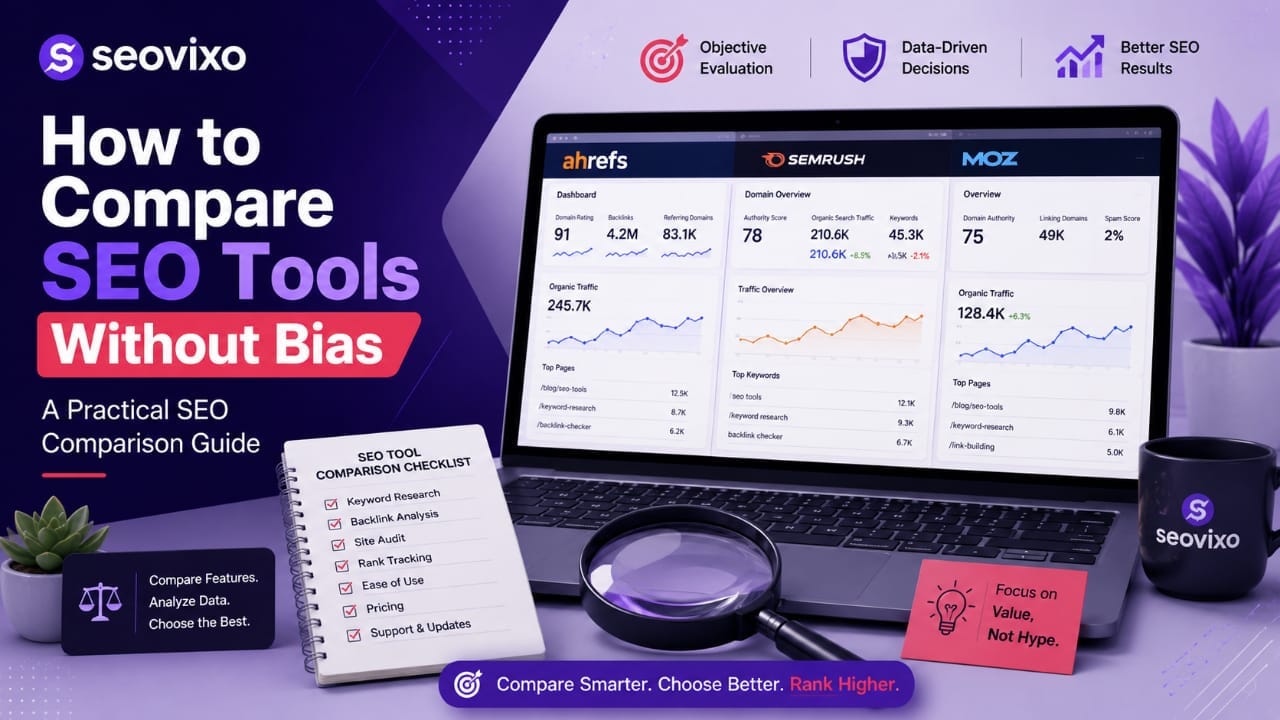
This guide explains how to compare SEO tools objectively, avoid affiliate-driven recommendations, test the important features, and choose a platform based on evidence rather than marketing claims.
To compare SEO tools without bias, define your requirements first, test the same tasks on every platform, compare data quality rather than feature counts, calculate the real cost, and separate personal preference from measurable performance. A tool should win because it fits your needs—not because it has the longest feature list or highest affiliate commission.
Why SEO Tool Comparisons Are Often Biased
SEO software is a competitive industry. Platforms spend significant amounts of money on marketing, advertising, affiliate programs, partnerships, and promotional campaigns.
This creates a problem for people searching for independent reviews.
Many comparison articles are written around statements such as "Tool A is the best" or "Tool B is better for SEO," without explaining how those conclusions were reached.
Some reviews also give disproportionate attention to the product that provides a higher affiliate commission.
That doesn't automatically mean the recommendation is wrong, but it means you should examine how the recommendation was produced.
A trustworthy comparison should explain:
- What was tested.
- How the tools were tested.
- Which features were compared.
- What type of website was used.
- How pricing was calculated.
- What limitations were discovered.
- Who should and shouldn't use each tool.
Transparency is much more valuable than simply declaring a winner.
What Does an Unbiased SEO Tool Comparison Mean?
An unbiased comparison doesn't mean pretending every tool is equally good.
It means evaluating each platform using the same criteria and allowing the evidence to determine the result.
For example, if you're comparing three SEO platforms for keyword research, don't test one platform using five difficult keywords and another using a single easy keyword.
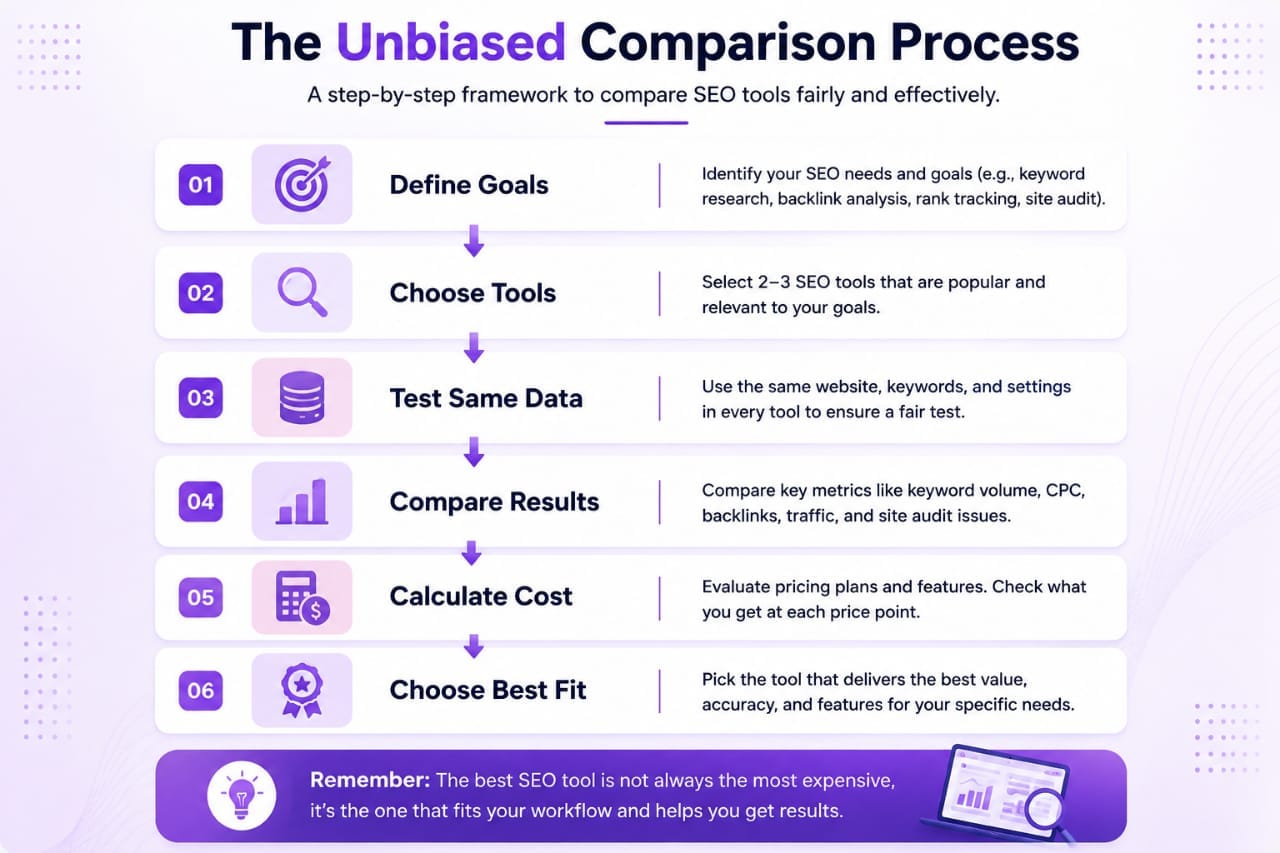
Use the same keywords and evaluate the results using the same criteria.
A fair comparison might examine:
- Keyword data.
- Search volume estimates.
- Keyword difficulty.
- SERP analysis.
- Backlink data.
- Site auditing.
- Rank tracking.
- Competitor research.
- Ease of use.
- Pricing.
This makes the comparison reproducible rather than based entirely on personal opinion.
Don’t Start With the Tool—Start With Your Requirements
This is one of the most important rules when comparing SEO software.
Before opening a dozen comparison articles, determine what you actually need.
A beginner running a small blog may need:
- Keyword research.
- Basic rank tracking.
- Technical SEO monitoring.
- Simple competitor analysis.
A large agency may need:
- Thousands of tracked keywords.
- Multiple projects.
- Client reporting.
- Large-scale site crawling.
- Advanced backlink analysis.
- API access.
These users shouldn't necessarily choose the same platform.
The best SEO tool is the one that solves your actual problems.
Features vs Useful Features
SEO platforms often advertise dozens or even hundreds of features. More features sound better, but feature count can be misleading.
Imagine Tool A has 100 features and Tool B has 40.
If you regularly use only five of Tool A's features while Tool B's 10 most important features work better for your workflow, Tool B may provide considerably more value.
When comparing features, ask:
- Will I actually use this feature?
- Does it solve a problem I currently have?
- Is the data actionable?
- Is the feature easy to understand?
- Does it save me time?
This prevents you from paying for impressive features that rarely affect your SEO strategy.
How to Compare SEO Tool Pricing Fairly
Pricing is another area where comparisons can become misleading.
Don't simply compare the advertised monthly subscription.
Look at what you're actually receiving for that price.
| Pricing Factor | What to Check |
|---|---|
| Monthly Price | Actual recurring cost |
| Annual Discount | Whether yearly billing changes the effective cost |
| Keyword Limits | Number of keywords you can research or track |
| Projects | Number of websites supported |
| Crawl Limits | Pages you can audit |
| Additional Costs | Extra reports, users, credits, or add-ons |
A cheaper subscription isn't necessarily better value if important features are heavily restricted.
Data Accuracy Is More Important Than Database Size
SEO companies often advertise enormous databases containing billions of keywords, backlinks, or web pages.
Large numbers sound impressive, but database size alone doesn't tell you how useful the information is.
For example, keyword search volumes are estimates rather than guaranteed traffic numbers. Different platforms may provide different estimates because they use different data sources and calculation methods.
The same applies to backlink databases.
One tool might discover a backlink that another hasn't indexed yet. That doesn't automatically mean the second tool is inaccurate.
When comparing data, look for consistency and usefulness rather than expecting every platform to report identical numbers.
Test the Same Website in Every Tool
If you're seriously comparing SEO platforms, use the same website whenever possible.
This gives you a consistent testing environment.
For example, you could compare:
- The same website audit.
- The same five competitors.
- The same target keywords.
- The same backlink profile.
- The same pages for content analysis.
Record the results in a spreadsheet rather than relying on memory.
This simple process can reveal significant differences between platforms that aren't obvious from their marketing pages.
My Experience
When comparing SEO tools, I've found that the platform with the most impressive dashboard isn't necessarily the one I find most useful. A tool can provide hundreds of reports, but if finding a simple keyword opportunity takes too many clicks, it becomes difficult to use consistently. I now focus much more on actionable data, workflow efficiency, and limitations than on the number of features listed on a pricing page.
How to Compare Keyword Research Tools
Keyword research is one of the most important features in an SEO platform, but it's also one of the easiest areas to compare incorrectly.
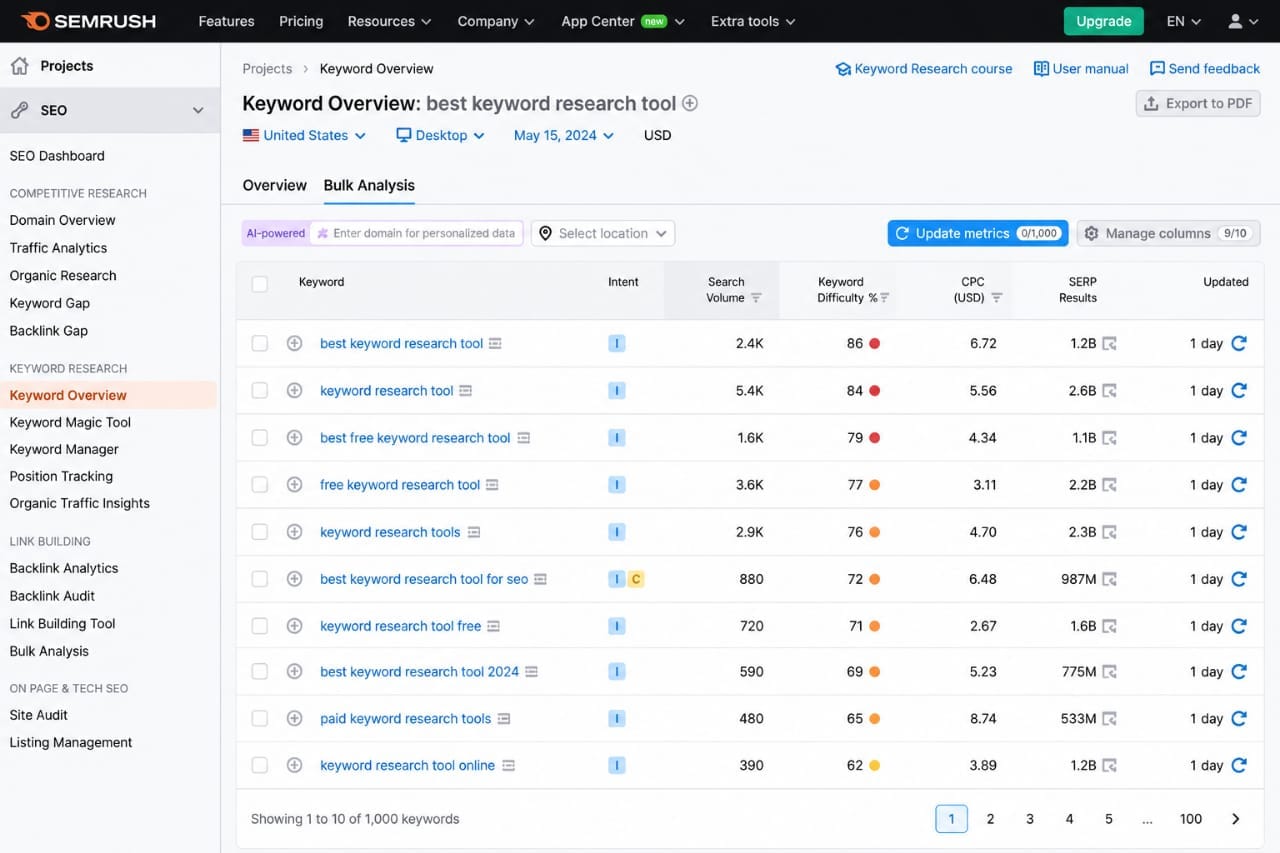
Don't simply enter one keyword into every tool and choose the platform showing the lowest difficulty score. A fair test should use several keywords representing different search intents and competition levels.
For example, test:
- A broad keyword.
- A long-tail keyword.
- A commercial keyword.
- An informational keyword.
- A keyword from your own website.
Then compare search volume, keyword difficulty, related terms, search intent, SERP information, and the quality of keyword suggestions.
The goal isn't to find identical numbers. The goal is to determine which tool provides the most useful information for making better keyword decisions.
Compare Keyword Difficulty Carefully
Keyword difficulty scores are particularly easy to misunderstand.
Different SEO platforms calculate difficulty using different methodologies. One tool may primarily consider backlinks, while another may incorporate additional SERP or authority signals.
Therefore, a keyword difficulty score of 25 in one platform isn't necessarily equivalent to 25 in another.
Instead of comparing the numbers directly, inspect the actual search results.
Look at:
- Domain authority of ranking pages.
- Number and quality of backlinks.
- Content quality.
- Search intent.
- Page relevance.
- Presence of weak or outdated results.
This gives you a much more realistic understanding of ranking difficulty.
How to Compare Backlink Databases
Backlink analysis is another area where SEO tools can produce very different results.
No backlink database contains every link on the web. Search engines and SEO platforms discover links using different crawling systems and update their databases at different speeds.
When comparing backlink tools, don't ask, "Which tool found the most links?"
Instead ask:
- Does it discover important referring domains?
- How quickly does it detect new links?
- Can I identify valuable links easily?
- Does it distinguish useful links from low-value ones?
- Can I analyze competitors effectively?
A smaller database with highly actionable information can be more useful than a larger database filled with data you don't need.
Comparing Site Audit Features
A good site audit should do more than produce a long list of warnings.
Some SEO tools can generate hundreds of technical issues, but that doesn't necessarily mean they provide a better audit.
A useful site audit should help you understand:
- Which problems are important?
- Which issues should be fixed first?
- Which pages are affected?
- Why is the problem occurring?
- How can it be fixed?
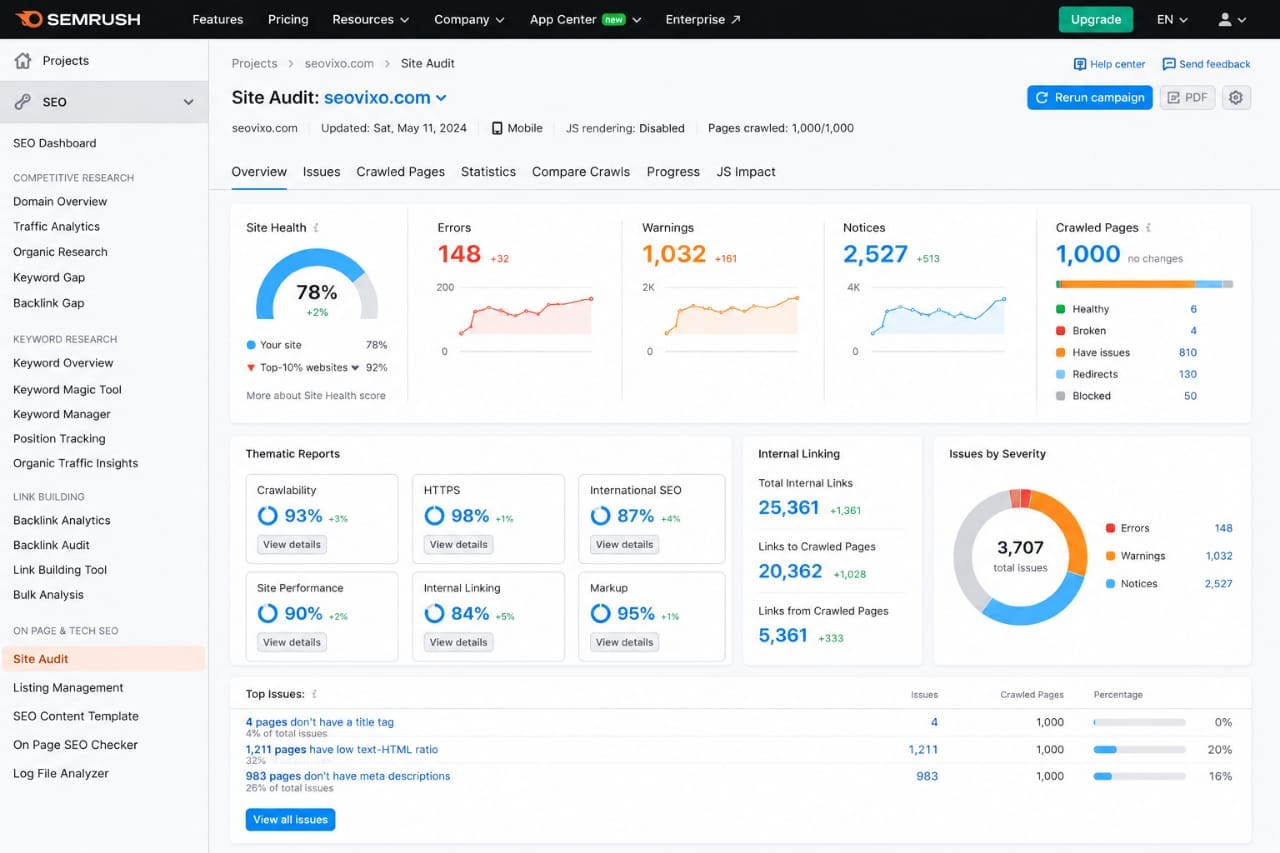
When testing site audit tools, run the same website through each platform and compare the findings.
Pay particular attention to whether the tool identifies genuine problems rather than simply generating a large number of warnings.
Don’t Treat Every SEO Warning as a Ranking Problem
This is an important point when comparing SEO software.
An audit tool might report hundreds of issues, but not every warning represents a serious SEO problem.
For example, a tool may flag:
- Missing image attributes.
- Long URLs.
- Minor HTML issues.
- Missing metadata.
- Redirect chains.
Some issues deserve immediate attention, while others may have little practical impact on organic performance.
A good SEO tool helps you prioritize problems instead of simply creating a larger to-do list.
How to Compare Rank Tracking
Rank tracking sounds simple, but different platforms can report different positions because rankings vary by location, device, search engine, personalization, and search features.
When comparing rank trackers, use the same:
- Keywords.
- Country.
- Search engine.
- Device.
- Tracking frequency.
Then compare how the platforms handle:
- Historical rankings.
- SERP features.
- Local rankings.
- Competitor rankings.
- Ranking changes.
- Keyword grouping.
For a blogger, a simple and reliable rank tracker may be more useful than an enterprise system with hundreds of advanced reporting options.
Compare Competitor Analysis Features
Competitor analysis is one of the most useful ways to discover new SEO opportunities.
A good platform should help you identify:
- Keywords competitors rank for.
- Pages generating organic traffic.
- Content gaps.
- Backlink opportunities.
- Competing domains.
- Keyword overlaps.
When testing this feature, choose two or three websites that genuinely compete with yours.
Don't select huge websites simply because they have millions of pages. A smaller competitor with a similar audience can provide much more actionable information.
User Experience Is Part of the Comparison
SEO software can contain excellent data and still be frustrating to use.
If you have to navigate through multiple menus just to find a basic report, you may not use the platform regularly.
Evaluate:
- Dashboard simplicity.
- Report organization.
- Loading speed.
- Export options.
- Filters.
- Notifications.
- Ease of finding important information.
Usability directly affects value. A powerful tool that you rarely use can be less valuable than a simpler tool that becomes part of your weekly workflow.
Test Free Trials Before Paying
If an SEO platform offers a free trial or limited free version, use it before committing to a subscription.
Don't spend the entire trial exploring random features. Create a testing checklist first.
For example:
- Research five keywords.
- Audit one website.
- Analyze three competitors.
- Check several backlinks.
- Set up a few tracked keywords.
- Export one report.
After completing the same tasks on different platforms, you'll have a much better idea of which tool actually fits your workflow.
Create a Standard Testing Method
The best way to remove personal bias is to create a repeatable testing process.
- Choose the same website.
- Select the same keywords.
- Use the same competitors.
- Run the same SEO audit.
- Compare the same backlink data.
- Test the same rank-tracking requirements.
- Record pricing and limits.
- Score each category separately.
This prevents one impressive feature from influencing your entire opinion of a platform.
SEO Tool Comparison Scorecard
| Category | Suggested Weight | What to Measure |
|---|---|---|
| Keyword Research | 25% | Data quality and usefulness |
| Site Audit | 20% | Accuracy and prioritization |
| Backlinks | 15% | Discovery and analysis |
| Rank Tracking | 15% | Accuracy and reporting |
| Competitor Research | 10% | Actionable insights |
| Usability | 10% | Workflow efficiency |
| Price & Limits | 5% | Value for your budget |
The exact weights should change depending on your goals. For example, a link-building agency might give backlink analysis a much higher weight than a beginner blogger would.
A Practical Lesson
I've found that comparisons become much clearer when you stop asking which platform has the most data and start asking which platform helps you make the best decisions. Actionable data beats impressive numbers. If a report identifies a real opportunity and tells you what to do next, it has much more value than a dashboard filled with statistics that don't change your SEO strategy.
How to Build a Fair SEO Tool Scorecard
Once you've tested the major features, the next step is turning your observations into a structured score. This prevents one impressive feature from dominating your final decision.
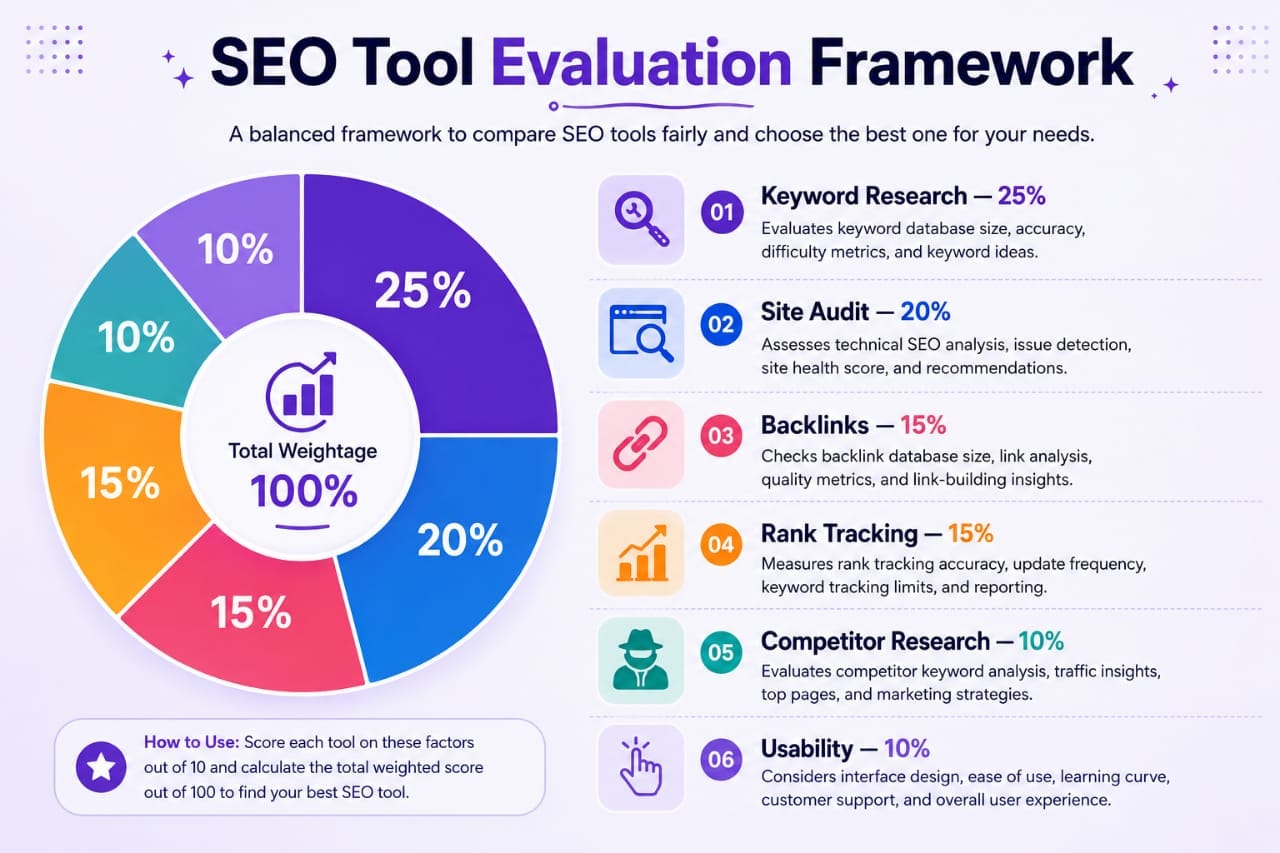
A simple scoring system can use a scale from 1 to 10 for each category.
| Category | Score | What to Consider |
|---|---|---|
| Keyword Research | 1–10 | Useful data, suggestions, SERP analysis |
| Backlink Analysis | 1–10 | Referring domains, link discovery, competitor research |
| Site Audit | 1–10 | Accuracy, prioritization, recommendations |
| Rank Tracking | 1–10 | Tracking accuracy, history, reporting |
| Usability | 1–10 | Navigation and workflow |
| Value | 1–10 | Features relative to actual cost |
Don't give a tool a high score simply because it has more features. Score each category according to how well the platform performs the task you actually need.
How to Compare Free vs Paid SEO Tools
Free and paid SEO tools shouldn't always be compared as if they're identical products.
Free tools often provide excellent information for beginners, but they may have limitations on search volume, daily queries, historical data, exports, projects, or advanced reports.
Paid platforms generally provide broader datasets and automation, but the subscription only makes sense if those additional capabilities actually save you time or improve your decisions.
Before upgrading, ask yourself:
- What limitation am I currently experiencing?
- Will the paid feature solve that problem?
- How frequently will I use it?
- Could another free tool provide the same information?
- Will the additional SEO insights justify the monthly cost?
Don't pay for an SEO tool simply because professional bloggers use it. Your requirements may be completely different.
Consider the Total Cost, Not Just the Subscription
The advertised subscription price isn't always the complete cost of an SEO platform.
Some tools limit usage through credits, keyword tracking limits, crawl quotas, additional users, or report allowances.
For agencies, there may also be costs associated with additional seats or client projects.
A fair comparison should therefore calculate the amount you'll realistically spend based on your actual usage.
For example, a tool costing $50 per month may provide better value than a $30 tool if the cheaper platform requires expensive add-ons to perform the same tasks.
Don’t Let Affiliate Commissions Influence Your Verdict
If you're publishing an SEO tool comparison as an affiliate, transparency becomes especially important.
Affiliate marketing itself isn't a problem. The problem occurs when commissions influence the conclusion instead of the evidence.
A professional comparison should clearly explain:
- Whether affiliate links are used.
- How products were evaluated.
- What limitations were discovered.
- Which users should choose each product.
- Which users may be better served by an alternative.
If one tool pays a higher commission but performs worse for your testing criteria, your article should say so.
Trust is more valuable than a single affiliate sale.
Common Mistakes When Comparing SEO Tools
1. Choosing the Tool With the Most Features
More features don't automatically mean better value. A smaller platform can be a better fit if it performs your most important tasks efficiently.
2. Comparing Only Prices
The cheapest tool isn't necessarily the most economical. Consider data quality, limits, usability, and how much time the platform saves you.
3. Trusting Marketing Claims Without Testing
Every company naturally presents its product in the best possible light. Independent testing provides a more useful perspective.
4. Treating SEO Metrics as Exact Facts
Metrics such as search volume, keyword difficulty, traffic estimates, and domain authority are useful indicators, but they aren't guaranteed measurements of future performance.
5. Ignoring Your Own Website
A tool that works perfectly for an enterprise website may be unnecessary for a small blog. Always test tools using your own SEO requirements.
A Simple SEO Tool Comparison Checklist
Before choosing an SEO platform, run through this checklist:
- ☐ Define your primary SEO goals.
- ☐ Identify the features you actually need.
- ☐ Test the same keywords in each platform.
- ☐ Compare the same competitors.
- ☐ Run the same website audit.
- ☐ Check backlink discovery.
- ☐ Test rank tracking.
- ☐ Evaluate usability.
- ☐ Review usage limits.
- ☐ Calculate the real monthly cost.
- ☐ Check whether a free alternative is sufficient.
- ☐ Record both strengths and weaknesses.
This approach turns an opinion-based comparison into a repeatable evaluation process.
My Final Recommendation
After comparing SEO tools, I wouldn't recommend choosing a platform simply because it has the biggest database, the most impressive dashboard, or the highest rating on a comparison website.
Instead, identify the tasks that matter most to your SEO strategy and test each platform against those requirements. The tool that produces the most actionable insights for your workflow is usually the best tool for you.
For a small blogger, simplicity and affordability may matter most. An agency may prioritize reporting and large-scale data, while an advanced SEO professional may care more about APIs, crawling, backlink intelligence, and granular datasets.
Final Verdict
Comparing SEO tools without bias doesn't mean finding a tool that wins every category. It means understanding what each platform does well, where it has limitations, and whether those strengths actually matter to you.
The most reliable comparison process is simple: define your goals, use the same test cases, measure the same features, calculate the real cost, and document both advantages and disadvantages.
Don't let marketing claims, affiliate commissions, database size, or impressive feature lists make the decision for you.
SEO tools are there to support your strategy—not replace it. The quality of your keyword selection, content, technical SEO, internal linking, user experience, and overall strategy will still determine much of your success.
Choose the platform that helps you make better decisions consistently. That's a much more useful definition of the "best" SEO tool.
Frequently Asked Questions
What is the best way to compare SEO tools?
Define your SEO requirements first, then test the same keywords, competitors, website audits, backlinks, and rank-tracking requirements across each platform. Compare results, usability, limits, and total cost.
Are SEO tool metrics always accurate?
No. Metrics such as search volume, keyword difficulty, estimated traffic, and backlink counts are estimates based on each platform's own data sources and methodologies. They should be used as decision-making signals rather than absolute facts.
Should I choose the SEO tool with the biggest keyword database?
Not necessarily. Database size can be useful, but the relevance, freshness, usability, and accuracy of the data are more important than the headline number.
Are free SEO tools good enough for bloggers?
They can be. Beginners and small websites can accomplish many SEO tasks using free tools. A paid platform becomes more valuable when you need larger datasets, automation, historical information, advanced competitor research, or extensive tracking.
How can I avoid bias when writing an SEO tool review?
Use consistent testing criteria, disclose affiliate relationships, report weaknesses as well as strengths, avoid unsupported claims, and explain exactly how you reached your conclusion.
Should an SEO tool comparison have one overall winner?
Not always. Different tools can be best for different users. A more useful comparison explains which platform is best for beginners, agencies, technical SEO professionals, content creators, or specific SEO tasks.