Astra Theme Settings Every Beginner Should Change
Astra is one of the most flexible WordPress themes for beginners, but installing it and leaving every setting untouched is not always the best approach.The default configuration is designed to work across many types of websites. A blog, business website, portfolio, WooCommerce store, and magazine can all start with Astra, so the defaults cannot be perfectly optimized for every situation.
The good news is that you do not need to change everything.For a content-focused website, a few thoughtful adjustments to the container, typography, header, colors, blog layout, mobile navigation, footer, and performance settings can make the website easier to use and maintain.
More importantly, you should understand what each setting actually changes before modifying it.Astra is the foundation of your WordPress website, not your entire SEO strategy. Your content, hosting, internal linking, technical SEO, images, plugins, and overall user experience still matter.
Why Astra Settings Matter
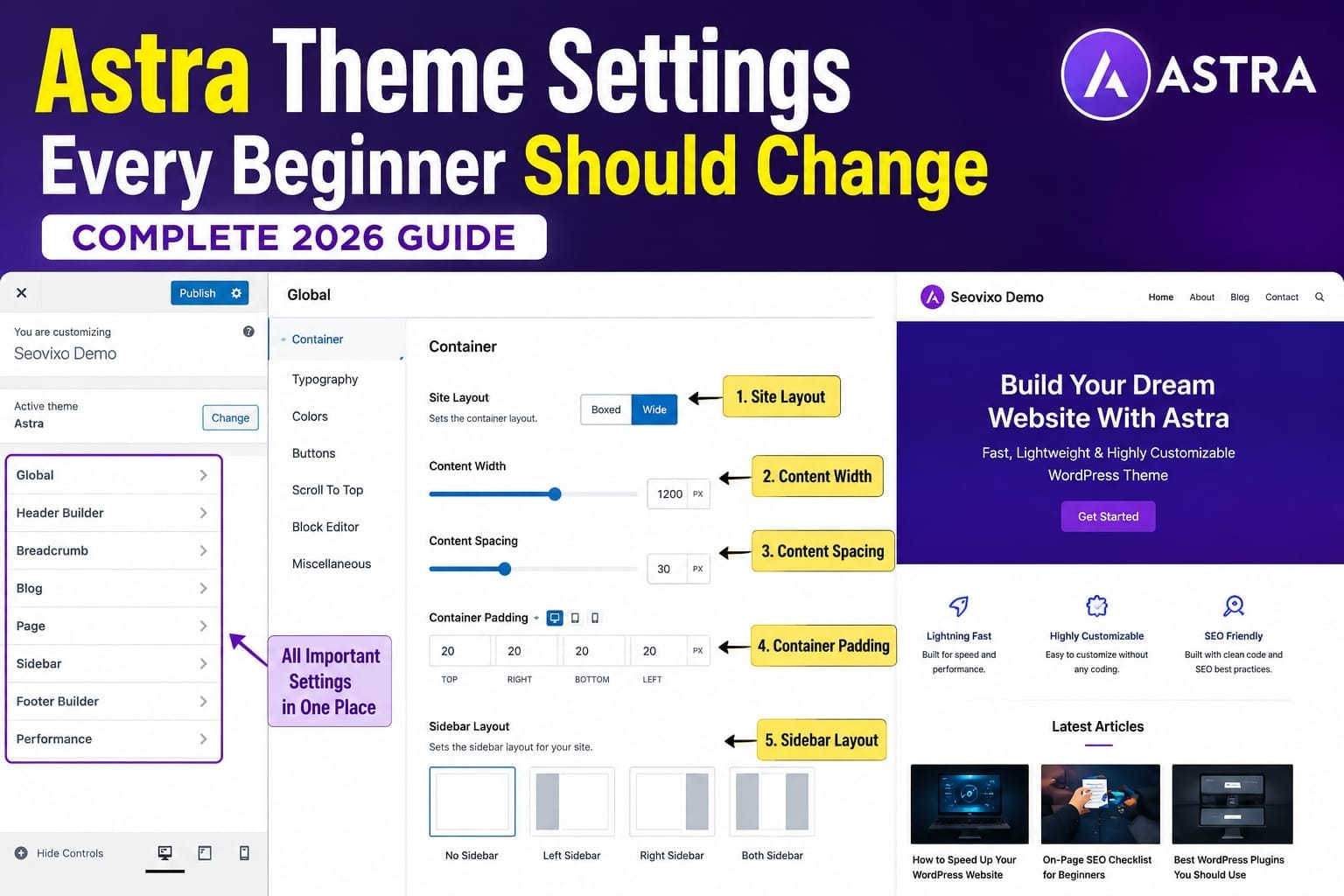
A WordPress theme controls much more than the visual appearance of your website.Astra influences the structure of your pages, the way your header and footer are presented, typography, layout widths, blog archives, sidebars, colors, buttons, and several other parts of the site's presentation.Astra's current Customizer provides centralized controls for areas such as typography, colors, containers, and buttons, making it possible to create a consistent design across the website.That consistency is important.Imagine visiting one page where the body text is small, another page with oversized headings, and another with completely different colors.
Even if the content is excellent, the website can feel unfinished.A consistent design makes your site easier to recognize and easier to navigate.
Start With the Site Container
The container controls how much horizontal space your website content occupies.A container that is extremely wide can make long paragraphs uncomfortable to read on large screens. A container that is too narrow can make the page feel unnecessarily cramped.For a blog, you generally want a comfortable reading width with enough empty space around the content.
The exact width depends on your design, font, sidebar arrangement, and screen size, so there is no universal number that every Astra website should use.The important principle is simple:Make long-form content comfortable to read.If your articles contain large paragraphs stretching almost across the entire screen, consider narrowing the content area.This becomes particularly important for SEO-focused websites because long-form articles can contain thousands of words.A comfortable content width makes those articles feel less overwhelming.
Don't Make Every Page Full Width
Full-width layouts can look excellent for landing pages, hero sections, and visual designs.They are not automatically better for articles.A long blog post usually benefits from a more controlled reading width.This is particularly important if you use Elementor. Astra and Elementor can work together, but Elementor settings can override some theme-level styling. Astra's documentation specifically notes that Elementor settings can take precedence over Customizer settings for elements created in Elementor.
Configure Typography Before Decorating the Site
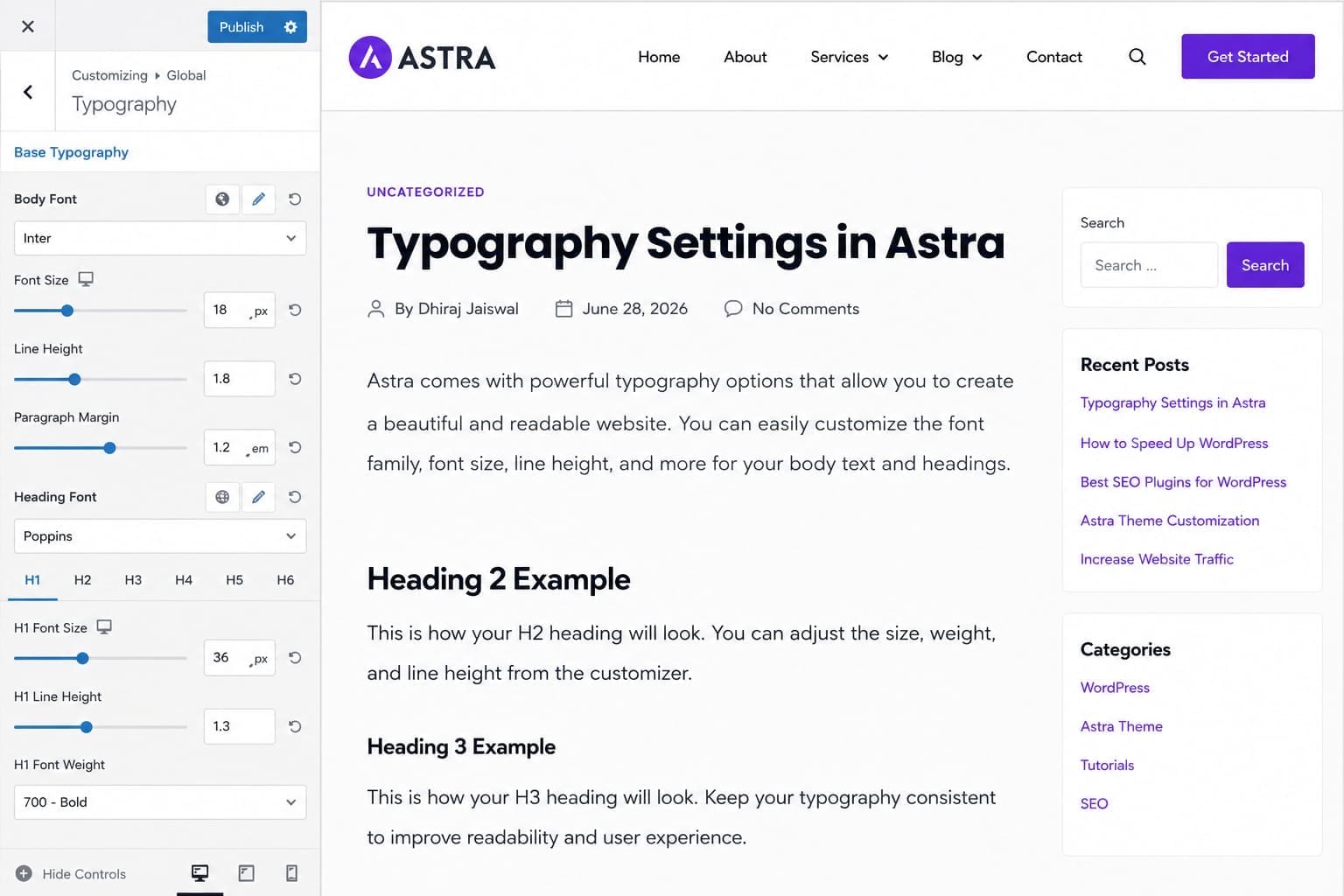
Typography is one of the most important design decisions you can make.Beginners often spend considerable time choosing colors and animations while overlooking font size, line height, heading hierarchy, and readability.Astra allows global typography controls for body text and headings.For a content website, prioritize readability.Your body text should be large enough to read comfortably on desktop and mobile devices.
Line height should provide enough breathing room without making paragraphs feel disconnected.Headings should create a clear hierarchy.The reader should immediately understand which text is the article title, which text introduces a major section, and which text introduces a subsection.
Keep the Font System Simple
You do not need several different fonts to make a website look professional.In fact, using too many font families can make the design feel inconsistent and may introduce unnecessary loading requirements.Choose a primary body font and a consistent heading style.If you use Elementor, be careful about setting different fonts there while also defining global typography in Astra.Otherwise, you may find that some pages use one font while other areas use another.Create a Consistent Color System
Astra allows you to establish global colors instead of manually choosing colors for every individual element.This is one of the easiest ways to make a beginner website look more professional.You can define a primary brand color, accent color, heading color, body text color, and supporting colors.The exact palette depends on your branding.For a content website, however, avoid using too many strong colors.Your primary text should remain highly readable. Accent colors should draw attention to important actions rather than compete with the content.Astra's current global design system includes controls for colors alongside typography, container, and buttons.
Use Accent Colors Strategically
An accent color can be useful for buttons, important links, callouts, and selected interface elements.It should not appear everywhere.If every heading, paragraph, button, icon, and border uses a different bright color, nothing looks important anymore.Consistency is more valuable than decoration.Simplify the Header
Your header is one of the first things visitors see.For a blogging or SEO website, you usually do not need a complicated header containing every possible element.A simple structure can include your logo, primary navigation, and optionally a search feature or important call-to-action.Astra's Header Builder lets you arrange header elements, while responsive controls allow you to create different arrangements for smaller screens.Keep your most important navigation easy to find.If visitors need to search through several menus before finding your main categories, the header is doing too much.
Keep Mobile Navigation Simple
Desktop navigation does not always translate perfectly to mobile.Check the mobile header manually.Look at the logo size, menu button, spacing, menu items, submenu behavior, and whether the header takes up too much vertical space.A mobile visitor should be able to open the menu and immediately understand where the important sections of your website are.
Optimize Your Blog Post Layout
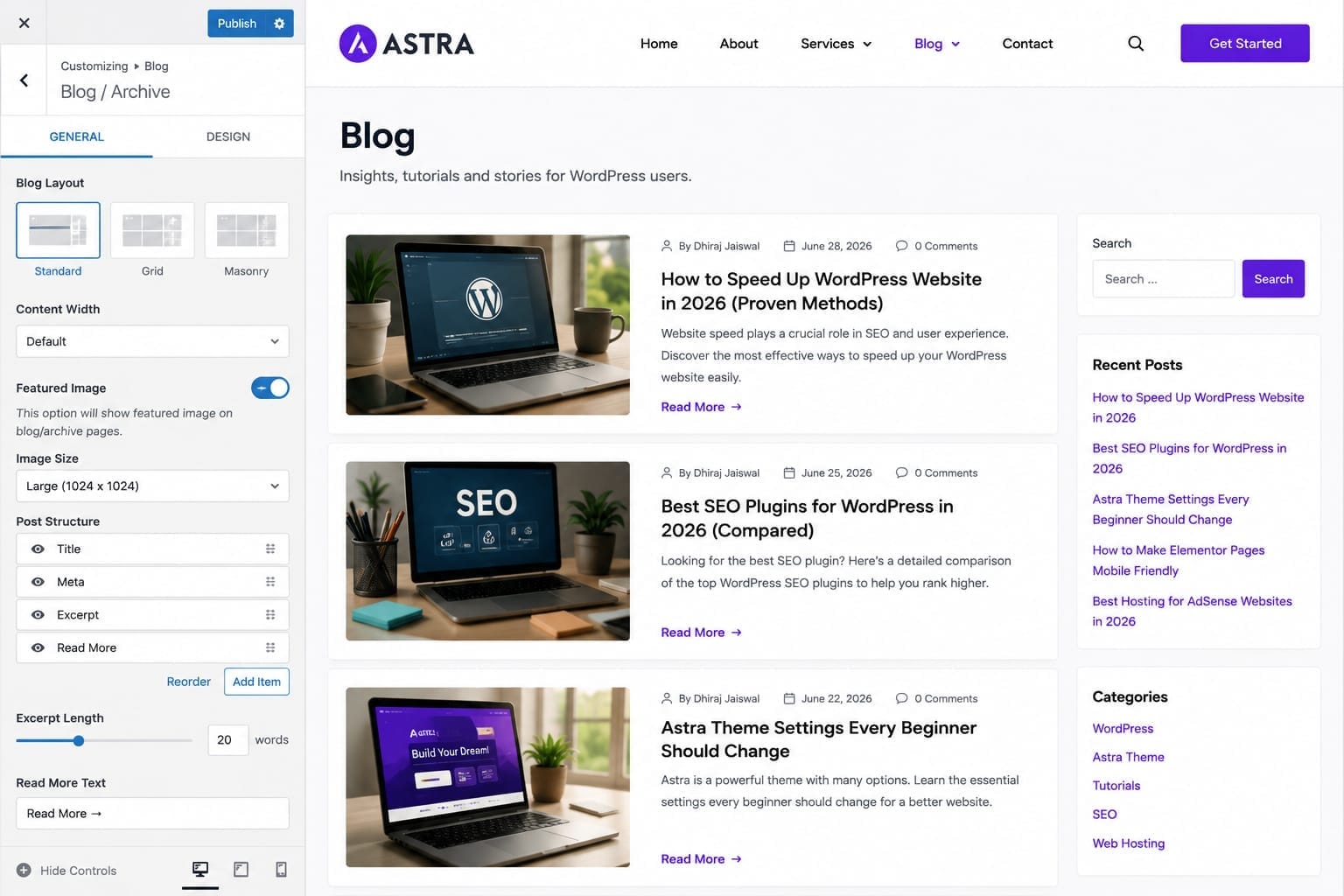
Astra gives you control over how blog posts and archives are displayed.Review which elements appear around your content.Depending on your website, these may include the featured image, author information, publication date, categories, excerpts, and other metadata.Do not display information simply because the theme provides an option for it.
Ask whether the information helps the reader.For an SEO-focused website, unnecessary visual clutter can distract visitors from the actual article.A clean article page usually needs a clear title, useful metadata, readable content, relevant images, internal links, and navigation to related resources.
Decide Whether You Actually Need a Sidebar
Sidebars can be useful, but they are not mandatory.A content-heavy website may benefit from a focused article layout without a sidebar.A sidebar can be useful when it contains genuinely helpful elements such as related resources, a newsletter signup, categories, or a carefully selected call-to-action.The problem begins when the sidebar becomes a collection of unrelated widgets.
You might have recent posts, categories, advertisements, social icons, tag clouds, search, archives, and several other elements competing for attention.That can make the page feel cluttered.For long-form articles, a cleaner layout is often easier to read.
Customize the Footer Carefully
The footer is easy to ignore because visitors see it at the end of the page.It is still an important navigation area.Your footer can contain links to important pages such as About, Contact, Privacy Policy, Terms, Disclaimer, Cookie Policy, and Affiliate Disclosure.You can also include carefully selected resource links, newsletter information, social profiles, or important categories.Astra provides a Footer Builder, and it can work alongside Elementor content.The important point is to avoid turning the footer into a huge directory.Keep it organized.
Review Astra's Performance Settings
Astra is designed with performance in mind, but the theme is only one part of your website's loading performance.Your images, plugins, fonts, JavaScript, hosting, caching, CDN, and page-builder content can all influence performance.Astra also provides performance-related options, including local Google Fonts support and file-generation features. Astra's current documentation recommends reviewing these options alongside Elementor's own performance settings.
Do not enable random performance options simply because they sound faster.Understand what each option does and test the website after changing it.
Be Careful With Fonts
Fonts can affect loading performance when they are loaded from external services or when a website loads multiple font families and weights.If you use Elementor and Astra together, make sure you are not unnecessarily loading the same fonts through multiple systems.Astra's documentation specifically discusses local Google Fonts and Elementor's font-loading behavior as part of performance optimization.
Configure Astra and Elementor Together
This is particularly important if you use Elementor.Astra controls the underlying theme structure while Elementor controls the content and page design.The two can work together effectively, but you need to understand which system controls which element.Astra's documentation explains that Elementor is compatible with Astra and that Astra can handle theme-level elements such as the header and footer while Elementor handles page content.This is especially useful if you use Elementor Free because you can use Astra's Header and Footer Builder without needing Elementor Pro's Theme Builder.
Avoid Fighting the Theme With Elementor
If you have already established global typography and colors in Astra, do not manually override everything inside Elementor.Doing so can create inconsistencies.Use Astra for global design decisions and Elementor for page-specific design where appropriate.This makes the site easier to maintain.
Check Mobile Settings Before Publishing
Never assume that a desktop design automatically works on mobile.Open your website on a phone and check the header, navigation, article width, images, buttons, tables, forms, and footer.Pay particular attention to horizontal overflow.A table that looks perfect on desktop can become unusable on a narrow screen.Likewise, a large heading can wrap awkwardly and create excessive vertical space.Astra provides responsive controls for many design elements, so use the available device-specific settings where necessary.
Don't Ignore Accessibility
Accessibility is not just a technical requirement for a small group of visitors.Clear typography, readable contrast, understandable navigation, visible buttons, descriptive links, and keyboard-friendly controls can improve the experience for everyone.Avoid extremely light body text.Avoid placing important text over backgrounds with poor contrast.Make interactive elements visually recognizable.Your website should remain understandable even when someone is navigating quickly through the page.
Review WooCommerce Settings Only If You Need Them
If your website is a blog, you do not need to spend time configuring every WooCommerce option.If you operate an online store, however, Astra provides WooCommerce-related customization options for areas such as product pages and shop layouts. Some advanced WooCommerce typography options are available through Astra Pro.Focus on the parts that affect your customers.Product images, product information, buttons, cart, checkout, and mobile usability deserve more attention than decorative settings.
Astra Free or Astra Pro?
This is one of the first questions beginners ask.For many blogs and small websites, Astra Free provides enough functionality to build a professional website.Astra Pro is primarily useful when you need additional customization and advanced features.The decision should therefore be based on your requirements rather than the assumption that Pro automatically makes a website faster or better.
Which Should a Beginner Choose?
If you are building a basic blog, informational website, portfolio, or small business website, start with the free version.Learn the theme first.Upgrade only when you encounter a feature limitation that genuinely affects your website.That approach prevents you from paying for functionality you may never use.
Astra Settings: Quick Comparison
Common Astra Mistakes Beginners Should Avoid
One of the biggest mistakes is changing too many settings at once.If you modify typography, container width, header, colors, footer, plugins, and Elementor settings simultaneously, it becomes difficult to identify what caused a problem.Make changes gradually.Another common mistake is installing plugins to solve problems that Astra can already handle
.Before adding another plugin, check whether the theme or WordPress already provides the functionality you need.You should also avoid loading unnecessary fonts, animations, sliders, and large images.A lightweight theme can still become part of a slow website if it is surrounded by excessive plugins and heavy page-builder elements.
Final Verdict
Astra does not need to be complicated.The best setup for most beginners is not the one with the most customization. It is the one that makes the website easy to read, easy to navigate, consistent across devices, and simple to maintain.
Start with the container.Then establish a readable typography system and consistent colors. Simplify the header. Review the blog layout. Decide whether a sidebar genuinely helps. Build a useful footer. Test the mobile experience. Remove unnecessary plugins and heavy elements.
If you use Elementor, decide which settings should be controlled by Astra and which should be controlled by Elementor rather than overriding everything in both places.Most importantly, remember that Astra is only the foundation.A beautiful theme cannot compensate for poor content, weak search intent, slow hosting, bad navigation, or an ineffective SEO strategy.