SSD vs NVMe Hosting: What’s the Difference and Which Is Better?
When choosing web hosting, you will often see providers advertise plans with SSD storage or NVMe storage. At first, the difference can seem like a simple marketing term.It is not.Both technologies use flash storage, so both are considerably faster than traditional mechanical hard drives. However, the way they communicate with the server is different, and that difference can affect storage latency, input/output performance, database operations, and how a server handles many requests at the same time.There is also one important point that is often misunderstood:
NVMe is not a completely different category from SSD. NVMe drives are SSDs.The real comparison in most hosting plans is usually between a SATA SSD and an NVMe SSD.For a small website, the difference may not always be dramatic. Your hosting provider's CPU, RAM, network, caching, server configuration, PHP setup, database performance, and resource allocation can have just as much influence on real-world website speed.So should you choose NVMe hosting?In most cases, yes if the price difference is reasonable and the provider offers good overall server resources. But you should not choose a hosting plan based on the word NVMe alone.
What Is SSD Hosting?
SSD stands for Solid State Drive.Unlike a traditional hard disk drive, an SSD has no spinning platters or mechanical read/write heads. It stores information using flash memory.That makes SSD storage significantly faster and more responsive than older mechanical storage.When your website is hosted on an SSD server, files such as WordPress core files, themes, plugins, images, databases, and other application data can be accessed much faster than they would be from a traditional HDD.This can help reduce delays caused by storage operations.For a typical website, SSD hosting can already provide good performance. A simple blog with lightweight pages, reasonable traffic, caching, and a well-configured server may perform perfectly well on SATA SSD storage.The important question is what kind of SSD the hosting company means when it says “SSD.”In many hosting environments, traditional SSD hosting refers to SATA-based SSD storage.SATA SSDs are still much faster than HDDs, but the SATA interface creates a performance ceiling compared with modern PCIe-based NVMe storage.
What Is NVMe Hosting?
NVMe stands for Non-Volatile Memory Express.It is a storage protocol designed specifically for flash memory and modern solid-state storage.Instead of communicating through the older SATA interface and AHCI protocol, NVMe storage typically communicates through PCIe.That difference is important because PCIe provides a much faster communication path and NVMe was designed to handle the characteristics of modern flash storage more efficiently.
Modern NVMe drives can deliver sequential transfer rates in the thousands of megabytes per second, while SATA SSDs are generally constrained to around the SATA III interface's theoretical limit of about 600 MB/s. Actual hosting performance depends on the specific hardware and server configuration.But raw sequential speed is only part of the story.
NVMe is also designed for much greater parallelism. It supports many queues and commands, which is particularly relevant when a server needs to process numerous storage operations at the same time.That can be useful for dynamic websites that constantly read from and write to databases.
SSD vs NVMe: What Is the Actual Difference?
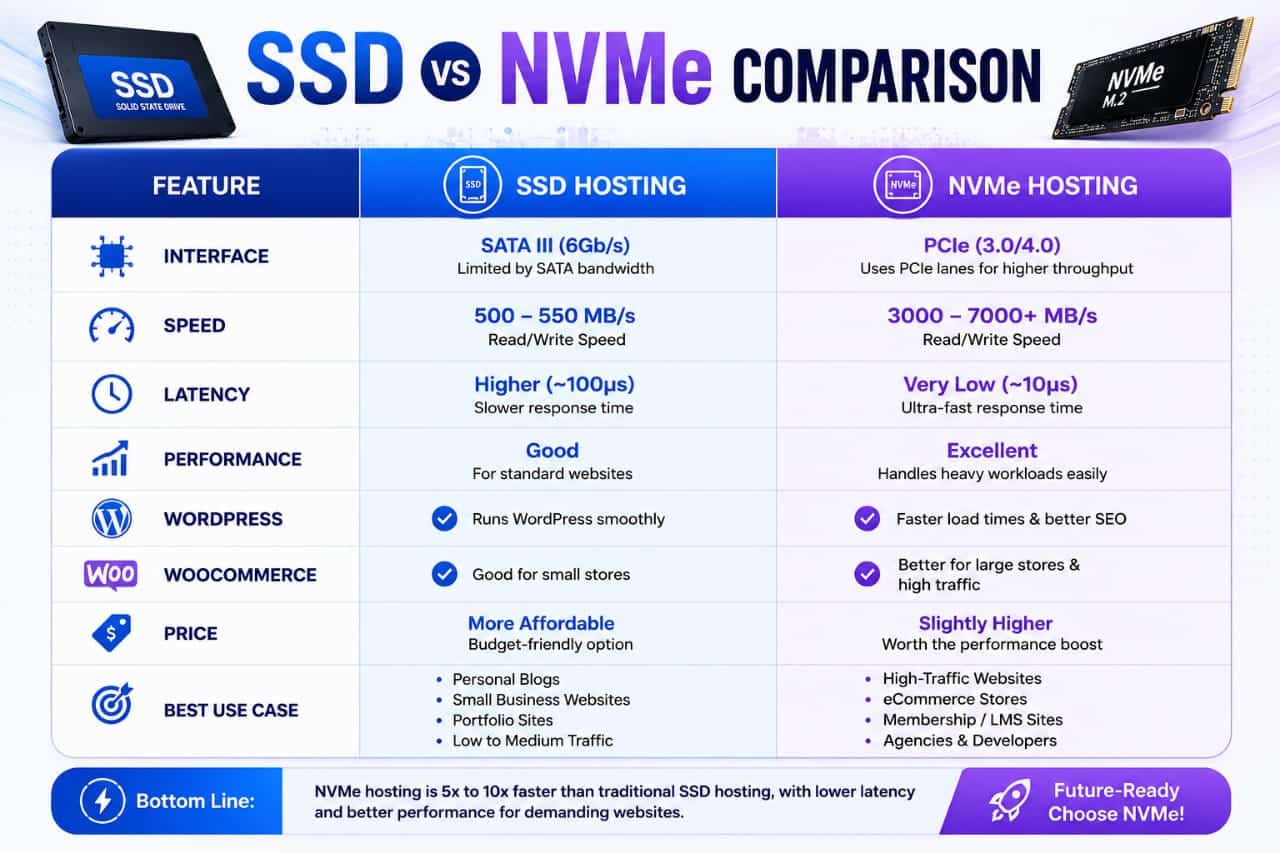
The easiest way to understand the difference is to think about the storage drive and the communication system separately.Both SATA SSDs and NVMe drives use flash memory.The major difference is how that storage communicates with the server.A SATA SSD uses the SATA interface and AHCI protocol. NVMe storage uses PCIe and the NVMe protocol.This gives NVMe a much more efficient path for modern high-performance storage workloads.
Here is the practical comparison:
Does NVMe Hosting Make Your Website Faster?
Yes, it can, but the amount you notice depends heavily on the type of website and the rest of the hosting environment.A website is not simply a collection of files being copied from a hard drive.When a visitor opens a dynamic WordPress page, the server may need to execute PHP, communicate with a database, access files, process plugins, generate the response, and send that response through the network.
Storage is only one part of this chain.NVMe can help when storage operations become a meaningful bottleneck, particularly with workloads involving frequent reads and writes.This is one reason NVMe can be especially useful for database-heavy websites, eCommerce stores, membership websites, forums, applications, and busy WordPress installations.
However, if your website is heavily cached and most visitors receive already-generated pages, the difference between good SATA SSD hosting and NVMe hosting may be much less noticeable.
What About WordPress Websites?
WordPress is one of the most common reasons people ask about SSD versus NVMe hosting.A WordPress website contains many small files and frequently interacts with a database.Plugins, themes, WordPress core operations, admin requests, scheduled tasks, database queries, and dynamic page generation can all create storage activity.NVMe can therefore be useful for WordPress, particularly as the site becomes more complex.
For example, an online store may have significantly more database activity than a simple personal blog. Product searches, customer accounts, carts, orders, inventory information, payment processing, and administrative operations can all generate additional server work.In that environment, faster storage and lower latency can be more valuable.But there is a catch.
A fast NVMe drive cannot compensate for a badly configured server.If a host has insufficient CPU resources, too little RAM, poor PHP configuration, overloaded servers, weak database performance, or aggressive resource limits, simply advertising NVMe storage does not solve those problems.
Does NVMe Improve TTFB?
NVMe can contribute to better server response performance, but it should not be treated as a direct guarantee of lower TTFB.TTFB, or Time to First Byte, represents the time involved before the browser receives the first byte of the server response.Many components can influence it.These include:- Server location- Network latency- CPU performance- Available RAM- PHP execution- Database response time- Caching- Web server configuration- CDN usage- Server load- Storage performanceNVMe can reduce storage-related waiting in workloads that depend heavily on disk I/O, but that does not mean switching from SATA SSD to NVMe automatically cuts TTFB by a fixed percentage.
That is an important distinction when evaluating hosting advertisements
When Should You Choose NVMe Hosting?
NVMe makes the most sense when you want a stronger overall hosting platform and the price difference is reasonable.It is particularly attractive for websites that have meaningful dynamic workloads.Consider NVMe if you operate:- A growing WordPress website- A WooCommerce store- A membership website- A forum or community- A database-heavy application- Multiple websites on one server- A website with increasing traffic-
Development or staging environments with frequent file operationsIf you are building a small personal blog with low traffic, good SATA SSD hosting can still be perfectly adequate.You should not upgrade purely because a hosting provider uses the word NVMe.
When Is SATA SSD Hosting Enough?
SATA SSD hosting can be a sensible choice when your website is relatively simple and the hosting plan provides good overall resources.For example, a small informational blog with caching and optimized images may not experience a dramatic real-world difference after moving from a decent SATA SSD server to NVMe.
The website might already be spending more time waiting for network communication, PHP execution, third-party scripts, or other components than it spends waiting for storage.In that situation, upgrading the storage technology alone may not produce the improvement you expect.This is why overall server quality matters more than a single specification.
NVMe Is Not a Substitute for Good Hosting
This is probably the most important lesson in this entire comparison.Imagine two hosting companies.The first has modern NVMe storage but places many accounts on an overloaded server, provides limited CPU resources, uses weak server configuration, and offers poor support.The second uses high-quality SATA SSD storage but provides generous resources, strong caching, optimized software, reliable infrastructure, and better resource isolation.The second provider could deliver a better experience.Storage is important.It is not everything.When comparing hosting providers, look at the complete environment rather than one specification on the pricing page.
What Else Should You Check Before Buying Hosting?
Before choosing a plan, investigate the resources and infrastructure behind the storage.Look at CPU allocation, RAM, PHP versions, caching technology, server locations, backups, uptime history, CDN options, support quality, migration assistance, and account limits.For WordPress specifically, check whether the host supports modern PHP versions and whether it provides useful caching or optimization tools.
Also examine the difference between promotional pricing and renewal pricing.A cheap introductory plan can become considerably more expensive after the first billing period.The cheapest NVMe plan is not necessarily the best-value plan.
Is NVMe Worth Paying More For?
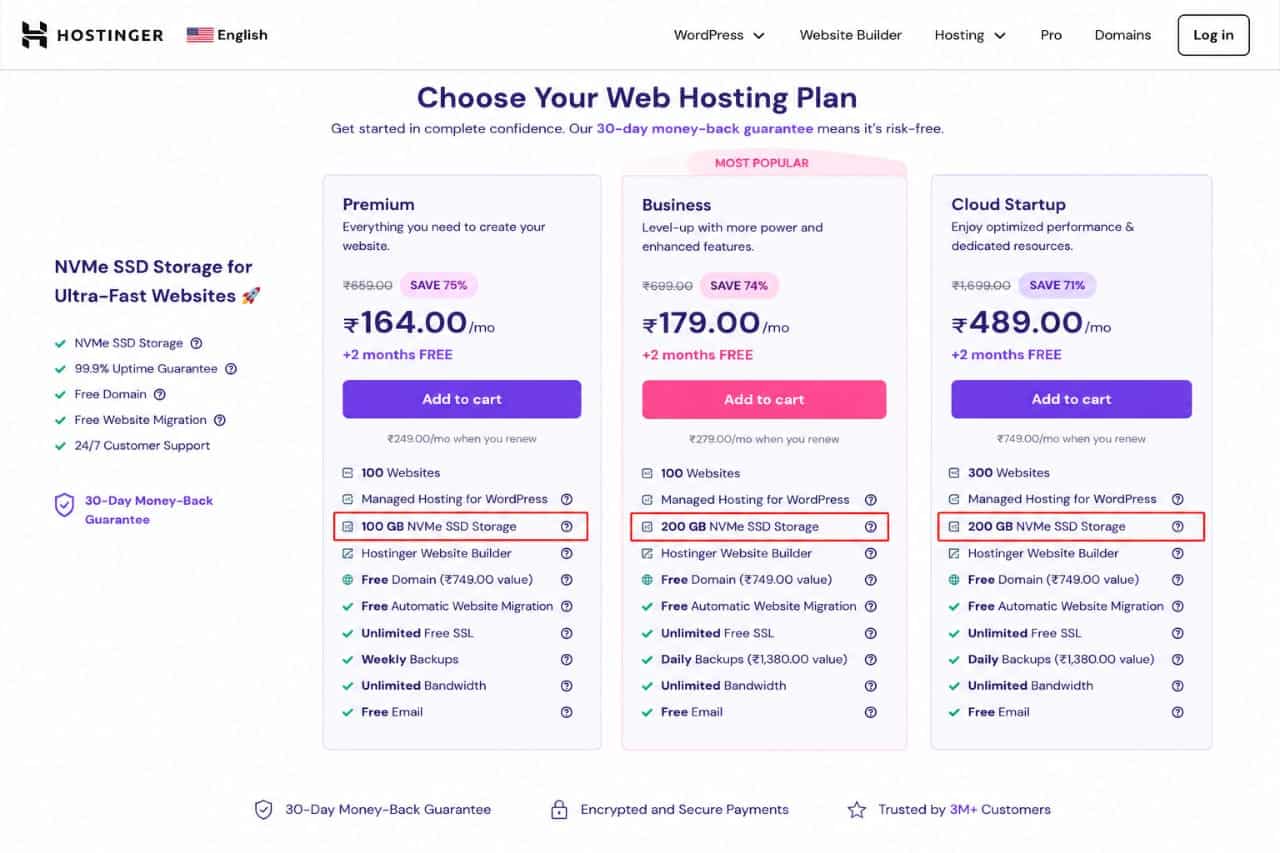
If the price difference is small, NVMe is usually the more attractive choice for a new website because it gives you access to newer storage technology and greater performance headroom.But if the difference is substantial, think about your actual workload.For a low-traffic blog, putting the extra money toward better CPU resources, stronger caching, backups, or a more reputable host may provide greater value.
For a busy database-driven website, NVMe can make more sense because the workload is more likely to benefit from lower storage latency and higher I/O capability.
The correct decision is therefore not simply:NVMe = good, SATA = bad.It is:Choose the hosting environment that provides the best balance of storage, CPU, memory, networking, reliability, support, and price for your website.
SSD vs NVMe: Which One Should You Choose?
For most new websites, I would choose NVMe if it is included at a reasonable price.The technology is newer, it offers considerably higher storage performance potential, and it provides more headroom for demanding workloads.But I would not move to an expensive hosting plan simply because it says NVMe.If your website is a small blog, a good SATA SSD plan can still be more than sufficient.
If your website is running WooCommerce, handling substantial database activity, hosting multiple sites, or experiencing storage-related bottlenecks, NVMe becomes much more compelling.The hosting provider itself may matter more than the storage label.
Final Verdict
SSD and NVMe hosting are not really two completely separate storage technologies.NVMe is a type of SSD.The more useful comparison is between traditional SATA SSD hosting and PCIe-based NVMe SSD hosting.SATA SSDs already provide a significant improvement over mechanical storage and can handle many ordinary websites very well.NVMe takes flash storage further by using PCIe and a protocol designed specifically for modern solid-state storage.
Its greater throughput, lower latency, and ability to handle highly parallel I/O can make it particularly valuable for dynamic and database-heavy workloads.But don't let a hosting company convince you that NVMe alone determines website speed.A fast storage device inside an overloaded server is still an overloaded server.When choosing hosting, consider the entire infrastructure.
For a new blog or small website, good SSD hosting can be enough.For a growing WordPress site, online store, application, or database-heavy project, NVMe hosting is generally the better long-term choice when the overall hosting environment is strong.The smartest purchase is not the plan with the biggest specification on the sales page.It is the plan that gives your website the right combination of performance, reliability, resources, support, and value.