How to Fix Duplicate Content Problems: A Step-by-Step Guide
Duplicate content occurs when identical or substantially similar content is available at multiple URLs. It can happen because of website settings, URL parameters, WordPress archives, or separate pages that cover nearly the same information.Seeing duplicate URLs in Google Search Console does not automatically mean your website has a Google penalty.
Google can often identify similar pages and choose one representative URL to show in search results. However, inconsistent URLs and canonical signals can make it harder to control which page you want users to find.
In this guide, you'll learn how to find duplicate content problems, choose the right fix, and verify the results on a WordPress website.
What Is Duplicate Content?
Duplicate content is content that appears at more than one URL, either on the same website or across different websites. The pages might be identical or sufficiently similar that search engines treat them as versions of the same content.
For example,
the same article might be accessible through both an HTTP address and an HTTPS address, or a page might load with several tracking parameters.
Duplicate content is not automatically a violation of Google's spam policies. The practical goal is to keep URLs consistent, prevent unnecessary variants, and help search engines identify the page you consider the primary version.
Common Causes of Duplicate Content
Duplicate URLs can arise from several situations:
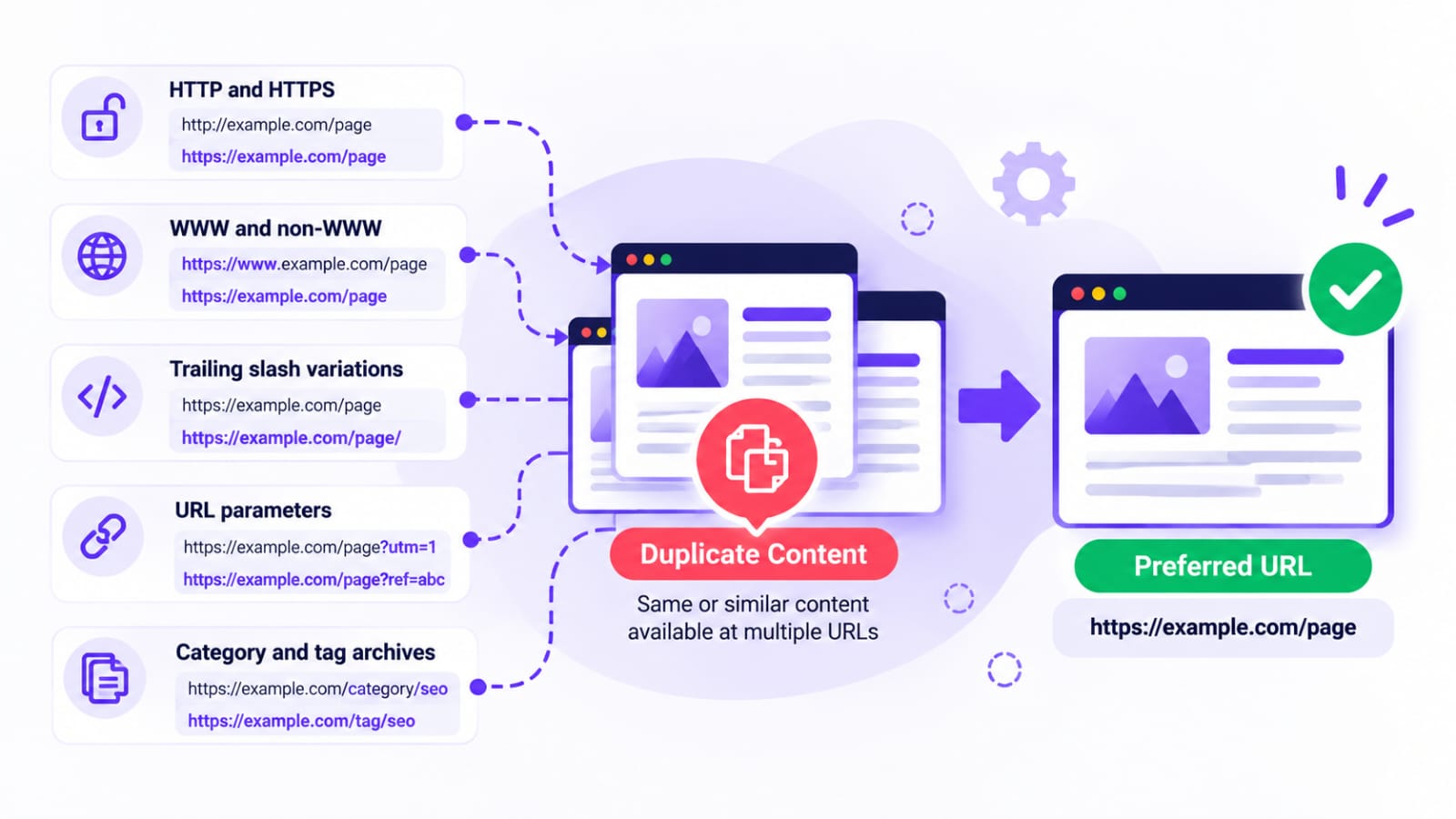
- HTTP and HTTPS versions: Both versions of a page remain accessible.- WWW and non-WWW versions: "www.example.com" and "example.com" serve the same content.
- URL parameters: Tracking or sorting parameters create additional URL versions.
- WordPress archives: Category, tag, date, or author archives display overlapping content.
- Similar blog posts: Two articles target the same intent and provide nearly identical information.
- Trailing-slash variations: The server treats URLs with and without a final slash as separate pages.
- Copied content: Another website republishes your content, or your own site unintentionally repeats substantial material.
Not every instance needs a fix. Different archive pages, product variants, and articles covering related subjects may serve legitimate purposes. Investigate how the URLs behave and whether they provide distinct value before changing them.
How to Find Duplicate Content Problems
Start by identifying the URLs involved. Don't change redirects or canonical tags simply because a report contains the word “duplicate.”
Use Google Search Console
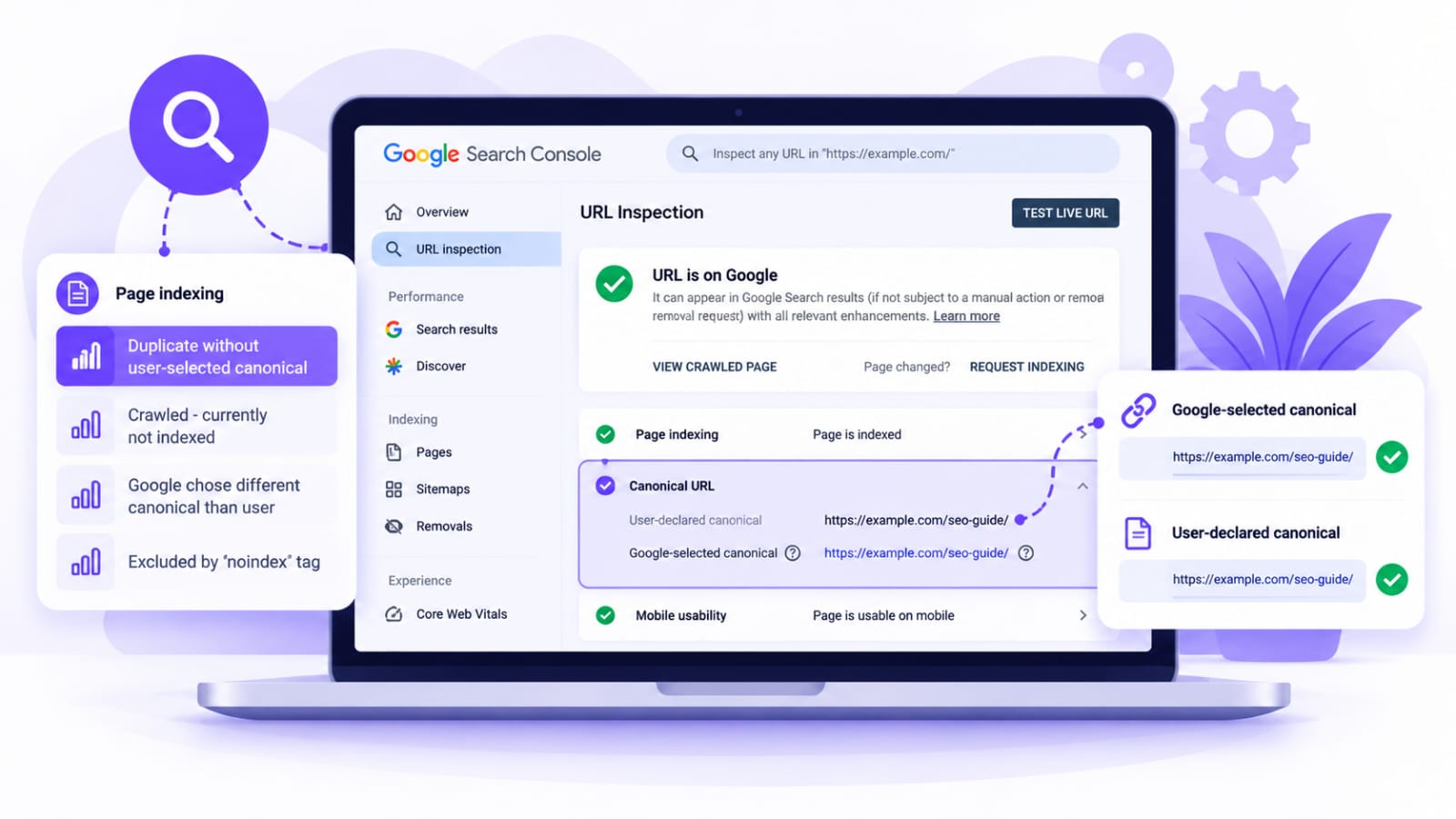
Open Google Search Console and review the Page indexing report for messages such as “Duplicate without user-selected canonical” or “Google chose different canonical than user.”These messages mean different things. A duplicate URL may be excluded because Google has selected another version as canonical. That can be perfectly reasonable if the selected URL is the one you want indexed.
Next, use URL Inspection to examine an affected URL. Compare the user-declared canonical with Google's selected canonical, where available. Check whether the selected URL is the intended page and whether the indexed version reflects your latest changes.You can also search Google for distinctive phrases from your article to find other copies, but search results alone cannot establish whether a technical canonicalization problem exists.
Check Your WordPress URLs
Open suspected URLs in a browser and compare their content. Check whether different versions redirect to one preferred URL or load separately.
For example, compare:-
"https://example.com/seo-guide/"
- "https://www.example.com/seo-guide/"
- "http://example.com/seo-guide/"
Use your own domain when testing. Also check parameterized URLs and similar articles. A crawling tool or a spreadsheet of URLs can help when the site has many pages.
How to Fix Duplicate Content Problems
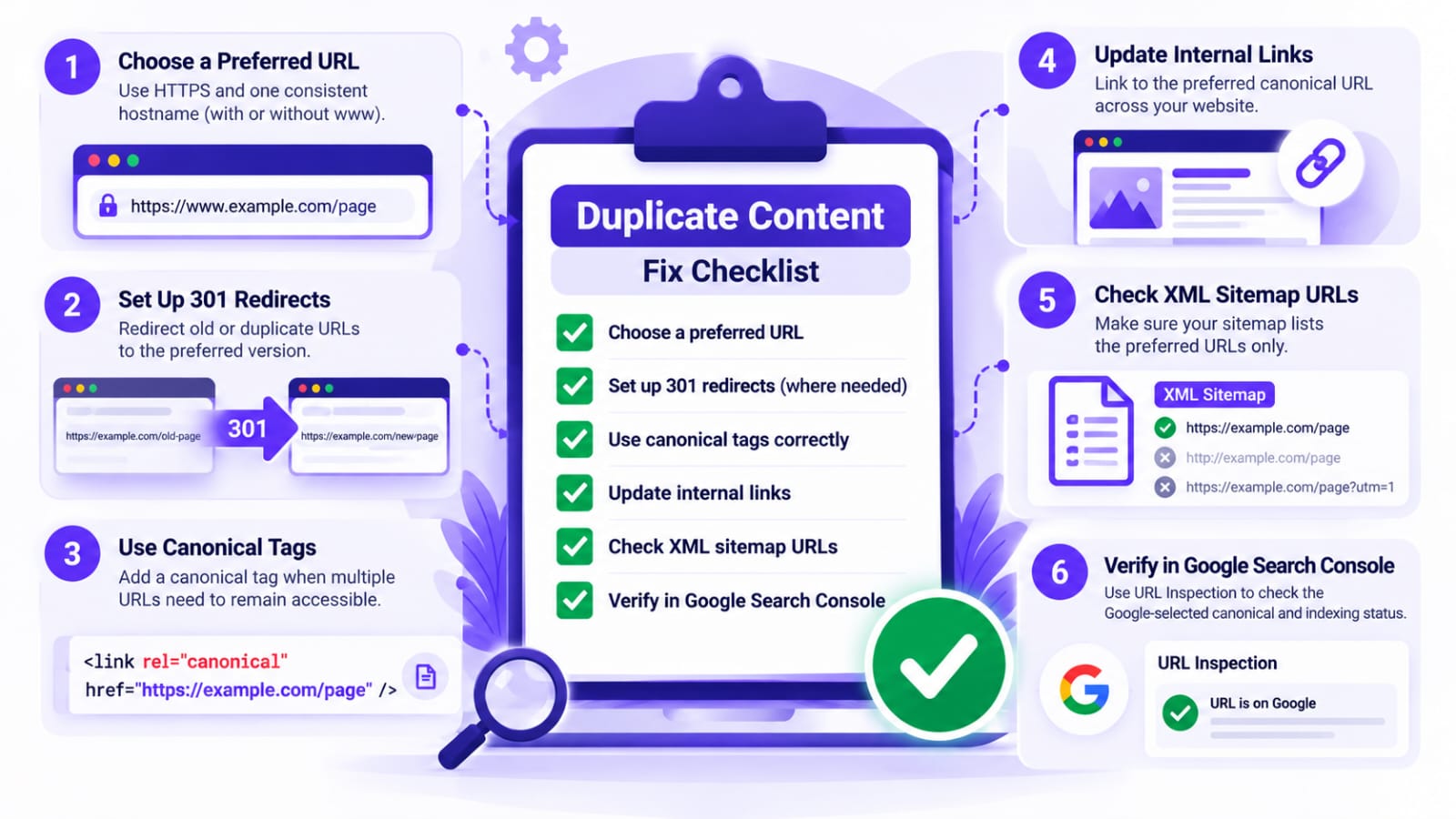
1. Choose one preferred URL
Decide which URL should represent each piece of content. Keep that URL consistent in internal links, canonical tags, and your XML sitemap.For most websites, the preferred version uses HTTPS and one consistent hostname. Configure the site so alternative host or protocol versions resolve to the preferred URL where appropriate.
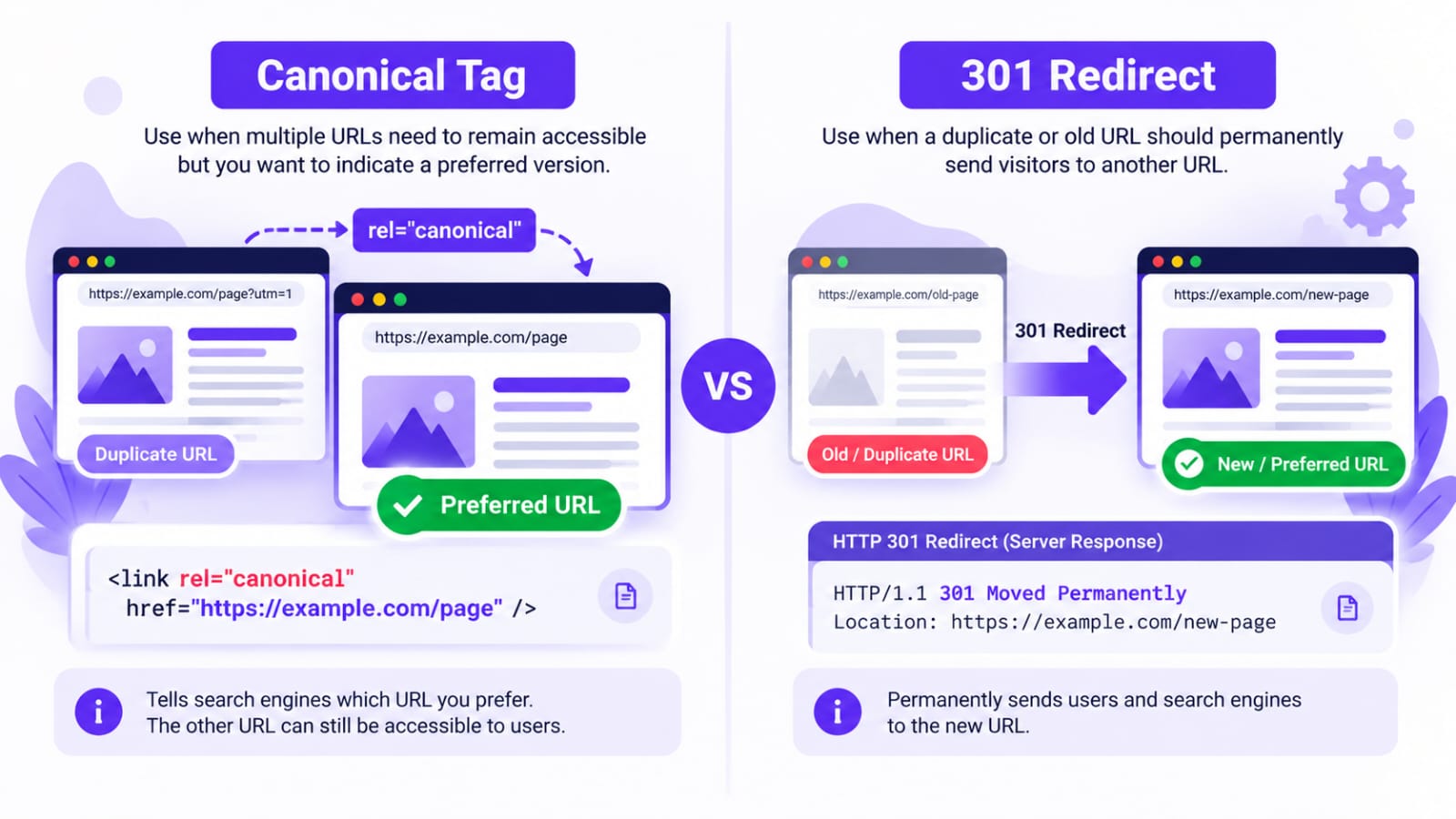
2. Use a 301 redirect when a duplicate URL should disappear
A permanent 301 redirect is suitable when a page has moved, an old URL has been replaced, or two substantially overlapping articles have been consolidated into one.For example, if "/old-seo-guide/" is permanently replaced by "/seo-guide/", redirect the old URL to the new page. Update internal links to point directly to the destination.Do not redirect every duplicate URL to the homepage or to a page with a different purpose. The destination should be the most relevant replacement.
3. Use a canonical tag when both URLs need to remain accessible
A canonical tag tells search engines which URL you prefer to represent duplicate or very similar pages.It is useful when multiple URL versions need to remain accessible, such as a page with tracking parameters. The preferred page typically contains a self-referencing canonical, while the alternate version points to the preferred URL when appropriate.
A canonical tag is a signal, not a command. Google may choose another canonical if the site sends conflicting signals or the pages appear meaningfully different from your intended setup.Read Google's "canonicalization guidance" (https://developers.google.com/search/docs/crawling-indexing/consolidate-duplicate-urls) before implementing more complex changes.
4. Fix overlapping WordPress articles
If two articles answer essentially the same question, compare their search intent, content, traffic, and backlinks before deciding what to do.If one article fully replaces the other, consolidate the useful information into the stronger page and redirect the retired URL when appropriate. If the articles serve different needs, improve their distinct purpose rather than merging them automatically.
For example,
a guide about identifying keyword opportunities should not be merged blindly with a guide about writing SEO titles just because both discuss SEO. Related topics can have separate pages when each serves a different purpose.
5. Review WordPress archives and SEO plugin settings
WordPress category and tag archives can display excerpts or posts that also appear elsewhere. This is not automatically a problem; archives may help visitors browse your site.Review whether each archive provides a useful navigation page. Configure indexing settings based on its purpose instead of applying "noindex" to every archive.
If you use Rank Math or another SEO plugin, inspect its canonical and indexing settings. Avoid installing multiple plugins that output conflicting SEO directives, and check the rendered page source after changing settings.
6. Update internal links and your sitemap
Internal links should point to the preferred canonical URLs rather than alternate versions. Your XML sitemap should also list the URLs you want search engines to consider canonical.Don't rely on a sitemap alone to fix duplicate URLs. Redirects and canonical tags are stronger canonicalization signals, and Google considers several signals when choosing a representative page.
7. Verify the fix
After making changes, test the affected URLs:
- Confirm redirects go to the correct destination and do not create loops.
- Check that canonical tags point to the intended URLs.
- Ensure internal links and the sitemap use the preferred URLs.
- Use Search Console URL Inspection to review Google's selected canonical when data becomes available.
Google may take time to recrawl pages and update its canonical selection. Request indexing for important corrected URLs when appropriate, but avoid repeatedly submitting the same requests.Start by identifying the URLs involved. Don't change redirects or canonical tags simply because a report contains the word “duplicate.”
Common Duplicate Content Fixes: Comparison Table
Mistakes to Avoid
Avoid using "robots.txt" as a canonicalization method. Blocking crawling does not tell Google which URL you prefer, and a blocked URL may still be indexed without its content.
Don't use "noindex" as the default method for consolidating duplicate URLs on your own site. When appropriate, redirects or canonical tags are generally better suited to expressing which version should represent the content.
Also avoid changing canonical tags, redirects, and indexing directives simultaneously without documenting what each change is intended to accomplish.
Test your implementation and check for conflicting signals.
Final Checklist
Before finishing a duplicate-content audit, confirm that you have identified the affected URLs, chosen a preferred version, applied the appropriate fix, updated internal links, and checked the sitemap. Then verify the redirects or canonical tags and monitor Search Console for changes.Duplicate content is often a normal result of how websites work.
Focus on correcting genuine inconsistencies and making your preferred URLs clear rather than trying to eliminate every similar page. A careful, URL-by-URL approach is safer and more useful than applying the same fix across the entire website.